
- Title: THL T100S 24/8/2014
- Listed: July, 2014
- Last modified: 08/25/2014 2:09 am
- Version: 4.3 Hybrid
You must be logged for ROM download.
54564 total views, 1 today
1 Total favorites


 Member Info
DESCRIPTION
" Who do not appreciate effort, doesn't deserve it " > > Aristotle.
All hardware works fine fast & stable. Multilanguage, for TWRP & CWM - Rooted.
Notice:To get the full potential of ROM, you must install it fully, for stability and performance in full .
* > ROM supports %100 ( Xposed & grafity box ). install ROM without any Wipes.
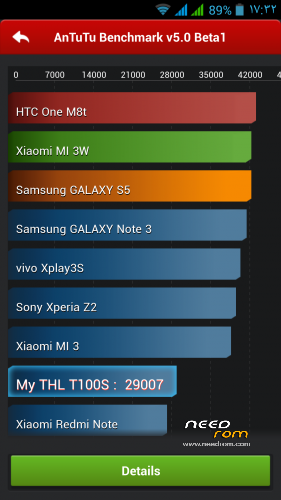
Don't use beta ver antutu
ROM T100S-TA2
ROM T100S-SU , without boot Sound . Super Support Navigator
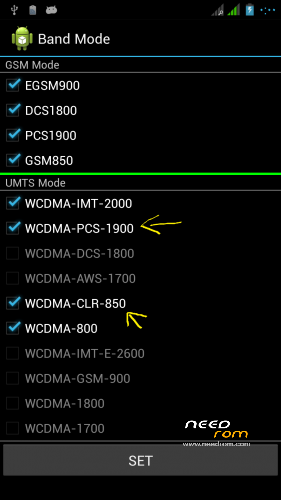
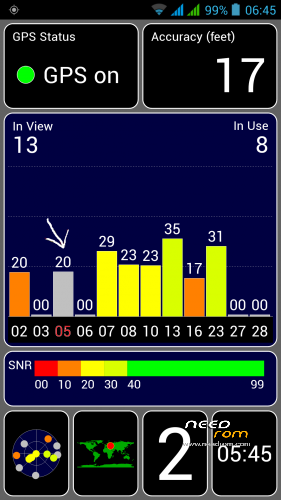
Fix GPS, power save ( deep sleep ),Reference signal, WiFi, bluetooth, camera focus and graphics mode.
=> IF my Work convince you, To me as a thanksgiving: Voting .
—————————————————————————————
=>> to Donate
USA $
BENEFICIARY: OKAB BADR ACCOUNT: 26204602204650 .
BANK OF BENEFICIARY: PRIVAT BANK DNEPROPETROVSK,UKRAINE . SWIFT CODE: PBANUA2X .
INTERMEDIARY BANK: JP MORGAN CHASE BANK, New York ,USA. SWIFT CODE: CHASUS33 .
CORRESPONDENT ACCOUHT: 0011000080
PayPal : baderagab@gmail.com
Europe €
BENEFICIARY: OKAB BADR ACCOUNT: 26204602204702 .
BANK OF BENEFICIARY: PRIVAT BANK DNEPROPETROVSK,UKRAINE , SWIFT CODE: PBANUA2X .
INTERMEDIARY BANK: JP MORGAN AG Frankfurt Germany , SWIFT CODE: CHASDEFX .
CORRESPONDENT ACCOUHT: a/c № 623 16051 45 .
※Please make a backup of your device before installing or updating ROM
what is the difference with the recent rom of you 4.3 hybrid?
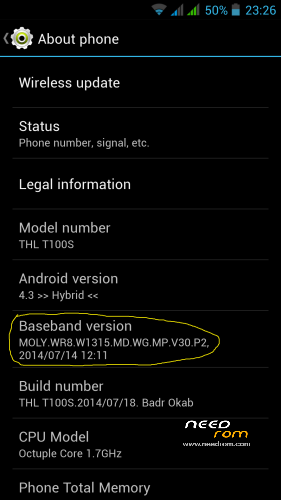
I think the first picture shows it - a newer Baseband Version.
Good Job Bader!!
just downloaded…. thanks I'm gonna try it out and let you know thanks again for the hard work.
Hi,
I'm a new to all this updates stuff, my build number is: thl_T100S.A2.JB9.FHD.EN.16P256.IMX135.MT6592GW.20140102
Can someone please explain which updates I can install?
Many thanks in advance.
1: Back up your phone, Download Zip file(Do not Unzip) Place on SD card
2: Flash with twrp . ( In recovery choose ''Install ROM.zip from SD '')
3: Reboot the phone after installed Rom.
Instead of TWRP, can i use CWM to flash (in recovery "install ROM.zip from SD)
yes you can it 20calle14
Installed All works I'll try GPS this afternoon
Thanks for this hard work Bader Okab
Vote 5*****,for nice rom
Good rom Bader but google+ wont syncronize some contacts and games like clash of clans wont start.
Got message like google+ not reachable. Equal if update or clean install. Version 4.3 still the best.
reboot mobile and try again doa4ever
did it bader. downloaded also all apps new from play store but same problem with google+. wired. i know. try it once again tomorrow.
nevertheless…great rom you made.
to day I'v check google + , but I don't have any problems
Bader does twrp have an option not to wipe rom?
you don't need any Wipe
Every time i install a update or a new rom i lose my imei and get nvram error. Is there a permanent fix?
My friend, there is nothing permanent until I'm not permanently this because we are human beings and we are not Gods . xakkan
I do it 20 times in day
Hi Xakkan,
There is an APK for IMEI backup and restore here : http://forum.hovatek.com/showt.....ead.php?tid=231
I use this reguarly when testing roms, works perfectly, small and unovtrusive, just keep the APK on your SD and reinstall once you have loaded the new ROM. I also have the issue with NVRAM, once again use the following, keep a copy of the files on your SD and follow the steps:
Prerequisites:
(i) you have a backup of valid IMEI of your phone (both sim slot).
(ii) you have a rooted phone.
(iii) you have one stable file explorer installed on your phone that can access system files.
(iv) you have nvram folder created and visible in your phone (Ideally there are Three folders + Two files. Folders are named as 'APCFG', 'dm', 'md' and Files are named as 'BackupFlag', 'RestoreFlag')
Step # 1: Extract a good copy of the WIFI and WIFI_CUSTOM files from a ROM (let me know if you need a copy of the files)
Step # 2: Copy these two files (extracted) to your SD card
Step # 3: Navigate to system\data\nvram\APCFG\APRDEB (You will find two files here 'WIFI' and 'WIFI_CUSTOM')
Step # 4: Replace both these files with the good ones.
Step # 5: Reboot your phone and ENJOY
ok, thanks for the inspired answer.