
- Title: Alfahd android tools v2
- Listed: March, 2016
- Last modified: 03/31/2016 2:28 pm
- Version: all
You must be logged for ROM download.
15838 total views, 1 today
12 Total favorites
 Member Info
DESCRIPTION
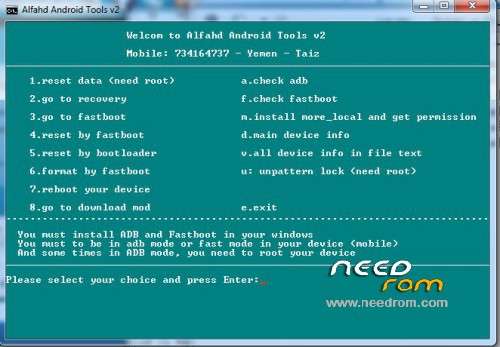
1- Reset data
This option will wipe user data and factory reset , and you must root your device
2- Go to recovery : to go to recovery via adb mode
3- Go to fastboot: to go to fastboot via adb
4- Reset by fastboot : in this option when you are in ADB mode the mobile will restat to fastboot mode and will wipe user data , and if not work you can use step 5
5- Reset by bootloader: it's the same step 4 but in other command
6- Format by fastboot: this command format userdata
7- Reboot your device: to reboot your device normaly
8- G0 to download mode: reboot you’re your devices in download mode
a. Check adb: you must enable USB debugging (Android Debug Bridge) , and this option check if you enabled adb
f. check fastboot: to check if you in fastboot mode
m. install more local application and to give the app grand without root
d. to viwe the main details of your mobile
v. to view all information about your mobile and create text file for it
u. to erase pattern lock , in this option you must root your mobile
e. exit from this tool
※Please make a backup of your device before installing or updating ROM
برنامج في قمة الابداع
الف شكر لك يابن تعز العز
goood work man
goood , it's work very well man
tenks
tenks
grand merci
good tool
ابداع يا استاذ فهد
thanks
Thanks a lot!