
- Title: Cheetah Rom
- Listed: January, 2014
- Last modified: 01/07/2014 4:59 am
- Version: ROM Android 4.2.1
You must be logged for ROM download.
15911 total views, 1 today





 Member Info
DESCRIPTION
Cheetah Rom The Fastest
This is the version to install from CWM recovery
valid for all models of Haipai I9389
Links to everything that is required for proper installation can be found in the following paragraphs.
An introduction is due
If you are looking for a Rom that only changes the look and feel of the phone, which has a nice logo Samsung, or other (which I think is really pathetic), or having many beautiful colorful icons and also some beautiful 3D effects and maybe even makes a good coffee… then don't download my Rom is not for you!
But if you are looking for fluidity and speed, if you want a gps fix in a few seconds, if you want a wi fi stable and fast, if you want the best performance from your phone, then download it, this is your Rom!!
Features of the Cheetah Rom
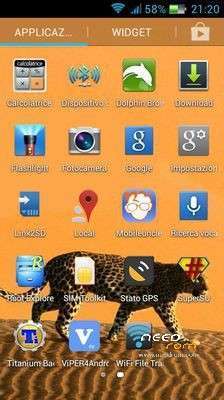
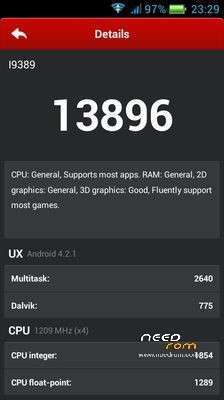
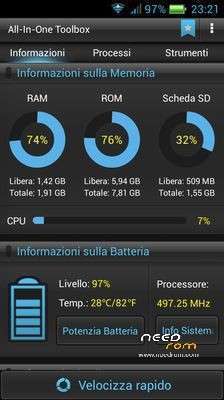
First of all as its name explains this ROM is very fast and extremely fluid.
I have adopted the latest kernel available (that of August 20) and changed the boot order to make the ROM even more powerful.
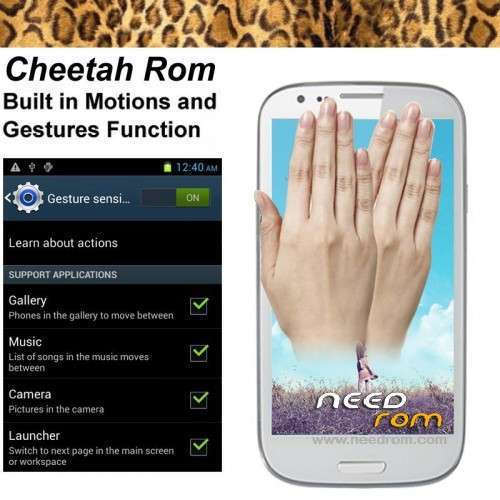
This Rom has been implemented function Gesture Sensing.
* Implemented function Gesture Sensing
* Root
* Deodex
* Kernel (boot.img) of August modified with real support init.d
* Zipalign at every boot
* Sqlite optimization at every boot
* Smoother and faster
* Absolutely minimal app in the system
* Extremely stable
* Improved from stock in every aspect
* Optimized
* Ram power consumption of less than 30%
* SuperSu
* New Boot Animation
* New Logo.bin
* Build.prop optimized
* Gps.conf optimized
* Gps engaging the satellites in a few seconds
* Hosts file modified
* Scripts and Tweaks listed in the following section
Added the original xLoud Audio (Loudness Enhancement Engine)
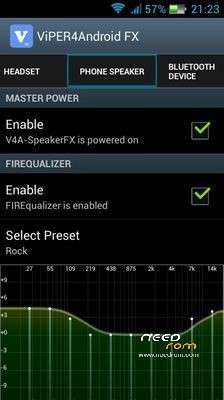
Added the original Vipers4Android Audio Effects (see specifications below):
- NEW Speaker Optimization
- Differential Surround / Haas Effect
- ViPER Bass With different bass modes, you can have greater bass experience than before!
- ViPER Clarity With the latest Clarity mode selection, you can balance up heavy bass with high clarity audio that you can never imagine before!
- Headphone Surround+ (VHS+) With this VHS+, V4A made its way to achieve great surround technologies for Android
- Auditory System Protection (Cure Tech+)
- Convolver
- And many more
Scripts & Tweaks
After careful selection and long and patient work, in order to adapt to this device and delete all the conflicts I could insert different and will list only the main ones:
* Adrenaline Engine
* Loopy Smothness
* Geeky Engine
* Net-Fork
* Supremacy
* VelocityTweaks
* SlaidyBoost
* BeatsAudio
* CosmisTweak LightSpeed
Introduction to the installation of the Cheetah Rom
Before installing the Rom you need to make a backup of your device in case something goes wrong. Do it with MTKDroidTools flashabile with FlashTool.
Those who have already installed the recovery Cwm they can make a second directly from recovery.
For the first, here is a guide to the procedure of backup, for the latest version of MTKDroidTools and drivers necessary for the proper use of the application Backup with MtkDroidTool
Just this already, but if you want here is the guide for the second procedure to install the modified recovery Cwm How to install Cwm recovery
Installing the Cheetah Rom
You may have already downloaded the zip file from the link above and copied the zip file in SD card.
Restart your device in Cwm recovery and make a backup of your device.
Then always from Cwm perform a full wipe:
-> Wipe data / factory reset
-> Wipe cache partition
-> Advanced -> Wipe Dalvik Cache
-> Advanced -> Wipe Battery Stats
-> Mounts and storage -> format system
-> Mounts and storage -> format EMMC
to make sure you have no problems!
You are ready to install the Cheetah Rom from Cwm with the usual:
-> Install zip from sdcard.
After the installation, reboot again into CWM recovery and from here again:
-> Wipe cache partition
-> Advanced -> Wipe Dalvik Cache
Reboot and let it load the Rom (the first time it may take 3/4 minutes) and enjoy your new Cheetah Rom!
Which author of this Rom decline any liability for whatever may happen to Vs device as a result of the flash itself.
If you are afraid, then don't install anything and you will sleep peacefully the night, otherwise you do it at your own risk!
In any case, just do a Nandroid backup before installing anything and every problem should be averted.
Resolution of any problems after the installation of the Rom
I invite everyone to make a backup.
Only if you have done the backup and you are able to restore the device then you can write me relatively few bugs in the rom or any other problem.
So ATTENTION! … You did not do a Nandroid backup? … You are not able to restore the device? … Well, do not write to me, because I will not answer to you!!
Conclusions
Enjoy my work. It's really powerful and optimized. Enjoy!!
I have put, too, the link to the CRT recovery version 2.1, which I made for this device. It 's a good recovery full touch. The features in this link https://www.needrom.com/mobile/recovery-cwm-full-touch/
P.S. I'm Italian and sorry if I have not written in good English
※Please make a backup of your device before installing or updating ROM
Very good rom, thank you very much.
Thanks
Hi "Bella Morettona" !!! How are you!!!
Vedrai che alla fine ci ritroveremo tutti qua!!!! Tocca trovà una soluzione però….nun se po' pretende da scrive in inglese!!!!
Ciao mangaaaa!!!
guarda che siamo tutti qui http://www.androidworld.it/for...../olidan-118595/
can i backup apps from kingrom?
thank you
ragazzi seguo da molto le vostre guide …ho un haipai i9389 ho installato rom manger,,,vado in recovery per installare qualche rom,,e mi dice installation aborted,,oltre questo vorrei tanto che faceste la miui per flashtool per questo benedetto telefono
in arrivo la Miui… a molto presto
hi I install this firmware but the camera not open, can you help me?