
- Title: Custom Rom V1 Vernee Mix2 4gb
- Listed: January, 2018
- Last modified: 01/07/2018 10:06 pm
- Version: Custom Rom V1 Vernee Mix2 4gb
You must be logged for ROM download.
22228 total views, 1 today
8 Total favorites
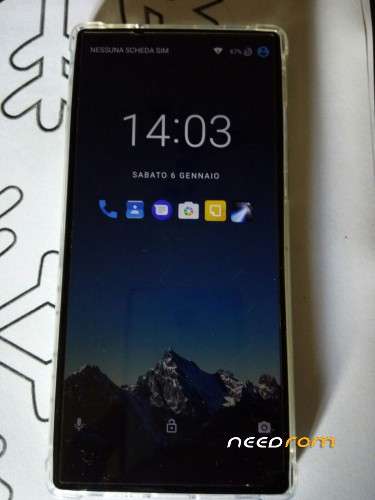
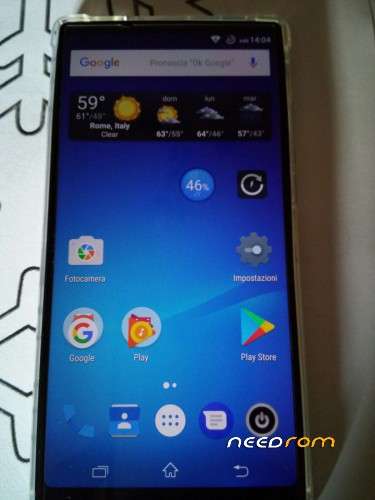
 Member Info
DESCRIPTION
Ghost45 V1 (Android 7)
-Base Android 7 Official firmware Vernee Mix2 4gb
-Pre root with Busybox
- Xposed
- GravityBox (must be activated )
- Recovery twrp By Ghost45
- New melodys Iphone & Samsung & Blackberry
- New apps xposed to change icons menu (must be activated in xposed app)
- New tricks and several apps also for gps fix
- New apps for camera
- Magisk (superuser) must be installed after the flash the device with flashtool after the first reboot.
- Corrected the problem of the full screen that not run in several apps or make slow the device.
- Deleted several apps that receive too ram.
- Corrected several mistakes.
How install the Custom Rom V1
1) Install the adb drivers and fastboot commands :
http://www.mediafire.com/file/2df821420x…_1.4.2.rar
2)Unrar the rar. Run “adb-setup.exe”. Hit “Y” to all 3 questions.
3) Tap on Settings –> About phone –> Tap Build number seven times.
Developer options –> OEM unlocking enabled and USB debugging enabled.
4) Plug your phone to PC via USB cable.
Allow the pop up request on your phone to give your PC USB debugging.
5) Open CMD (command prompt).
6) Type the next command : adb reboot bootloader (and press enter)
7) Now type the command : fastboot oem unlock (and press enter) Press volume up (into your phone) to confirm to unlock the bootloader.
You will see in the CMD prompt the next messages :
"Start unlock flow", and when it will be finished, you will see "OKAY".
 Reboot in normal mode ( After you have unlocked the bootloader, the phone will reset to factory data).
9) Now tap 7 times on Build number. Then Developer options, and re-enable OEM unlocking and USB debugging.
2) Step (install the Custom Rom)
download the new firmware.
Unzip the compressed file
Device in off mode ,without the usb cable connected!
Run Flashtool version octa-core ….. select the scatter file,
so check that all the flags in flashtool are selected check also if in the menu' in top is selected firmware upgrade
and now make on the buttome download (green arrow) in flashtool …… ONLY NOW CONNECTED THE USB CABLE not before and
push the level volume + in the same time when the usb cable will be connected to the pc an DO NOT REASE IT untill the yellow band is started and mean that the flash is in progress DO NOT RELEASE BEFORE the flash progress will stop in this device
This is a semplify procedure for the installation of the firmware…..
This step is Necessary to receive right root at 100%
(in android 7 you use the file Magisk,zip to receive right root )
1) Restart in android system after the flash process of the installation of the firmware Step 1
2) Copy in the SD card the file magisk.zip
2) Restart the device in Recovery twrp (modded) and run the installation of the compressed file zip(magisk.zip) and restart after in android system and you will find the magisk app and obviously the right root correctly installed.
Attention Please !
In this strange device the normal way to flash the firmware not are the same of all mtk devices look all the forums that are full of strange errors after flash .
So in many devices probably the flash not run at the device will enter in brick mode so carefully that you will remain with a good paperweight.
Many thanks to SOCRATE the Great Admin of Needrom
※Please make a backup of your device before installing or updating ROM
Obrigado! Na torcida por novas (e muitas) custom ROMs.
Cara, vc pode me ajudar com algumas duvidas? Nunca instalei rom no celular, mas vi que esse em especial PRECISA de uma diferente, especialmente pq a que veio instalada n consegue nem usar um simples app de banco corretamente.
Faz isso dai é confiavel? Vou perder algo importante, tipo imei ou algo que obstrua o celular?
can you post more screenshots from the device, with list app, memory and other, thank you for the rom
Attention to the flash….
probably all of you must have the bootloader unlocked…!
Step necessary (to receive right root)
Great, everything worked
Live wallpapers run on this custom rom or ….. ?
Hi,
what is the way when the bootloader is already unlocked?
I skipped step 1. and just dirty flashed from Flash tool, but I think nothing changed in system.
Gonna lock the bootloader again, and follow your steps exactly.
Rom installed and put into test. Root Secuss. Thanks Ghost45. I have already test your rom in letv the 1s
Live wallpapers run on this custom rom or ….. ?
In this phone there is no live Wallpaper. In the system there.
But why? Vernee apolo lite and vernee thor E run live wallpapers(sorry my english bad).
I watched the system folder, there is no them. I mean, no application which runs live wallpaper.
I read that a lot of Nougat 7.0 phones has the same problem. Seem that Google change something that break compatibility with live walls and put it back in 7.1
Vernee Thor E (Android 7.0) have live wallpaper