
- Title: CyanogenMod Update
- Listed: January, 2016
- Last modified: 05/20/2016 10:15 am
- Version: CyanogenMod 12.1
You must be logged for ROM download.
226633 total views, 4 today
243 Total favorites

 Member Info
DESCRIPTION
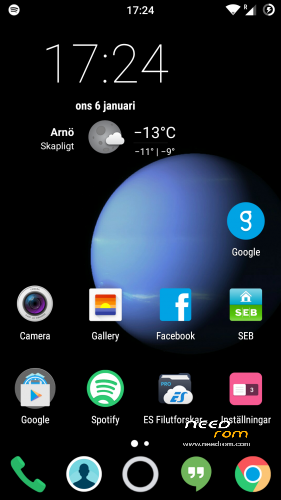
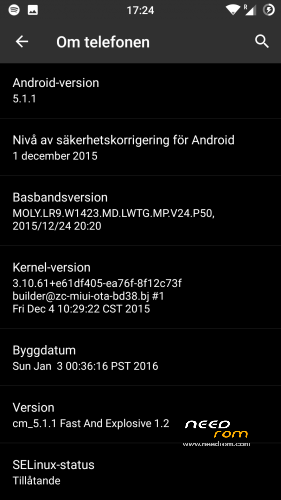
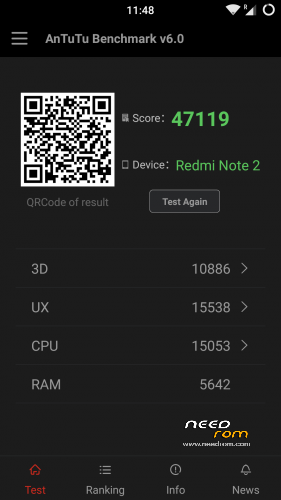
This is CyanogenMod 12.1 for xiaomi redmi note
Change log Fast and Explosive Update 5.2 Clean CM (Latest)
New build and a stable one 
Battery friendly rom and kernel
Latest Gapps
FM-Radio (You need to factory reset your phone for it to work or just start music player once and push play then close the app and open FM-Radio and it should work.)
Clean CM
security patch update
This is the best build so far
Change log Fast and Explosive Build 4.0
New build 2016-03-14
new camera libs
Gapps updated
4G/LTE Optimized
New Modem
Camera apk moddded
Change log Fast and Explosive Build 3.7
Settings is now fixed so all the buttons are working
Maybe more, but i don´t remember
Change log Fast and Explosive Build 3.6
New libs for whole ROM @Coremainia ROM is now even faster!!
faster focus in camera
xposed deleted
uploading separate install for xposed framework
Change log Fast and Explosive Build 3.5
New Build 2016-02-21
kernel optimized by @Coremania
4G lock implemented
Faster and more explosive
Change log Fast and Explosive Build 3.2
New kernel and again optimized by @Coremania
added intelli3g.apk for xposed
added disable su idicator for xposed
some installer faults removed
some camera libs updated, can´t see any difference  Working on it..
Change log Fast and Explosive Build 3.0
New Build
The new kernel for this build has been optimized by @Coremania for battery and snappines (It`s a merged boot.img and it`s for testing)
Also @Coremania managed to do some magic so we can enjoy gestures in future updates
Busybox updated
Different framework
I did my best trying to fix the crazy bluetooth bug. If it`s not working now i can`t do it!!
I can recomend the DEEP DARKNESS theme by Manuel Moellmann
Enjoy
Install
Download zip file to sd
Reboot to TWRP
Factory reset
Wipe cash
Install zip
done
Enjoy CM!!
※Please make a backup of your device before installing or updating ROM
@dianel101
hi
did not fix error your checking code USSD in build5 ?
@hoangphong bro after you flashed your build 5 did it take longer to load and as the cyonogenmod boot animation removed. After i flashed mine. It said i should swipe to root my phone on twrp then I did. Then it was stock at mi boot image
the camera orientation is locked? I only get portrait mode correct. If I turn it into landscape I see on the screen everything turn 90° and if i move the phone up and down side, then get left and right movement on the screen.
also in some apps I only get landscape mode. Even if I turn it to portrait the screen is then compacted to fit but the menus and pics get distortion.
The problem itself seem to be screen rotation per app related. Any camera that I use instead of the stock one has this problem… if I set lock screen rotation into portrait before opening the cameras, then I can take the photos with all of them without any problem.
You have to click on automatic screen rotation in the swipe down menu. I don’t think CM is the right rom for you. It’s to advanced.
Just a note for everyone, you can not use CM themes with Xposed installed, it will look like it downloaded fine from play store but will give fail message in notification bar.
If you want to use CM themes you must use xposed uninstaller-20150831-arm64.zip from here:
Just disable resource hooks in xposed. some themes work with it enabled, but some don’t.
@bluerichblue bro after you flashed your build 5 did it take longer to load and as the cyonogenmod boot animation removed. After i flashed mine. It said i should swipe to root my phone on twrp then I did. Then it was stock at mi boot image
I am using xposed and CM themes work fine
Thanks for the suggestions, i will play around and figure it out. Worst case i'll leave Xposed off and use CM as is, i only use it for themeing anyway !!
bro after you flashed your build 5 did it take longer to load and as the cyonogenmod boot animation removed. After i flashed mine. It said i should swipe to root my phone on twrp then I did. Then it was stock at mi boot image
Good build5. No more FC keyboard and other app.
But i have some bugs:
Sim config not save if on/off airplane mode. Default voice sim is has change as “not set”.
And parameter – check proxymity sensor if device is unlocked is not work. I hand off proximity sensor and unlock device.
Skip track by volume buttons in default player option is not work perfect. I have some bug in another phone and device in cm12. I think this function not correctly work if i use handsfree wire control and after i disconnect headphones this function is not work. Only reboot later. On/off function is helpless.
All bugs is not principial. Its simple little sadly
You rom is perfect rom as i see.
Thank you so much.
You have XNR2 or you develop only as read comments on this place?
Problems with wifi connection on build_8.
Are you sure? Cause my WiFi is working.
I could not connect to the home AP. In all previous versions, it was all ok.
Some themes are not installed.
Thank you !