
- Title: HDC NOTE 4
- Listed: December, 2015
- Last modified: 12/25/2015 7:29 pm
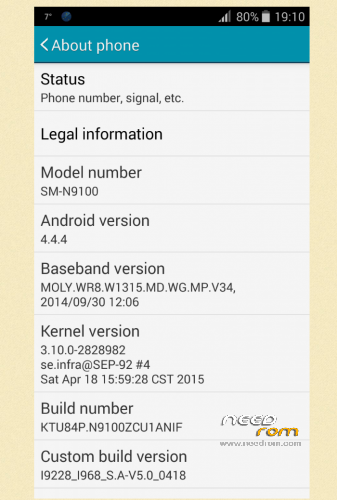
- Version: i9228 i968 S.A-V5.0 0418
You must be logged for ROM download.
16679 total views, 2 today
4 Total favorites
 Member Info
DESCRIPTION
multilingual:Yes
Install ROM :
before installation , save your IMEI number . enable them after the installation program MTK Droid tools.
- Unpack FlashTools, and Click on Flash_tool.exe
- Select a the MT6582_Android_scatter.txt in ROM
- Wait file to be added into Flash Tool
- choose Option->USB Model,click USB Model
–> Choose Option->DA DownLoad All->Speed->High Speed, click High Speed
- Turn off your phone, remove the battery.
- "Press F9 (hit Download button)" OR " if upgrade ROM Firmware->Upgrade "
- and connect your phone into the computer via USB data cable.
- The process will start and a red progress bar will appear after color purple, yellow.
- And green circles display
- Finish !
- You can now safely disconnect your phone and turn it on.
※Please make a backup of your device before installing or updating ROM
code for back samsun logo *#*#11111#*#*
begin with good… thx guys
give me other link its is not working
Try now must be wrongThe link is not working
i need rom for this device please:
Hardware : MT6572 (MT6589 is Fake!)
Model : SM-N9100
Build number : ALPS.JB3.MP.V1.8
Build date UTC : 20150626-103728
Android v : 4.4.4
Baseband v: MOLY.WR8.W1315.MD.WG.MP.V4.P1, 2014/04/08 15:45
Kernel v : 3.4.5 (whl@server7) (gcc version 4.6.x-google 20120106 (prerelease) (GCC) ) #1 SMP Thu Aug 20 17:06:26 CST 2015
need help my computer is not showing driver for usb
is't work for this device plz visite link to see pic click-here
I think not. sorrytşklr paylaşım için