
- Title: huawei p8 lite US stock rom
- Last modified: 09/28/2017 10:53 am
- Version: Android Lollipop EMUI 3.1
You must be logged for ROM download.
8499 total views, 1 today
1 Total favorites

 Member Info
DESCRIPTION
How to update or install Huawei P8 Lite Stock Rom:
Step 1: Download Stock Rom zip file and extract it. Now open extracted folder and you can see dload folder. In this dload folder, you find UPDATE.APP file.
Step 2: Connect your phone to PC and copy the dload folder into your Phone Internal Storage. Do not copy dload folder into any folder or SD card!!
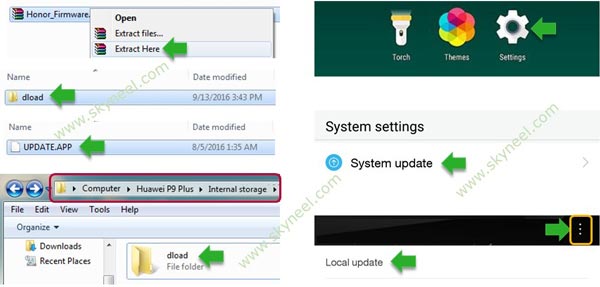
Step 3: Go to the phone setting then tap on System Update. After then you can see right side corner three dot menu icon (see in the image), tap on it. Now tap on the “Choose Local Update” tab and tap on the UPDATE.APP file. See in this image.
Step 4: Now your phone is going to reboot in recovery mode and Rom flashing process start. Don’t interrupt this process, it might to take 4-6 minutes for your phone to first boot on Stock Rom.
※Please make a backup of your device before installing or updating ROM