
- Title: HYPEROS 3 (DIAG ENABLER PRO)
- Listed: February, 2026
- Last modified: 02/27/2026 5:00 pm
- Version: ANDROID
You must be logged for ROM download.
404 total views, 9 today
3 Total favorites
 Member Info
DESCRIPTION
HYPEROS 3 [DIAG ENABLER PRO]
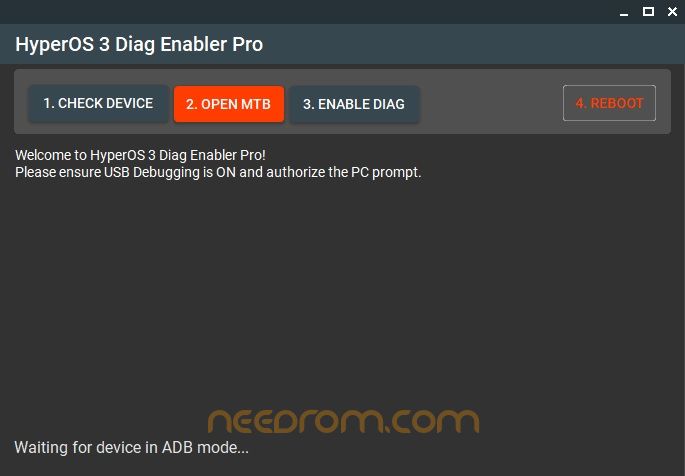
IF YOU FIX XIAOMI PHONES, YOU MAY HAVE NOTICED SOMETHING NEW. AFTER THE HYPEROS 3 UPDATE, TURNING ON DIAG MODE IS NOT AS EASY AS BEFORE. MANY REPAIR PEOPLE GOT CONFUSED. THE OLD METHOD STOPPED WORKING
How to Turn On Diag Mode (Simple Steps)
Here is the easy way:
Turn on the phone.
Go to Settings and enable Developer Options.
Turn on USB Debugging.
Connect the phone to your computer with a USB cable.
Unlock the phone and allow permission.
Open the Diag tool on your computer.
Click “Check Device” to confirm connection.
Click the button to open the hidden menu.
Enable Diag mode.
Restart the phone after finishing your work.
That’s it. Simple and clear.
Real-Life Example
Think of Diag mode like a secret repair room inside a house. The house looks normal from outside. But if there is a serious wiring problem, the electrician needs to open that hidden room.
Without opening that room, he cannot fix the main issue.
Diag mode works the same way. It lets the repair person access the phone’s inner network system.
Password: 123
Thank and Donate…
File Free
※Please make a backup of your device before installing or updating ROM

|