
- Title: N9006/ iBaby888
- Listed: February, 2014
- Last modified: 02/22/2014 3:07 pm
- Version: Android 4.3
You must be logged for ROM download.
35804 total views, 3 today
 Member Info
DESCRIPTION
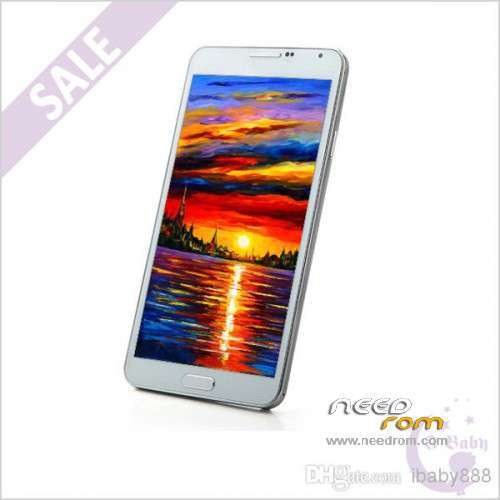
ONLY For HDC N9006/N900 from iBaby888 : MTK6589
+ 5.7 inch IPS + 1280×720 + RAM 1G + ROM 8G
+ Single Sim
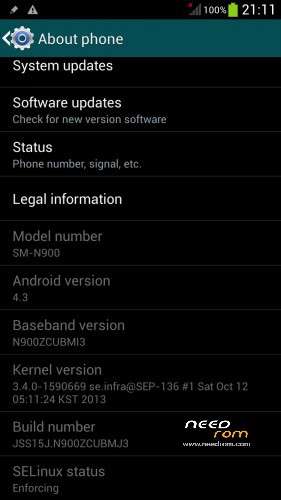
Official Version : JSS15J.M900ZCUBMJ3
Baseband: N900ZCUBMI3
Install ROM:
First of all: Make a backup of your system
Install with SP_FLASH_TOOL
- Select a the MT6589_Android_scatter_emmc.txt in ROM
- Wait file to be added into Flash Tool
- "Press Download button and connect your phone into the computer via USB data cable.
- The process will start and a red progress bar will appear after color purple, yellow.
- And green circles display
I made some chances:
GPS – Works
IR – Works
P. STORE – Works
S-VIEW – Works
ROOTED
My phone work perfect…
Good luck
(The UPDATE ROM is complete – All errors have been fixed)
※Please make a backup of your device before installing or updating ROM
Thank this rom destroy my fantastic phone! After the installation the touch no longer works properly and the back button is completely out of order
NOW I HAVE A PHONE THAT I CANT USE
THANK YOU MUCH
Thanks for your appreciation. But let me ask you something, your mobile phone is the ibaby888 seller, and the system is equal to the picture that is on top?
I dont think so…..
One more thing, you should have made a backup as it is in the instructions.
i some problem friend.you have search solution?
hi AS6221417, Yes I buy this phone here: http://www.dhgate.com/store/pr...../177585213.html
The system is equal to the picture and i made a backup before installing rom but even after a restore the phone remained in that condition
Now i dont know what do…Please help me
Well, do the following:
1 – Search in Google, SP_Flash_Tool_v5.1352.01 version.
2 – Open Flash Tool and on top click FORMAT. Choose the options: Auto Format Flash and Format Whole Fash Except Bootloader.
3 – Click START and plug the phone to the computer. When is finish will appear a green symbol.
4 – Unplug phone to the computer, and choose the option DOWNLOAD on top. Choose the option Download Only. Select the Scatter file in the ROM and click DOWNLOAD, and plug the phone to the PC.
5 – When finished, the same green symbol will appear, and you can unplug the phone. Put the battery in the phone.
Now is very important, when you turn on the phone to the first time, press and hold the buttons: VOLUME + and POWER until apear the Recovery Mode.
6 – In Recovery Mode choose the option: Wipe Data/Factory Reset. When is finished, restart the phone and it is done.
Good luck…
THANKS ALOOOOOT AS6221417
without doing the wipe data/factory reset thing my phone was constantly looping through the samsung sm n900 part, but thankfully you fixed it !
Thanks for the answer but nothing change
I think Ibaby send me a damaged phone…Now i dont know what do
Thank you again
Lets ask you a question: What was the ROM you used? The first or Update?
Ibaby has send me damaged phone too
The phone block and reboot few times per day when i received call for exemple or when i do nothing i just hear the samsung reboot sound…
I had test the two version but in update version stylus options don't work…
GPS doesn't work whatever ROM version i use…
It's weird, because my phone is the same seller, but it is another model.
The link is this:
http://www.dhgate.com/product/.....68.html#ctabBox
I used the update rom
I checked and the model are the same…I dont know what appened, this isnt the first time i install a rom, rather, i think i have a lot of experience
Fail to detect the phone in spflash tool
First, remove the battery. And do it in this order:
Click START and plug the phone to the computer.
If not work, you have problems with the drivers.
friend i have hdc note 3 mtk6589 1/8 gb seller ibaby888
when i have open phone all ok,work perfect. i have update rom with this your file,and now i have two problems. no good calibrate touch screen,and button touch back no work.
is possible solution?
thanks
help me
questa rom danneggia gli ultimi telefono che spedisce ibaby.non usatela
I have this phone, however, my "Official Version" is JSS15J.N900ZCUBMJ3 instead of JSS15J.M900ZCUBMJ3
My problem is that I put my SIM in, and it only had Edge service. I checked in MobileUncleTools, and it is not allowing me to enable WCDMA-PCS-1900 so I replaced the modem.img file and then it won't even connect to the T-mo network to even make calls.
I have tried 4 different modem.img files with the same results. It will not connect to the network at all, just shows an "X"
The funny thing is, is that when I go into ANTUTU, it is showing:
Quad-Core ARMv7 Processor (VFPv4,NEON)
For the CPU Model
Any suggestions?
necessarily be ibaby888 buyer? or being N9006 mtk6589 can put the Rom?
Thank you