
- Title: NEXUS
- Listed: June, 2016
- Last modified: 06/26/2016 12:20 am
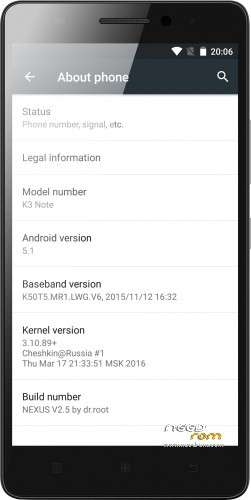
- Version: 5.1 V2.5
You must be logged for ROM download.
135225 total views, 14 today
192 Total favorites
CUSTOM




 Member Info
DESCRIPTION
Intro
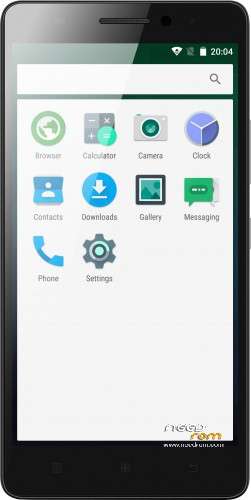
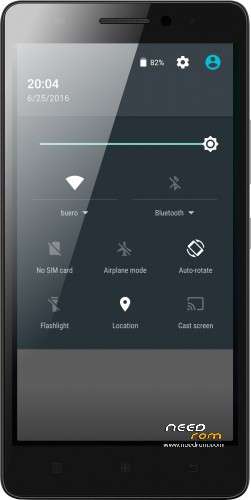
This ROM is really fast and look like android should always look, clean and vanilla.
Features:
New in 2.5
-DT2W
-LED
-extremely light (266MB)
-better performance
-some updated libs
-updated modem
-updated SystemUI for more AOSP look
-fully Lollipop AOSP look and feel
-multilang
-no root (SuperSU)
-no GAPPS (use opengapps.org ARM64)
first minutes after clean install, the system lags. just wait and reboot 
ROM Install
Step 1: Download my ROM and copy on a SD card
Step 2: Reboot and press Volume UP+DOWN buttons to enter the custom recovery
Step 3: Wipe
Step 4: Install the ROM
※Please make a backup of your device before installing or updating ROM
OK, so I just started over again and wiped system and internal storage as well. Now looking better. Wonder why this is rarely pointed out that system and internal storage should be wiped to get rid of all old stuff. I want my free space
Task manager required a long press of the home button but the K3 has a button for that on the left. Can this be assigned somehow by the user?
OK scratch last post too. I now realize the left button is menu, middle home, right back. Makes sense. Just on Limochello ROM left button was task manager. Works fine as is. Thank you for a great ROM. If double tap can be added it will be close to perfect.
The best roomfor me! Thank you!
Question about ViperFX, does that get flashed before or after ROM? Do I boot up after one of them or install both before booting? Thanks!
I dont know the technical answer but the sensible thing to do would be to first flash the ROM, boot into it and let it stabilise. Then flash all the other stuff. At least thats how I did it and no problems.
Got it all working on the first try. (literally my first time rooting, doing custom recovery, flashing ROM on any phone). Really is simple. I bet it used to be much harder years ago(?). Thanks! I followed Shashwat Uttam's awesome video here ( https://youtu.be/pQIQECBC6zQ ). Used TWRP, SuperSU, this amazingly good NEXUS ROM, and ViperFX. What a difference in how much the phone can handle now that it isn't bloated down. Huge thanks!! I am using Light Flow Lite to get the LED to work with notifications, BUT I cannot get it to flash, it is steady on only. Anybody get their LED to flash care to share how??
everything worked great but when i tried to install xposed stacked and i can't boot.I didnt do a wipe cache.Waht can i do now ?
Guess you need to use SP tools.
And start over
Thanks jaykerry, is there a guide how to flash it properly ?I forced to flash again the custom rom
Search 'Shashwat Uttam' on youtube, he has two videos which got me through the whole process… https://youtu.be/pQIQECBC6zQ&#.....038;nbsp;
Hope your k3 note gets up n running soon
Maybe this link will help.
http://forum.xda-developers.co.....mt6752-t3114016
thanks again jaykerry, i rooted my phone with kingroot,then i flashed TWRP with flashify and i flashed NexusV2 custom rom from TWRP.Everything went smooth, until i tried to flash xposed-v78-sdk22-arm64 from TWRP.I installed it said succeful and i rebooted.My phone couldn't boot so i forced to plug out the battery and flash the custom rom again through TWRP.Do i have to wipe something before install xposed framework ?
Guys , is the first version (Nexus v1) have the memory unswapped ?
I hate it when my internal swapped with external microsd since my sdcard is only 8GB , and my internal got swapped with it on Nexus v2 .
Anyway , is there anyway to fix this ? If this didn't happen , the ROM'd be 100% for everything .
I have tried to change build.prop on the line ro.mtk_2sdcardswap=1 , "1" to "0" but that makes my internal storage unreadable .
I'm on AOSP ROM for the time being , will probably change to this ROM later after I can find on how to fix this .
anyone can help me please ? What version of xposed framework do i need to flash in order to work with Nexus V2 custom rom ?
this one
https://dl.dropboxusercontent......exus_xposed.zip