
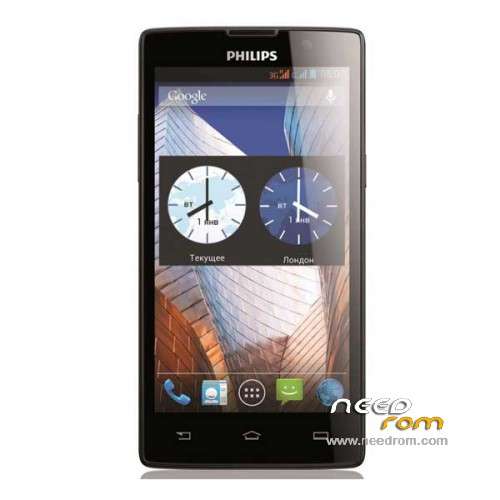
- Title: PHILIPS W3500
- Listed: June, 2015
- Last modified: 01/29/2020 1:47 pm
- Version: ROM Android 4.2.2
You must be logged for ROM download.
23092 total views, 1 today
7 Total favorites
 Member Info
DESCRIPTION
ROM Mobile PHILIPS W3500 - ROM Android 4.2.2
ONLY MT6582
ROM 7 – Official ROM PHILIPS W3500 version: W3500_M6582M_1449_00_V27A_AG – SANGFEI-W3500-Argentina-QB25D-S600-6582V1.0.0 – Philips-user 4.2.2 JDQ39 – Gapps include – Multilang
OTA
ROM 6 – Official ROM PHILIPS W3500 version: W3500_M6582M_1542_00_V07A_IND – SANGFEI-W3500-INDIA-QB18D-S600-6582V1.0.0 – Philips-user 4.2.2 JDQ39 – Gapps include – Multilang
OTA
ROM 5 – Official ROM PHILIPS W3500 version: W3500_M6582M_1413_00_V05A_RO – SANGFEI-W3500-ROMANIA-QB18D-S600-6582V1.0.0 – Philips-user 4.2.2 JDQ39 – Gapps include – Multilang
OTA
ROM 4 – Official ROM PHILIPS W3500 version: W3500_M6582M_1427_00_V05A_MX – SANGFEI-W3500-Mexico-QB25D-S600-6582V1.0.0 – Philips-user 4.2.2 JDQ39 – Gapps include – Multilang
OTA
ROM 3 – Official ROM PHILIPS W3500 version: W3500_M6582M_1542_00_V30A_RU – SANGFEI-W3500-RUSSIA-QB18D-S600-6582V1.0.0 – Philips-user 4.2.2 JDQ39 – Gapps include – Multilang
OTA
ROM 2 – Official ROM PHILIPS W3500 version: W3500_M6582M_1409_00_V05A_CN
Add another ROM, same version ( if you've problem with ROM 1 )
ROM 1 – Official ROM PHILIPS W3500 version: W3500_M6582M_1409_00_V05A_CN – Philips_W3500_A – SANGFEI-W3500-MP-CN-QB18D-S600-6582mV1.0.0
Gapps not include – No Rooted
Language support: EN/CN/TW
ROM install:
- Unpack FlashTools in the ROM , and Click on Flash_tool.exe
- Select a the MT6582_Android_scatter.txt in ROM
- Wait file to be added into Flash Tool
- choose Option->USB Model,click USB Model
–> Choose Option->DA DownLoad All->Speed->High Speed, click High Speed
- Turn off your phone, remove the battery.
- "Press F9 (hit Download button)" OR " if upgrade ROM Firmware->Upgrade "
- and connect your phone into the computer via USB data cable.
- The process will start and a red progress bar will appear after color purple, yellow.
- And green circles display
- Finish !
- You can now safely disconnect your phone and turn it on.
※Please make a backup of your device before installing or updating ROM
Hello , i have the same problem, i'm from argentina too
same problem
rate to it 1
Hello don't works, thanks
rate this firm 1
and install the tool fhash but not turn on the computer, we charge a similar rom and it works not with all of its functions .. for me is not cooked the rom ..
this rom working for anyone or not ?
hello SoCr@Te thanks for your time the rom 2 don't works… bootloop when start android and search WIFi have you any fix
thanks
hello also i changed the preloader from Philips_W3500_140409_ForFlashtoolFromReadBack_140710-124655
My phone isn't working. When i connect my phone to the pc(Usb cable, Removed the battery). Nothing happens, please help.
rate it to 1
hello install several times but will not start my philips W3500 with this rom ....hola lean probe la rom 2 aplica un format antes de flashear igual no anda se inicia esta en chino y se reinicia todo el tiempo cuando busca wifi
hello I'm updating…
the ROM 1 works but with another preloader and if you turn on the wifi or bluetooth the device will be restarted.
also you must change the imei because is invalid after install
MAC ADDRESS unavailable
IPV4 unavailable
please help
hello does not work any of the roms ... rom two straight strip flash tool mistake ...not work, mobile dead, rate it to 1……….
HELLO DOES NOT ME PULL THIS FILE CHECKSUM ERROR .. Image Uboot Checksum Error! – Intermittent Error With SP flash tool
How to recover flash error SP Flash Tool ? when you flash the SP Flash Tool can be seen that an error message " failed checksum Uboot Image reference value ! Checksum ( 0×0 ) in the .ini configuration file. Please fill appears at some point will again checksum correct …
man just delete checksum file and flash