
- Title: Resurrection Remix 5.7.4 R74 By Ahmed Nasser HK for HTC Desire 620G
- Listed: February, 2017
- Last modified: 02/17/2017 2:06 pm
- Version: 6.0.1
You must be logged for ROM download.
14031 total views, 1 today
2 Total favorites





 Member Info
DESCRIPTION
Hi Guys, Today Another Most Favourite Custom ROM In The World , Are Ported To Our Device. This ROM Is Updated To R74, All Common Bug Fixed By Ahmed Nasser HK.
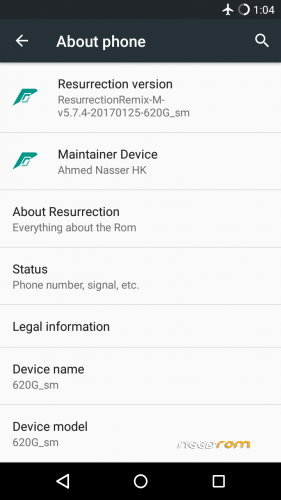
Resurrection Remix 5.7.4-R74 By Ahmed Nasser HK
====================================
- R70 -> R74 Manual -
Updtae All Libraries And Binaries & Some SourcesCM By Build CM 13.0.1 R74 & Lineage 13.0
====================================
====================================
ADDED :
-Added MicroG About MicroG (Goodbye Gapps Issues)
- MicroG Features:
- Opt-in To Google Services And Extend Application Support
- On-/Offline Location Service
- Easy On Battery, Memory And CPU
- No Bloatware
- Works On Real Devices, Test Emulators And Virtual Mobile Infrastructure
- Free And Open Source (Apache 2.0 Licensed)
-Added Apps & Modules System MicroG
-Added Smart Wake
-Added Smart Cover
-Added Camera Next
-Added Email – Calendar Powered By Boxer
-Added Sony Keyboard
-Added Yahoo Weather
-Added Xposed Installer
-Added MLUSBMounter
-Added MX Player
-Added YGPS
-Added Dialer With Truecaller
-Added Dolby Atmos
-Added OMX MTK VIDEO DECODER
====================================
====================================
CHANGES :
-Improved The Power Profile
-unlocked Items In Settings Display–battery Indicator And Notifications, You Can Assign Their Colors
-improved Battery Power At The Expense Of The Binaries And Libraries
-Activated ClearMotion, Bravia Engine And X-Reality Engine V4, Spelled Trouble-free Codecs To View FullHD Streaming Video Braries
-Remove SuperSU,dolby, From App Drawer, Them Already In Settings
-Remove Unnecessary Items In Settings
-Restyle Settings Items
====================================
====================================
FIXED :
-FIXED VPN
-FIXED Reconnect Wifi In Case Of Loss Access Point
-FIXED Green Streamers In Video And Online TV
-FIXED Live Videos And Live In Facebook
-FIXED 2g/3g Switch (not Full Fixed) Only In System Profiles
====================================
====================================
Quote:
STEPS
After Flashing The Rom Go To Xposed Installer -> Modules -> Activate The 2 Modules (fakegapps&gmscore)
NOTE :
Probably Working Google Play Music Google News, Google Games, Google Sheets, Google Slides, Etc (All Of The Utility Apps)
For Example: If Use Google Play Games You Will Need To Remove MicroG And Flash Gapps : Remove MicroG By Delete The Following Apps:
App->NominatimGeocoderBackend
Etc->permissions->com.google.android.maps.xml
Framework->com.google.android.maps.jar
Priv-app->WiFiLocationService
Priv-app->MozillaUnifiedNlpBackend
Priv-app->GSMLocationService
Priv-app->AppleUnifiedNlpBackend
Priv-app->GmsCore
Priv-app->GsfProxy
Priv-app->PlayStore
Priv-app->Xposedfakegapps
Priv-app->XposedXposedGmsCoreUnifiedNlp
====================================
====================================
ROM OS Version: 6.0.x Marshmallow
ROM Kernel: Linux 3.4.x
ROM Firmware Required: Stock KitKat
Based On: CyanogenMod
====================================
Version Information
Status: Stable-Bugless
Created 2017-01-26
Last Updated 2017-01-26
====================================
※Please make a backup of your device before installing or updating ROM
having a problem while flashing gapps.Even if i retried 10 times installing the rom again and again….
i have manually downloaded the gapps from opengapps.org( ARM, androind 6.0) i tried various package option on the site.
after flashing the gapps, It show
"GOOGLE PLAY SERVICE HAS BEEN STOPPED"
And !!!
the playstore shows
error cant find the server " RH – 01 "
I tried various workarounds but didnt work,
go to setting and give all permission
do u even know how to build rom
ur rom is not working in my htc desire 620 g dual sim
its just flash ur boot logo then i hv to instal octo os from my old colection
if u just want to show ur logo on starting of phone then just startmaking custom boot logo not rom
its just blinking and boot loping fom ur logo to switch of then startover again then bootlogo
if it is the rom of desire 620 g dual sim mtk 6592 then why does not working termek do the same thing as well
how to give permission and internet is not working at all
After boot in setup internet connection in not working only show checking connection and not login,,
help me please…
2g cant switch to 3g ??
i know its too late but the sensors are not working