
- Title: ROM CANVAS 4 HD by TEAMFORCE
- Listed: November, 2013
- Last modified: 11/14/2013 1:43 am
- Version: JB 4.2.1
You must be logged for ROM download.
18236 total views, 3 today
CUSTOM

 Member Info
DESCRIPTION
** GENERAL DATA ROM **
MICROMAX BASE COVER A116 ROM
Android 4.2.1 —- —–
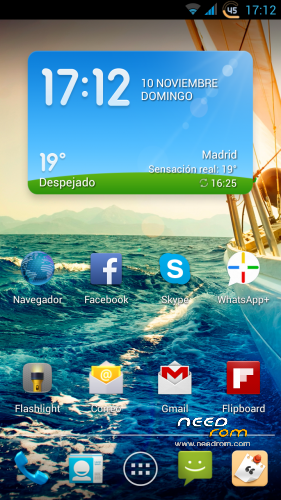
-> Improved HD graphics (best color and brightness)
-> Faster and smoother
-> Init.d Scripts
-> Tweaks Build
-> Fully Deodexed
-> Ziplagin every start
-> GPS Settings
-> AdBlock Host
-> Busybox
-> Faster Streaming
-> Net Settings speed
-> Tweaks Signal
-> Improved responsiveness and speed
-> Proximity Tweaks
-> Drum Sets
-> It takes in making Call
-> Fast GPS
EXTRA:
-> VIPER – Professional Equalizer
-> Battery Style
-> Juice Battery-Saving
-> Smart Gesture-Shares with the proximity sensor
-> Video floating
-> Screen unlock blowing
-> Shake-Player Cell pro-shift with a flick of the wrist
-> AutoTogge
-> RamExpander-Increase your ram
-> Holo Launcher HD
-> Faster GPS
-> Titanium Backup Pro
-> Is Explorer
-> Xposed
-> 2.6.9 Gravitybox
-> Masterkey
-> GPS Sigyc
-> Zedge: Ringtones.Wallpapers etc. ..
-> New Flashlight
-> New Calculator
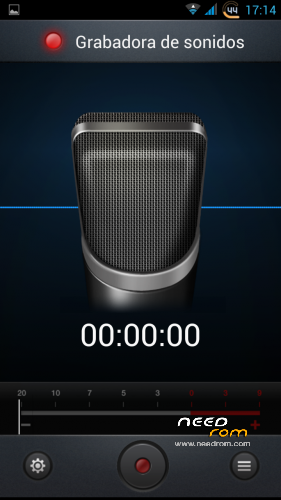
-> New Voice Recorder
-> …… Etc. …..
INSTALLATION:
CANVAS4.HD 1.Download and place in the root of the sd: —–
2.wipe Data, Wipe Cache, Wipe Dalvik, Format System.
3.Install from sdcard, find zip.flash CANVAS4.HD.
4 When installation. REBOOT
5 Starting CANVAS4.HD ROM.
6 connect the wifi and configure google account. STARTING
. Okay …. hope we are within 5 minutes .. to q stabilizes ..
7 We will update applications .. play applications store (Market)
8 Busybox.
Open application and we check our permits root.dejamos q give end terminal.cuando install (smart choice)
9.Fastergps
Open application and give permission root.elegimos continent (European) country (Spain)
10. Fix ERCEA
Zip unloaded the Ercea.lo get into the SD and reboot in recovery.Wipe Cache and Dalvik Cache, flasear zip and reboot ..
11 Enable Unknown Origin in Settings / Security ..
FIX SD PROBLEM:
INSTALL:
install cwm …. NOT TO DO WIPES
※Please make a backup of your device before installing or updating ROM
the work that the team are doing for all of us is 'fantastic. if they can solve these problems is 'the best rom 1. configuration viper 2. activation screen with volume buttons as in the other rom 3. chance 'to eliminate vibration from the launcher 4. elimination notice sim 2 not detected
FIX SD PROBLEM!!!!
https://mega.co.nz/#!DJ81UTZK!.....QQKclS…yI2QGSAEspVsJQ
INSTALL:
install cwm …. NOT TO DO WIPES
@erfae link doesn't function.. mega need cript ket
Sorry
https://mega.co.nz/#!DJ81UTZK!.....MyI2QGSAEspVsJQ
can you expain how solve this problem please?
1. configuration viper 2. activation screen with volume buttons as in the other rom 3. chance 'to eliminate vibration from the launcher 4. elimination notice sim 2 not detected
@ geronimo
1. To configure viper just come by this link … is in Spanish .. but I think you can help …..
http://www.htcmania.com/showth.....ad.php?t=608639
2 With respect to screen activation … this rom does not carry it …. try to modify it and I'll create a fix ….. A ROM from another device adapted to our G3S
3 To turn off the vibration, stop by settings / audio profiles
4 sim warning …. I'll have to modify some file … try for the next rom that does not appear
Ciao Geronimo, grazie per la risposta dell'altra Rom, questa mi sembra ottima ma credo di aver capito che ha qualche Bug, che ne pensi?.
Saluti
Max
Hello Geronimo, thanks for the reply of the other ROMs, this seems to me very good but I think I understand it has some bugs, what do you think?.
congratulations to developers
greetings
max
si e buona ma ha dei bug ed e' troppo carica a mio avviso…. vorrei capire la nuova che hanno pubblicato com'e!
Si ho visto ora la nuova Lewa ma mi sembra che non c’è la lingua ITA. Vediamo com’è
Language: Portugues (Brasil) ??
Language: Portuguese (Brazil)?
@thales_sanca
leads Portuguese (Portugal)