
- Title: ROM Miui V5 4.1.24 Multilang
- Last modified: 01/25/2014 5:25 pm
- Version: 4.1.24
You must be logged for ROM download.
20975 total views, 3 today

 Member Info
DESCRIPTION
ROM Mobile ZTE Nubia Z5S Mini – ROM Android 4.2.2 MIUI Multilang
ROM Features:
MIUI V5 – 4.1.24
Gapps not include – No Rooted
Language support: Multilang
Download and unzip Z5s mini Full pack.zip to desktop of microsoft windows
must before any procedure that your usb driver is properly installed, and the mode develloper is enabled
if you do not it does not continue
Mode Develloper :
1, open the "Settings" on your phone, click on the "About phone".
2, which can be seen "version number" that seven consecutive click "version number."
3, then return to the "Phone", you can see the "Developer Options" appeared.
4, click open the "Options for developers."
5, open the upper right of the "switch" area, check the option "USB debugging".
USB driver :
1- Install Adb Driver
Download adb_drivers_z5s_mini_install.exe
The Google USB Driver is required for Windows only in order to perform adb debugging with any of the Google Android devices. Windows drivers for all other devices are provided by the respective hardware manufacturer, as listed in the USB Driver
USB Driver
Dowload and unzip Z5s mini Full pack.zip and In folder USB Driver
follow the procedure as any driver installation under Windows
Example :
http://zteblade3.com/how-to-root-the-zte-blade-3/install-usb-drivers/
ROOT :
1 - Dowload and unzip Z5s mini Full pack.zip and In folder Rooter
open the software AnzhiRoot.exe,on the main interface click the button "ROOT" in the bottom right.
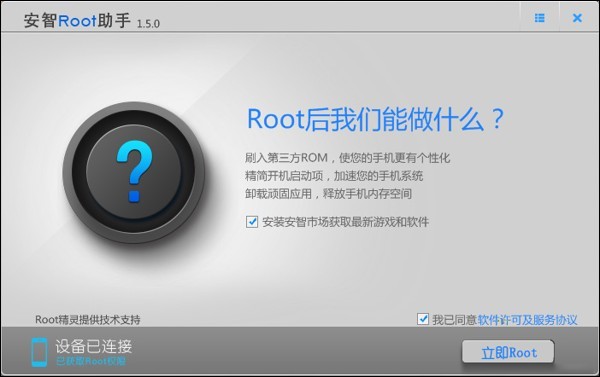
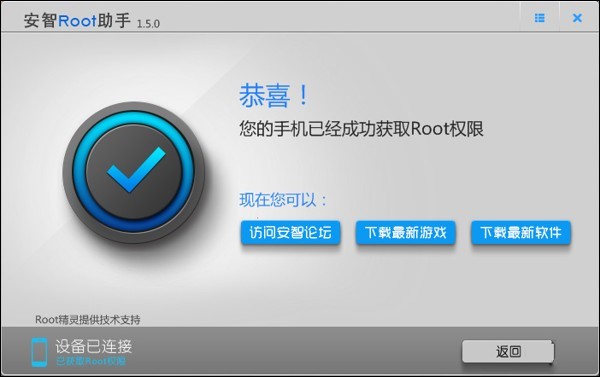
until the end of the procedure.
Recovery :
Dowload and unzip Z5s mini Full pack.zip and In folder z5s_mini_tools
CWM ( If you use "this recovery in chinese » Run in shell windows "Install_recovery.bat" replacement cwm (recovery) Chinese version in English
and just tap 1 and Enter, your phone reboot in recovery.
Install ROM :
Step 1: Download the custom ROM miuiandroid_multi_NX403A_4.1.24_jb-4.2.zip copied to an external SD card root directory
Step 2: the shutdown state. While holding down:
– Power button + volume button up, to enter the recovery mode.
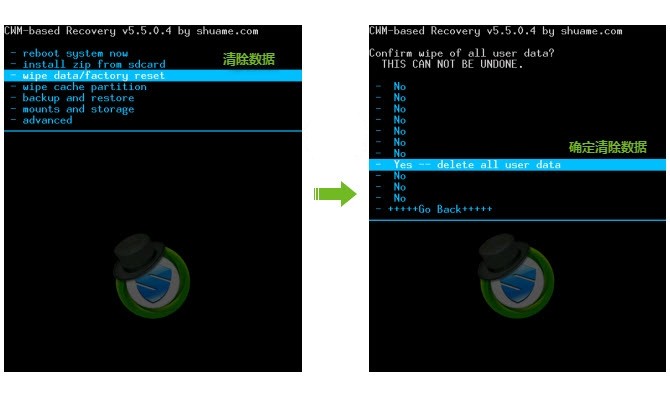
– Wipe Data / Factory Reset -> delete all user data
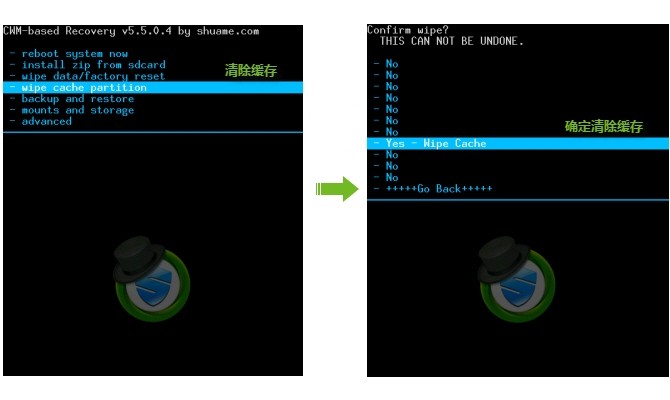
– Wipe Cache Partition -> Wipe cache
– Advanced -> Wipe Dalvik Cache
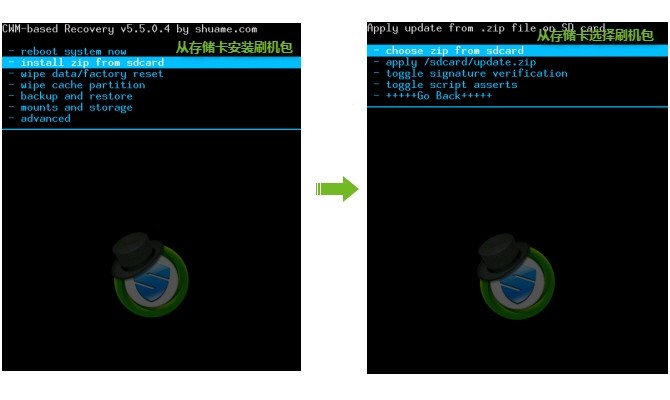
Step 3: Return to recovery main interface Install zip from sdcard -> choose zip from sdcard -> Select your ROM miuiandroid_multi_NX403A_4.1.24_jb-4.2.zip
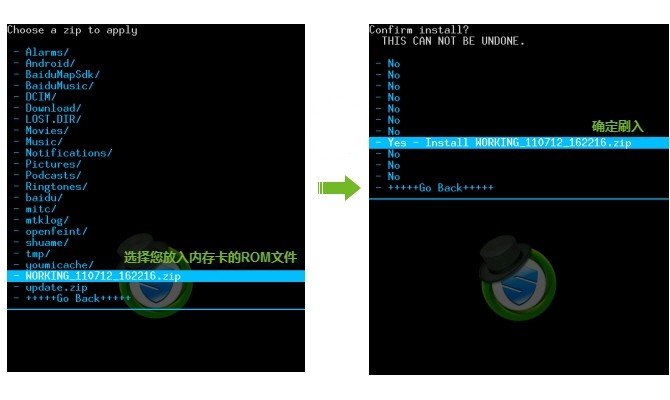
Step 4: Brush complete, restart the phone Patience required – first boot takes a while
ROOT :
Dowload and unzip Z5s mini Full pack.zip and In folder Rooter
open the software AnzhiRoot.exe,on the main interface click the button "ROOT" in the bottom right.
until the end of the procedure.
Gapps :
Dowload and unzip Z5s mini Full pack.zip and In Folder Gapps
Step 1: copy miuiandroid_gapps-4.2.2-small_signed.zip copied to an external SD card root directory
Step 2: the shutdown state. While holding down:
– Power button + volume button up, to enter the recovery mode.
Step 3: to recovery main interface Install zip from sdcard -> choose zip from sdcard -> Select your file miuiandroid_gapps-4.2.2-small_signed.zip
Works Perfectly
※Please make a backup of your device before installing or updating ROM
Hi
First of all thanks for this great rom.
I try to reboot in recovery as you discrive above but it dont work for me,
is it possible to make a step by step tutorial with pictures ( for dummies like me ) to get the job done? ( installing CWM and reboot in recovery )
Thanks in advance
to enter the recovery
1 – turn off the phone
2 – hold Power button + volume up button
3- keep pressing buttons until the onset of recovery
if the recovery is in Chinese must be replaced by an English version.
follow this procedure
Recovery :
Download and unzip z5s_mini_tools.zip
Copy z5s_mini_tools to your desktop of microsoft windows
execute the script (batch) Install_recovery.bat
"it absolutely aut the adb driver is installed and the Mode develloper is activate, otherwise the procedure will not work"
and just tap 1 and Enter, your phone reboot in recovery.
if not reboot, press poweroff and power on.
at the end of this procedure replacing your recovery in English version.
details of script
adb wait-for-device
adb push recovery_cwm.img /data/local/tmp –> copy with adb recovery_cwm.img in /data/local/tmp to your smartphone
adb push busybox /data/local/tmp/ –> copy with adb busybox in /data/local/tmp to your smartphone
adb shell su -c chmod 775 /data/local/tmp/busybox–> change permission of busbox
adb shell su -c /data/local/tmp/busybox dd if=/data/local/tmp/recovery_cwm.img of=/dev/block/platform/msm_sdcc.1/by-name/recovery–> copy in raw device recovery_cwm.img to your smartphone
echo MIUI CWM based Recovery v6.0.3.7 Installer–> info on the installation is finish
pause>null
adb reboot recovery–> via adb reboot your smartphone
good job
IMPORTANT
Before any procedure Make the ROOT of your smartphone
follow the procedure root:
execute AnzhiRoot.exe
Thanks for your reply
I follow your procudure correctly and it doesnt work,
I will wait for a easy way for getting the job done.
Kind regards Patrick
Hello Friend,
I tryed to update my phone but is freez on the update and now the phone is bricked. can not power on can not enter recovery, Can you help to me?
When I plug the phone to the computer only see in the device manager:
"qualcomm hs-usb qdloader 9008 "
thank you
the procedure was reorganize and explanations added.
Added drivers for adb Nubia Z5s mini
if the procedure does not work for you explain me what you did with details
but is freez on the update and now the phone is bricked? What Happend
When I plug the phone to the computer only see in the device manager:
"qualcomm hs-usb qdloader 9008 "
Repeat the procedure: develloper mode and Usb Driver
Yes The phone is bricked. I made the error I tryed to install it for my z5S. So can help me? The phone is bricked I can not power on can not enter recovery. if I press the power buttom dont be anything, When I plug to computer , the pc recognise "qualcomm hs-usb qdloader 9008 "
" if I press the power buttom dont be anything "
this is not a procedure for the recovery mode
the shutdown state.power of Z5s
– Power button + volume button up holding in anytime, to enter the recovery mode.
When I plug to computer , the pc recognise "qualcomm hs-usb qdloader 9008 "
Repeat the procedure: develloper mode and Usb Driver
I was buzy for a week to get the job done, and now a have the same problem ( phone is bricket )
I try the do anything to start the phone but it dont work ( phone is dead )
Please help
Hello.
Is this ROM the same than this https://www.needrom.com/mobile.....s-mini-miui-v5/ but a newer version?
Or it doesn't have anything to do?
What are the differences (apart from being rooted)?
Regards.
no it is not the same version of rom, I propose the v5 rom miui 4.1.24 the last date in the french multilang.
the difference is the 4.1.10 version 4.1.24 propose that there has developed numerous correction bug.miui correction rom every week.
Prettyboy. did u fix your problem? i got a same problem with u. My phone is obviously dead. it is not to be able to turn on the power. And when i charge it, the lamp didnt work that means it can not be charged.
Should i send it to service centre in china ? Help me ㅠㅠ
HI
No I still have the problem phone is dead, I hope that there is some one the fix this problem.
When i know how to fix this problem, i will post it here.