
- Title: STAR B94M/B943
- Listed: April, 2013
- Last modified: 04/23/2013 10:45 pm
- Version: ROM Android 4.2.1
You must be logged for ROM download.
64436 total views, 2 today
188 Total favorites
 Member Info
DESCRIPTION
ROM Mobile STAR B94M/B943 – ROM Android 4.2.1
For Quad Core version ONLY MT6589
Features ROM:
New JB 4.2.1 ROM available, given by the manufacturer.
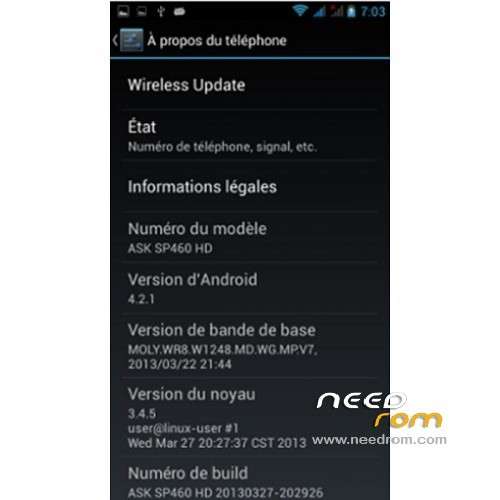
The build.prop says it's a ASK SP460 HD, but it doesn't matter
All works perfect:
Wifi stable
3G stable
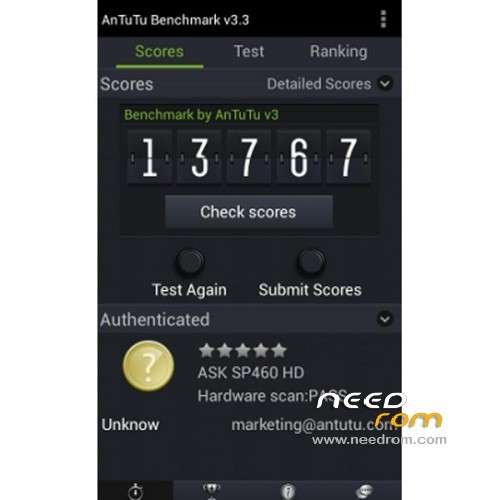
Antutu: 14100 points (version 3.3)
Network localsation and GPS works fine (but GPS may need a modified gps.conf for Europe)
[How to] Installation:
Make backup
Switch off the phone, connect usb and remove the battery
You must use SP flash tool and flash the firmware.
Select the scatter file given in the download
Then click download, and put the battery. After it's finished, remove the usb connection, and restart the phone.
Root and recovery are possible too, download the link, and use SP Flash tool in the same way. It's preferable to install TWRP instead of CWM, the Root is proposed at the end of the next recovery.
[UPDATE] 23/04/2013
I've baked a new build.prop file in order to improve some stuffs:
- Powersave tweaks: to activate the deep sleep mode. Indeed there was no parameters for the deep sleep mode in the native ROM. But be carrefull, the synchronization in mail acompt settings shut it down and kill the service until reboot. So shutdown your synchro if you want to save battery.
- 3G improvement tweaks
- Network and internet improvement tweaks
- Return of the B943 model name… bye bye ASK SPK460 HD ^^
[How to] Installation:
Download this File on your computer: Build_STAR_B943_23042013.zip
- Extract it and copy the build.prop file on your Sdcard (on the phone)
- From the phone, open a file explorer with root rights (Root explorer for me)
- Then copy build.prop, go into root / directory of the phone, go in /system
- Set the RW (read write) mode in your explorer, and paste build.prop into the /system directory. It will replace the original one (root explorer will make a backup by itself).
- It's not finished !! Don't forget to set the rights of the file, set them on rw-r-r (owner= read write, group= read, others= read)
It's done, reboot your phone
Enjoy !!! 
※Please make a backup of your device before installing or updating ROM
Besides, Benoit31, very kind request to inform us as soon as you perfect your new build.prop. Thanks in advance!
Sorry for that big bother, but I am not as strong in Linux-Android as you are, will it be possible to flash any update.zip file intended for CWM (like the one you uploaded) through TWRP. I never use it but I like the looks of it, though. )
)
Not for the moment, i'm preparing a ROM update with some improvement (build.prop+root+recovery+deodexed and zipaligned files, English settings, GPS settings for Europe and some fine another stuffs)
sorry, i misundertood you're question the first time
Of course you can apply update.zip with TWRP, like with CWM ^^
Hi, my B943 just arrived yesterday but I'm having some Major problems.
I can't get 3g to work, it's always saying "Disconnect" from SIM status> Mobile network state.
The phone doesn't recognize my 8gb SD HC Card, but a 2 gb is fine.
I'm in Portugal, do you think that flashing with this rom will solve at least the 3g issue or should I consider returning the phone?
Thanks in advance.
It's up to you. Flashing the ROM make you lost the guarantee. If you are ready to lost 3 to 5 month with an after sale service, do it.
But, the only thing i can say you is that this ROM fix a lot of problems (3G fix, localisation network, Wifi disconnections etc….) and make your phone faster. I can't promise you that your 3G issues will be solved.
The problem in Portugal is that the 3G only use 2100 Mhz frequency band, what can be a problem. I know another user in Germany with same problems as yours, and the 4.2.1 ROM hasn't settled the problem…so… ^^
In france we are using 900/2100 Mhz, and my phone is using the both band…
Thanks a lot for your answers, Benoit31. We will be looking forward to your improved ROM. Well done,
buddy!
You are welcome, friend from Russia !!
You are just a bit wrong Benuit, it's Ukraine, where I live!
lol i wasn't so far
Hi, i have installed this rom but 3g connection is very looooow!! the stock firmware speed go to 200 300 kb, whit this rom 20 30 kb!!! i have italian vodafone sim, change option to vodafone-factory but it same low speed in test download.
Hello, have you installed the new build.prop in the update link ?
if yes (or no), switch off the phone, remove the battery 10 seconds, and replace it. Switch on the phone and go into the recovery mode (power button and Vol+). Make a wipe data and dalvik cache (NO WIPE System !!). And then reboot your phone.
Hello,
I tried to install the new build.prop in system, but when I reboot the system, my phone become a brick. The android logo appears and this is all.
How can I solve this problem? Maybe build.prop is corrupted?
Thanks in advance.
Hello Benoit after flash rom folder names of the internal sd are all incomprehensible with all special characters, auto brightness does not work
It happens sometimes, flash again the ROM.
For me, auto brightness works, but it's difficult to see the differences, the auto adjustment is very smooth.
It's happens sometimes that the sdcard has a bad format, it's a well know problem for SD or SSD cards in general. Maybe you just need to format from the phone settings (storage option)
CAN I TRASLATE IN ITALIAN? ALL CHINESE!!!!!!!!
yes of course. Go in the settings, It's the "A" logo under the padlock logo, in the middle of the list, then first option. Italiano is in the list