
- Title: Stock MT6572 (MT6589 is Fake!) NAND version…. 100% Fully working
- Listed: July, 2015
- Last modified: 09/11/2015 2:19 pm
- Version: 4.3
You must be logged for ROM download.
40180 total views, 5 today
22 Total favorites
 Member Info
DESCRIPTION
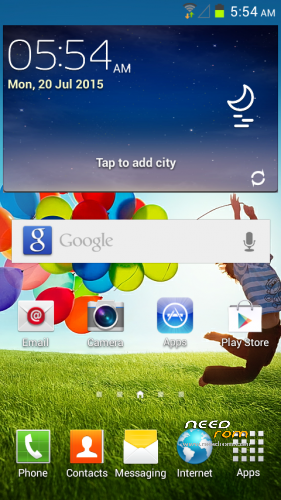
WARNING!!! This Stock ROM is for Samsung S4 clones Mediatek device only.
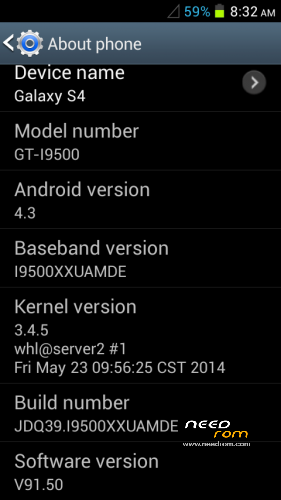
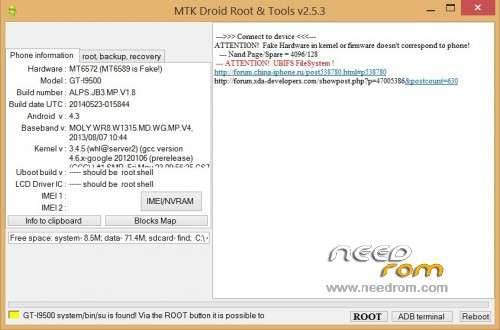
Hardware : MT6572 (MT6589 is Fake!) NAND version…. 100% Fully working
Model : GT-I9500
Build number : ALPS.JB3.MP.V1.8
Build date UTC : 20140523-015844
Android v : 4.3
Baseband v: MOLY.WR8.W1315.MD.WG.MP.V4, 2013/08/07 10:44
Kernel v : 3.4.5 (whl@server2) (gcc version 4.6.x-google 20120106 (prerelease) (GCC) ) #1 SMP Fri May 23 09:56:25 CST 2014
Methods To successfully flash this rom on your android
- Be sure to install correct usb driver for your android… download in this post.
- For dead android and won't detect by your PC! format 1st your device using SP flashtool include in this download.
- Try this trick if your device won't format or flash properly. simply hold + or – volume button in your device after hitting the format button, turn the volume of your PC to max to hear the notification sound when connecting and disconnecting your device when done connect the usb cord from your device without the battery then after hearing some notification sound that the device is connected just put the battery again without disconnecting the USB cord on SP flashtool with the battery of your device is in your phone until successfully formated.
- Begin fashing your rom by clicking download button. if the it says DRAM failed error! try unckeck or check DA DL All With Check and remove battery, or do step 3 again or even try to use new USB cable sometimes the cable does not receive or send data on it until you fully flash the stock rom completely.
- Use this stock ROM at your own risk.
This ROMS is a backup from my samsung s4 vietnam clone and from other people who have vietnam samsung s4 clone.
Kindly donate if this stock ROM has helped you and your device back to life! cheers… ^_^
※Please make a backup of your device before installing or updating ROM
not woking
can u take a photo to ur device plz..?
it is already there in the screenshot… can you post your error or steps that you have making? thanks.
i tried to flash the rom with system,secro and user data from your flash files and with my old phone preloader,uboot,bootimg and recovery and it works!!! but my android version was 4.4.4 after i flash your rom turned to 4.2.2 "weird" but however i got another issue… when i insert my sim card the phone cant recognize it it just say "no service" how to fix that issue and thnx a lot cuz the phone was bricked for about 1 year! FINALLY IT'S BREATHING
IT'S ALIVE!!!! :)
:)
thanks for the comment… try to check your phones IMEI if it is still not recognize by android. your phones IMEI in the back inside after removing the battery. you can write it using MTK droid tools include in this packages… or google search another methods to how overwrite IMEI… if it works let me know thanks…
thank you so much dude it really helps me and keep posting new roms to fix another bricked phones or tablets
GOD BLESS U
Your Welcome… ^_^ Thanks you also for the possitive reply…
God Bless…
Gracias
plz i have bricked my phone and i want to unbrick it …
this my help you
device name: galaxy s4
model number: GT-19500
andriod version: 4.4.4
baseband version: 19500XXUAMDE
kernel version: 3.4.5
whl@server3#1
thu dec 5 21:22:09 cst 2013
build number: JDQ39.19500XXUAMDE
software version: v92.04
dude u saved my life TVM
LCD what???
camera not work "can't connect to the camera"… other issue… IMEI is good but my cellphone say "No service"…