
- Title: TWRP Android 7
- Listed: February, 2017
- Last modified: 02/25/2017 4:41 pm
- Version: TWRP 3.0.2
You must be logged for ROM download.
15648 total views, 1 today
7 Total favorites
CUSTOM
 Member Info
DESCRIPTION
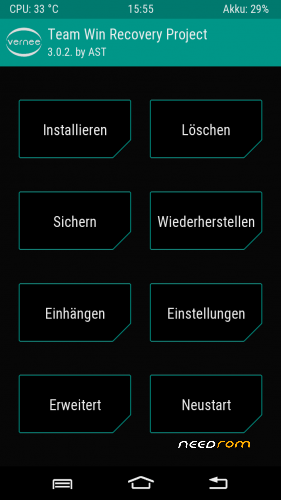
TWRP 3.0.2 for Vernee Thor with official Android 7.0
Tested with latest Rom "full_k06ntd_a-7.0-20170214"
Included
-TWRP recovery
-stock recovery
-scatter file
Install with latest SP Flashtool and conventional steps.
Many thanks to my friend "gruftie" for testing this TWRP.
※Please make a backup of your device before installing or updating ROM
Procedure to implement twrp and root from the files supplied by The Tester:
.
(tested for Thor devices with Android 7 (Nougat) with manufacturing date later than Nov. 2016!)
Load SuperSU (i.e. "SuperSU-v2.78-201609011115") to external storage. Start “flash_tool” (as admin) from SP_Flash_Tool_v5.1648 and select <Download Mode>, (should be default); select "MT6753_Android_scatter.txt" (i.e. the tester's recovery_thor_android7/twrp_recovery/MT6753_Android_scatter.txt) at <scatter loading file>; in column <name> click <recovery>, deselect all of the rest; double-click on <revovery/Location>, navigate to and select the "recovery.img" file from the tester's "recovery_thor_android7/twrp_recovery" directory.
Click or double-click <download> button, then connect switched-off Thor to the PC and wait for the Download process to complete… Click "ok" in the green ring. Disconnect Thor from PC; press power and volume_up buttons simultaneously (for a couple of seconds), standard 3-line recovery menu appears, go to <recovery> with volume_up, select <recovery> with volume_down. Vernee Thor TWRP 3.02 GUI should appear, go to <Install> menu, navigate to SuperSU, e.g. "SuperSU-v2.78-201609011115.zip", double click to install. Hurrah, You are done! Donations to be given to the tester!
It does not work… Installs TWRP ok, but after applying root with SR3-SuperSU-v2.79-SR3-20170114223742.zip (from within TWRP), when phone boots to android it keeps giving "application closing errors" continuously and phone is practically non usable.
TWRP works without problems!The problem is your SuperSU.zip.There are many versions.To try another version.
It works for me! I'm waiting for some custom roms xD
———————————————————————————– ———————————————————————————————–
I have the exact same problem of theopan, but for me, it's after cleaning both dalvik cache + cache partitions. After that, all my apps keeps crashing continously…
I guess it's because TWRP is cleaning some things needed after cache creation, maybe?
Had to remove all my apps and reinstall them, which is not really cool
Deleting those partitions should be removed from TWRP options since it's causing FCs on Android 7 and thor device.
I flashed it and Android didn't boot anymore (only Vernee logo, but no loading animation) so be carefull!! And yes i bought mine before august of 2016, I bought it around april 2016.
I fixed it by using flash tool to flash the stock ROM but ONLY boot and system! This way everything else is intact and you dont lose apps + app data (even whatsapp was still activated and everything)
It worked for me following grufties instructions. I downloaded the SuperSU zip (v2.82) from here:
http://www.supersu.com/downloa.....d
Thanks it works for me.
I also clicked "read only", to be sure.
Restoring from a previous backup misses messages, voicemail numbers, blocked numbers list and other settings. Anyone can try but make a separate backup of messages or they will be lost. The other things are easily setted again.
It is an known issue in android 7 and twrp 3. Recent version twrp 3.1.1 has this issue fixed. It would be nice if developer could give us a new fixed version based on 3.1.1 (I think 3.1.0 will do it also).
And no restore of nvram. This is serious because when going back to stock rom coming from a custom rom, usually imei's are lost and the phone can´t connect to network. It would be necessary to restore nvram to have imei's back. But this twrp doesn't do that.