
- Title: Zephyr OS V5.0 Rom for HTC Desire 620G
- Listed: February, 2017
- Last modified: 02/23/2017 6:11 pm
- Version: 6.0.1
You must be logged for ROM download.
9839 total views, 1 today





 Member Info
DESCRIPTION
Zephyr-OS is all about new features and looks! This beauty's inner beast gives you high performance at both smoothness and battery backup! Our team is constantly trying to improve this ROM at every aspect! You can except more from this ROM in the future updates!
Features :-
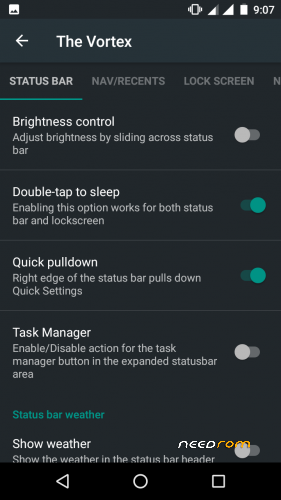
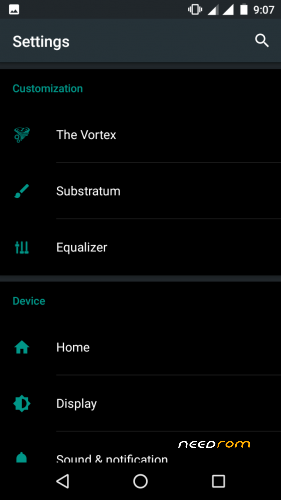
STATUSBAR -Carrier Label customisations -DT2S on statusbar/lockscreen -Quick Pulldown -AOSPA battery styles -Clock & Date customisation -Network Traffic indicator -status bar brightness control -Task Manager NAVIGATION/RECENTS -DT2S on navbar -recents panel search bar toggle -Clear all recents fab (top right/left/center,bottom right/left/center) -Hardware buttons action( for HWnavkeys devices only) -Disable HWKeys -Longpress recents button to switch between apps - DUI [Smartbar/Fling/Pulse] - Pulse advanced customization LOCKSCREEN -Middle Lockscreen shortcuts(Custom apps) -Quick unlock -Music seek control when screen locked -Volume rocker wake -LockScreen Music Visualizer -Music Visualizer custom colors -LockScreen bottom shortcuts -LockScreen Weather Customizations NOTIFICATION DRAWER -Customize quick settings tiles(add/delete/rearrange) -Brightness slider toggle -Advanced QS location tile -Vibrate on touch -Four tiles per row toggle -toggle status bar icons -Time contextual Headers - Disable Quick Settings in secured lockscreen -Added all the required tiles BLUR PERSONALIZATION - Statusbar blur - Quick Settings Panel Blur - Notifications Blur - Expanded StatusBar Blur - Recent Apps Blur MISCELLANEOUS -viper4Android -GESTURES (Hand Wave/Pocket mode) -Heads-up toggle -Dashboard switches -SUBSTRATUM for theming -Per app expanded desktop control -Multi window mode - Paranoid Android's Floating Window - Per app floating window control -light and dark theme toggle -FORCE MOVE apps to SDCARD -Download Speeds for your downloads -Ability to pause/resume downloads -Custom Ambient Display settings -AppOps/Privacy Guard -Reset Battery Stats option
Changelog:
V4.2 Changelog - removed HALO (has caused enough touble already) - Fixed Apps usage access section - Fixed draw over apps permissions - Implemented BLUR UI for statusbar/header/qs panel/notifications - added substratum QS Tile - Updated Substratum - ability to enlarge first row - Fixed wifi and BT tile repositioning (Now you shall add any tile in place of wifi and bluetooth tiles) - Fixed Task manager position after removal of HALO BEFORE USING SUBSTRATUM THEMES - Disable DARK MODE from settings > display - Flash THEME READY GAPPS to see your google apps get themed properly Zephyr-OS 4.3 UPDATE Changelog:- - Updated to Android-6.0.1_r61 - Added HALO from Paranoid Android - fixed position of Halo and task manager - Fixed touch events when halo is activated - nuked email app (use gmail/inbox) from playstore- Added Task Manager - Added New QS tiles(sync/music/floating peek/ambient display/battery saver/expanded desktop) - Updated Prebuilt Substratum app - fixed kernel auditor FC on dashboard tile - reorganized dashboard tiles - Fixed Circle battery animation(thanks to SriSurya95) - Android N style Notifications - Updated New wallpapers Zephyr-OS V5.0-Sentinel UPDATE Changelog:- - Added Recents BLUR - LockScreen Weather Customizations - Dashboard Columns(one/two/three) - Dashboard tileview double lines toggle - Dashboard tileview dividers toggle - Toggle dashboard switches (wifi/bluetooth/Cellular data) - Disable FC notifications toggle (present in developer's options) - Selinux Switch (present in developer's options) - Added Now on tap for hardware keys - Added New LCD Density Changer(DPI) - Fling: Trails width configuration - Added support for VoLTE (Not sure if it works yet) - Poly Optimizations/Memory Sanitize optimizations - New icon for Fling QS tile - Long press Torch Tile to open Camera - Adapted Lockscreen to play nice with Day and Night
> Fixed Camera can't connect after some clicks
> Fixed Inverted video recording Issues
> Fixed and Added New FM app
> Updated to r66 (MOB31E)
> fire855's stability patches merged
Bugs :-
>VPN
>Switch
NO As Tunnling Whole Device Is Not working !
Use VPN for wifi
1. Download psiphon from playstore and open it, choose Browser-Only mode don't tunnel whole device.
2. Go to its logs tab and check the port of http proxy.
3. Now open WiFi setting and long press to your WiFi network (from which u are connected) go to modify tab and from check the advanced options.
4. Chosen manual proxy option and put host name as 127.0.0.1 and port as the no. which you noted in step 2 (eg. 8080) and click save .
For Cellular Data-
1. Download psiphon from playstore and open it, choose Browser-Only mode don't tunnel whole device.
2. Go to its logs tab and check the port of http proxy.
3. Now open Setting>Sim cards>Sim 1/Sim 2 settings/Access Points Names and click on Connected APN
4.In Proxy put 127.0.0.1 and port as the no. which you noted in step 2 (eg. 8080) and click save .
Enjoy you have set up a VPN connection successfully.
You can open your browser and check your IP
Note: You have to undo this after you don't need VPN by changing manual proxy to none .
※Please make a backup of your device before installing or updating ROM

|
good rom, thank's Tanveer