
- Title: JIAYU G4SL
- Listed: May, 2014
- Last modified: 06/27/2014 7:10 am
- Version: ROM Android 4.2.2
You must be logged for ROM download.
35737 total views, 1 today
1 Total favorites
 Member Info
DESCRIPTION
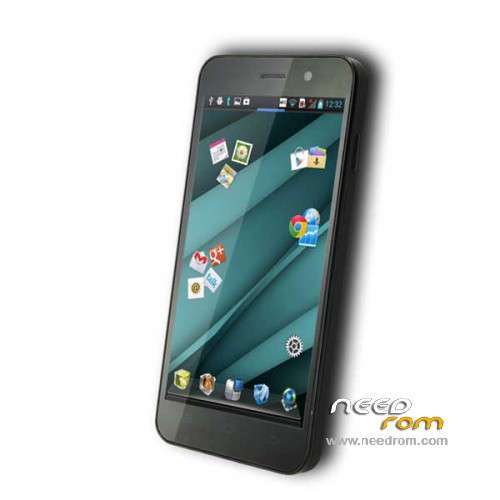
ROM Phone JIAYU G4SL – ROM Android 4.2.2
ONLY MT6592 – G4SL
Update Official ROM JIAYU G4SL version : G4SL 20140618-194209
Changelog:
1.Fix MP3 ringtones will be lost, the file manager in the audio file can not be automatic music player problem
2 After entering the corrected file manager, when searching for content background color and font color caused by the same problem can not be displayed
3 increases the system fluency
4 drop-down notification bar style update
5 Increase Desktop phonograph plugin
6 style music player update
7 system two menu style update
8 set - safe in the Variety add more styles and unlock unlock online
9 Set - Common system font settings in the new style replacement function
10 multi-task management to increase a key clean-up memory in the control, and can be unlocked sliding down the process, so important to the process of being cleaned out
Install Flash or OTA
—————————————————————————————————————————————————
Official ROM JIAYU G4SL version : G4SL 20140422-120615
Gapps include – No Rooted
Language support: Multilang
Install ROM :
- Unpack FlashTools, and Click on Flash_tool.exe
- Select a the MT6592_Android_scatter_emmc.txt in ROM
- Wait file to be added into Flash Tool
- choose Option->USB Model,click USB Model
–> Choose Option->DA DownLoad All->Speed->High Speed, click High Speed
- Turn off your phone, remove the battery.
- "Press F9 (hit Download button)" OR " if upgrade ROM Firmware->Upgrade "
- and connect your phone into the computer via USB data cable.
- The process will start and a red progress bar will appear after color purple, yellow.
- And green circles display
- Finish !
- You can now safely disconnect your phone and turn it on.
※Please make a backup of your device before installing or updating ROM
A new official update has been released: ver. 20140515 for both G4S and G4SL, in both recovery and sp_flashtool formats.
it's this rom not 05/15 but 04/22.
04/22 = rom date of created
Yeah, you're right, sorry.
I've been tricked by the title of the post in the official chinese board.
What is that “L”? I can’t find that model. Is that for Lewa ROM?
"L" means memory 1/4 instead of 2/16.
install rom, not gps and not internal memory :S
What?
My gps don't work properly in Spain.
Hi, I have bought this phone here (http://www.1949deal.com/jiayu-…..black.html). I can't update it using SP flash tools. I tried to upgrade firmware using (https://www.needrom.com/mobile...../jiayu-g4s/). Now it doesn't work at all. Computer sees it only as "MTK USB Port (COM 28)" no preloader… When I connect it (no battery and switched off) device will appear for about 20-30 seconds and dissapears – it repeats few times. When I tried to upgrade firmware red bar ("Download DA 100%") runs ok but there is error displayed and information: "PRO_INFO:Failed to get PMT info" if I do "Download Only" mode in SP Flash tool "Download DA " goes also well but after that again error: BROM ERROR: S_NOT_ENOUGH_STORAGE_SPACE (1011). Is it bad prealoader file. Bad drivers (I tried many times to install preloader driver – no luck) I found also thred on XDA with similar symptoms http://forum.xda-developers.co…..?t=1943442 Do you have or you can make Factory Rom backup using MTK Droid Tools? Any other ideas what can I do now?
I had the same problem, try to do it downloading the SP_Flash_Tool_v5.1352.01, i had that problem when I tried to flash a G4S rom with flash tool, when i tried to flash a G4SL rom it works fine.
Hi, Anyone who has original working G4SL 1GB/4GB could do flashable backup using MTK Droid Tools and post it somewhere please? It would probably unbrick our phones. Tutorial and download links here for example https://www.needrom.com/mobile...../…..roidtools/ . Thank you in advance….
I have one, but why? you need it, if with this flash rom they can unbrick their phones.
PS: im porting cm 11 for g4sL
sory by my bad english.
Thanks laek.17 for response. I tried also with newest SP Flash tool 5.1352.01. My problem is described well here http://forum.xda-developers.co......php?p=53707559
Can you tell me what you have done to fix it? Which mode in SP Flash tool (Download or Firmware Upgrade maybe Format?)? Computer seen your device with Preloader drivers or only "MTK USB Port (COM XX)"?
@laek.17
you port cm11?…. I could show you? as you did it not to compile a kernel for 4.4.3? …. there are only two ways to get CM11 …. one is compiling from source, for it also need the kernel source and another is making a port of mtk6592 other device, for that we also need the kernel source to modify the file "binder.c" and add support for 4.3.3 …. Yes you did it otherwise .. please … you can show?
I choose Firmware Upgrade with SP Flash tool 5.1352.01 and the new stock rom for G4SL, I got this error when I tried to flash one for G4S (which i downloaded and flashed by mistake).
Hola erfae, te hablo en español que nos entenderemos mejor jejeje, no me deja citarte asi que te respondo aqui, no soy un experto, mas bien estoy empezando, he portado CM 11 del THL 100s que esta en needrom y en htcmania (de J.Campano) pero no es una cyanogen por lo que he podido ver (ya que de momento es casi imposible) es mas bién en apariencia, creo que intentare portar la del Team Force con tu permiso, que creo que va bastante bién.
Saludos.
Why the changelog is exactly the same as for a previous update (20140609-211642)?