
- Title: ACER CloudMobile
- Listed: December, 2012
- Last modified: 12/14/2012 2:16 pm
- Version: ROM Android 4.1.2 Jelly Bean
You must be logged for ROM download.
19416 total views, 1 today
 Member Info
DESCRIPTION
ROM ACER CLOUDMOBILE- ROM Android 4.1.2 Jelly Bean
Install ROM :
Release Date: 2012/12/07
Method: Flashing with PC utility
Assembling: Acer AV051 S500 0.029.00 WW GEN1
Fits on: Acer AV043 S500 0.031.00 WW GEN1 and above
Core Version: 3.4.0 +
Supported languages: EN / FR / IT / DE / ES / PT / NL / RU
Extract both ADT and firmware.
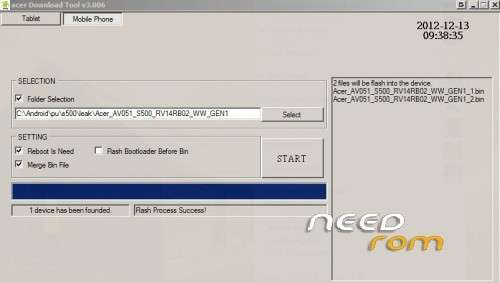
Launch ADT with acer_DownloadTool.exe.
Reboot the phone in bootloader by removing batery, insert it again and then plug your phone with USB cable while pressing Vol+.
You should see “boot mode: fastboot”.
Select “Mobile Phone” tab, select the folder where you extract the firmware and tick checkboxes as shown below : Look image
Click “Start” button and wait ~5min until the phone reboot by itself.
Once booted, we will know unlock bootloader. For that, reboot again in bootloader, then launch command :
fastboot -i 0×0502 oem unlock
※Please make a backup of your device before installing or updating ROM
Thanks for all of that but I don't understand how I should launch the command needed to root the phone? May you help me please ?
look here http://www.modaco.com/topic/35.....ked-bootloader/