
- Title: Android 4.4.2 AOSP TCL S720/T Recovery
- Listed: April, 2015
- Last modified: 04/08/2015 9:33 pm
- Version: Android 4.4.2 KitKat
You must be logged for ROM download.
25031 total views, 1 today
12 Total favorites
OFFICIAL


 Member Info
DESCRIPTION
Original ROM android 4.4.2 for our TCL S720/T.
Follow these steps to install it:
1- Install the rom with cwm.
2- Root it with Vroot(if not rooted).
3- Flash the modem.
4- Flash the Gapps.
5- Enjoy you Android 4.4.2 KitKat
※Please make a backup of your device before installing or updating ROM
Is this really the official Rom for the S720? is gps,playstore and compass working fine?
many thanks
Hello, yes, play store and compass works fine. But my GPS does not works. I don't know if it's only problem for me or for all.
All is working fine
Forgive that, GPS works fine I was testing in my village, but then I have gone to the town and it have connected with 6 satellites in 30 seconds
Hey man, just wanna ask, Bluetooth,WiFi, Gesture working?
CAn you create vid of this rom running on your phone.
Im using LEWA ROM currently, but keen to try Kit Kat Rom.
Cheers
Hi,
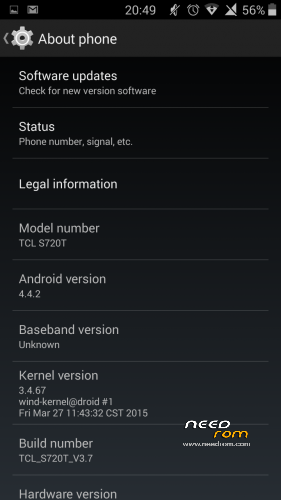
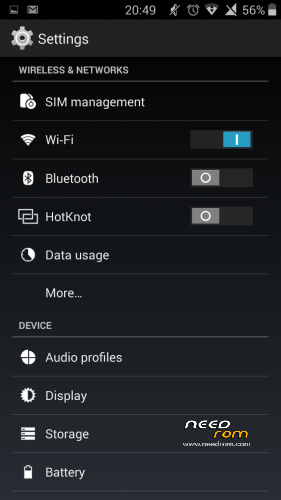
Thx for sharing this rom. I have the same problem like in your screenshot. The baseband version is unknown and i can't manage to fix it. My IMEI numbers are lost aswell. I have made a backup using Mobile Uncle but it doesn't seem to restore. Even with the custom modem. I hope someone can help me.
Hello, If you have lost your imei you have to follow these steps:
1- Made a CWM backup of your KK rom.
2- Install the original rom 4.2.2 with flash tools.
3- Then, with mtkdroid tools put your imei.
4- Go to reovery and restore your backup kk rom.
I lost my imei when I flashed a chinesse rom, and when I flash a new rom with flash tools, I lose my imei and I have to restore with the before steps.
Gesture is not supported in this kernel. Bluetooth, wifi, all is working.
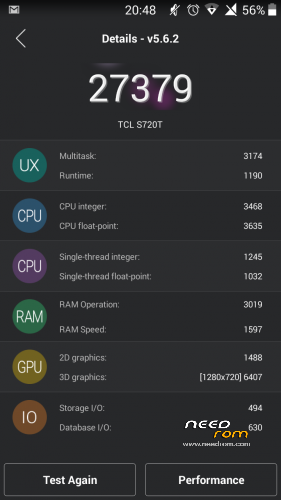
The rom is like the original, but with 4.4.2, and more options in "developer", or clud print. It runs very well.
I have been used it 3h of screen with wifi and gps, and it still has 68% of battery.
Unortunately no signal on TCL S720 WCDMA version
I tried almost everything.
Installing wcdma modem,restoring IMEI,puting the modem file manualy in system/etc/firmware via root explorer,
but no luck so far.
it is reading both sim cards but the modem/baseband isn't working.
I hope it will be fixed.
It is a nice fluid ROM
Thanks for sharing it
The modem works fine, I'm using it right now. See it:
http://qd.baidupcs.com/file/11.....B7%E7%89%88.zip
try this link, it can be flashed through recovery.
install this program for faster download: http://www.freedownloadmanager......org/
^
thanks dude
Ok, I have added your link, thanks, see you later in 4pda
Recovery ROM is working fine with TCL S720 WCDMA version ,signal issues are gone.
(Sp Flash Tool Rom has no signal foe TCL S720 WCDMA but everything else works,power button outs the phone to sleep on sp flash tool rom)
Recovery ROM has one "nasty" bug,
the power button doesn't make the phone go to sleep/doesn't turn off the screen.
holding the power works though,expands turn off/reboot option etc
I hope this bug will be fixed because it is a very nice,fast and fluid rom.
@se_rafa
can you tell me which version of cwm or twrp recovery are you using for flashing wcdma modem?
(and if you can throw a link for the recovery )
)
Thanks in advance
I use english cwm recovery, I don't remind what version is it, but it works for me.
https://mega.co.nz/#!GxY1VIrK!.....xAR51F1xD1KcxNw
The modem isn't working on my device.
I assume there are different revisions of TCL S720 and maybe that's the reaseon why on my device and a lot of other devices,
flashing modem over AOSP 4.4.2 Kikat Sp Flash Tool rom doesn't write the baseband correctly.
I tried flashing the modem with almost every recovery that I discovered(cwm from se_rafa,cwm english by rua from 4pda,twrp 2.7.0.0,twrp 2.8.2.0 twrp 2.8.5.0 .
Oh well I'll wait for a fix
Thanks se_rafa and all you guys.
Link ROM (install with recovery) doesnt work. Fix please.
Link has been fixed