
- Title: AOSIP by Gurumi
- Listed: November, 2016
- Last modified: 11/08/2016 1:36 pm
- Version: 6.0
You must be logged for ROM download.
10721 total views, 1 today
1 Total favorites
CUSTOM

 Member Info
DESCRIPTION
Read Full Description for Gapps and Swap Tutorial.
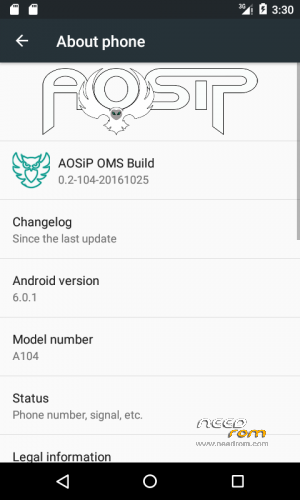
Hey Guys ! im back with an Amazing Marshmallow Rom now , why dont we try it out 
This rom is so awesome that i love it somuch compared to other roms because i modified this rom as i like .
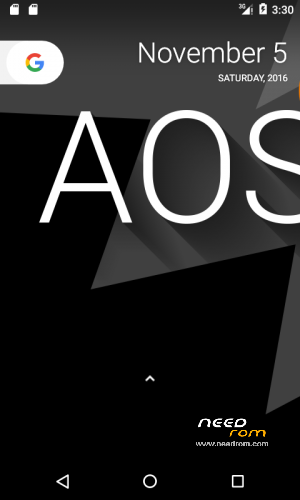
Default Pixel Launcher
Google Keyboard and a lot of shit … you ill like it . so first ..
ill write a guide about swapping ram . since my swap tutorials wont work on all roms , i have to find a way to make it work on all roms . so make sure you dont use this swap guide on other roms because it may brick your device. ok anyway lets just get started . first read advantages and disadvantages of swapping …
1. Manual mode .
2. Automatic mode.
Differences and Advantages.
1.Manual Mode:- in this process , you have to run a script on every time you restart your phone .
Advantages of Manual Mode :- 1. ROM will boot up faster , and you can swap ram when you are free without any problems while booting.
2. Automatic Mode:- in this method , Swap script will run in background while your phone is booting up so your phone will start slowly (may take upto 2 min)
Advantages :- people who have lot of time can use this method, once phone is booted up , its ready to use
Disadvantages :-phone starts up slowly , sometimes your friends may comment your phone , or sometimes you may feel like throwing it since its booting up slow .. so try at your own risk 
Swap Process :-
1. Manual mode :-
first you have to flash your desired amount of swap … install disk info pro app from here
Install and open app , check free size of all partitions , Gionee P3 always have 370+mb free in cache so we can flash 300mb cache zip to swap in cache . and if you want more ram check /system and /data partitons . and select zip files like if you want to swap more ram with /system partition , check how much space is free and how much space you want to use , like if you have 500 mb free and you want to swap 350 mb , then yeah sure , download 350 mb system zip and flash it .
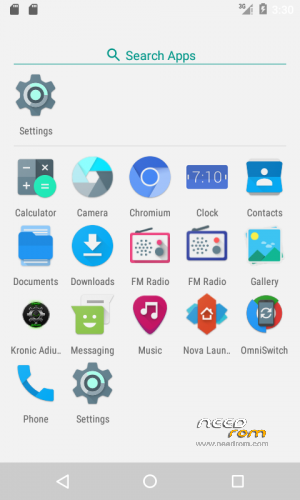
after flashing swap files, reboot to system . now go to diskinfo pro and check , there is no difference in swap . now open Kronic Adiutor (AOSIP rom have app by default so no need to download) and then grant root access , click menu , scroll down and find init.d menu . after u open init.d , you have to find some files and execute script .
file names –
cache zip – 00000-swap-cache
data zip – 00000-swap-data
system zip – 00000swap-system
if you flashed 300 mb cache zip , find – “00000-swap-cache” and click on it , you will see a menu , in that menu , select execute button , now script will be execued , after script is executed , go to diskinfo pro and check swap partition
if you flashed data or system zip , same process like . if you flashed data zip , then find for 00000-swap-data and execute it . if you flashed system zip , find 00000-swap-system and execute it .
2.Automatic Method :- {may not work some times , so try at your own risk or use Manual Method}
first you have to flash your desired amount of swap … install disk info pro app from here
Install and open app , check free size of all partitions , Gionee P3 always have 370+mb free in cache so we can flash 300mb cache zip to swap in cache . and if you want more ram check /system and /data partitons . and select zip files like if you want to swap more ram with /system partition , check how much space is free and how much space you want to use , like if you have 500 mb free and you want to swap 350 mb , then yeah sure , download 350 mb system zip and flash it .
after flashing swap files, you have to flash enable init.d zip and then reboot system.. it will take upto 2 – 3 min to boot . after phone is booted up , go to diskinfo pro app , there you can see swap is increased!
Download Links –
Gapps – go to www.opengapps.org and select ARM – Android 6.0 -Variant (check below lines and select variant)
Pico – with pico , you can only get playstore (google app , google now , and voice search features not included)
Nano – this zip will help you get Google App , Google now , Google Voice which is useful when you use Pixel Launcher (this rom have Pixel launcher as default only)
Swap Files …
Cache – 300mb cache.zip
Data Partitions :-
System Partition :-
If you like my work , please support by subscribing my youtube channel and comment thanks in my website . Thanks.
※Please make a backup of your device before installing or updating ROM
How can i install twrp recovery in gionee p3
please message me on facebook so that i can give you a detailed guide
how can i message you on fb can u give me your profile or page link.
facebook.com/gscntech
why this rom is not for two sim cards? there is supporting just one sim card gurumi.please fix it for two sim cards.
who said u that this rom only support 1 sim> im using only 1 sim because my sim2 slot is damaged .
when anyone is calling me no call receiver is showing gurumi.it is just ringing and cut off. please fix it.otherwise the rom is very good.
ill test it out bro i dont get any calls so dont know if its a bug or not
unfortunately , i cant fix it either .. my sim 2 slot is damaged and cant get it repaired for next few dys
Will this ROM performs faster?
I have tried many custom ROMs, but none of them are faster because of 512 MB Ram. What about this ROM?
This ROM is simply fast but if you want only Marshmallow ROM , i recommend you to give a try for XOSP rom , thats the latest of what i have uploaded and only have VPN bug and if you prefer Kitkat ROM , then go for MIUI 8 Stable (first rom i uploaded)
this rom is fast but it have bugs like when someone calls , we get blank screen thats why i dont use this rom at all
Did you port this ROM?
Can you tell me how did you port this ROM? What are the procedures?
Can I swap on other custom ROM?
sure bro . try swapping on other roms , i dont have any problem but give proper credits if you are sharing .. and yeah bro im the one who port roms that are uploaded by Gurumi name . im the only one porting roms to gionee p3 right now . some roms may not support swap so dont curse me if it doesnt work .. its just rom's problem and no one can fix it .