
- Title: AOSP 4.4.4 (KTU84Q)
- Listed: March, 2016
- Last modified: 03/05/2016 5:06 pm
- Version: 4.4.4
You must be logged for ROM download.
17211 total views, 2 today
4 Total favorites
 Member Info
DESCRIPTION
Firmware by chrmhoffman (http://forum.xda-developers.com/member.php?u=361777%E4%EB%FF)
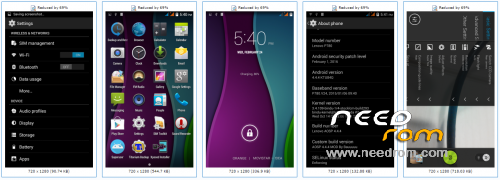
Android security patch level 1 Feb 2016 http: //source.android….lletin/2016-02-01.html
Built on latest AOSP
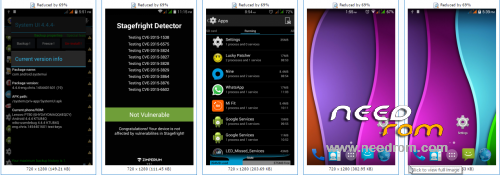
Fix for stage-fright vulnerability (the first the ever AOSP rom for P780)
Fixed camera sensors(It WAS not the easy of due to 4.4.4)
Changed to ebony black the interface
Added advanced the reboot menu
Fixed Issues the storage
Fixed the Bluetooth, the GPS
Removed the inbuilt ROOT and added Superuser
Updated the time zone file
Updated the the APN list
Removed the applications the unused
Removed the the ugly 3G indicators directory and the G
Removed the AOSP the gallery the modified and added the Lenovo the Camera
Added the SD card SWAP (For the Lenovo the Camera)
Removed the applications and the unused resources.
Optimized and the zip the aligned
Fixed some minor bugs
Additional the init.d scripts and build.prop tweaks
Added engineer mode in option developer settings
Framework, Improvements, corrected the battery power Calculation
Improved the performance and battery stability
Magnetic cover the unlock
LED notification for calls and messages
USB OTG (the FAT)
Option to the install the app in the SD-Card or Phone
Replaced modem to a V24 P780 2015/01 / 06
※Please make a backup of your device before installing or updating ROM
Hi,
Yesterday I installed this rom.It's really a very nice rom. I noticed that the google calendar synchronisation didn't work. There's no calendar option in the google account settings.
Best regards anttel
If so, Just update the gappsy fro opengapps.com or install google calender from Play Store.
Thanks! I flashed the open gapps from 2015-12-10 and now it’s working perfectly!
There is no scatter file… How can I load this rom? Via recovery?
Yes, that's correct.
OK, so I've installed TWRP 2.7.1.1 and when I try to install this ROM from zip file i got the following error: E:Error executing updater binary in zip '/external_sd/4.4.4-stable_CN.zip'. Does it mean that this ROM is not compatible with my device? Or should I use different recovery?
redownload and try again
Still the same after re-download. I've just found that the error is longer:
Installing "external_sd/4.4.4-Stable…zip'…
Checking for MD5 file….
Skipping MD5 check: no MD5 file found
– AOSP 4.4.4—
–By Bauuu—
————————–
Formatting sytem
–Mouting System
–Mounting Data
–Installing System
set_perm: some changes failed
And them the same error:
E:Error executing updater binary in zip '/external_sd/4.4.4-stable_CN2.zip'.
Any ideas? Thanks for any hints!
I've managed to install this ROM. After couple of different attempts it occured that TWRP was the problem. TWRP update to 2.8.4.0 solved the instlaltion issue.
Just so that other people will know: I have 4GB phone and only 1 GB is available for apps. I have Kaspersky ativirus that needs 500MB of free space to run. It seems that storage is separated to :Internal storage and phone storage. So if you have 4GB phone, you will have to repartion.
my install howto
1. base rom : https://www.needrom.com/wp-con.....ForFlashtool.7z
2. openrecovery-twrp-2.8.4.0rev2-p780cn.zip from https://yadi.sk/d/lOjKtlCQbHsh.....e/p780 (unzip and in flash tool (for me old 3.1316 version) chenge adress recowey.img for this img befor flash baralajbi_V7)
3. vol up + vol down + power = about 8sec (you mast see lenovo logo)
4. Wipe -> Cache, Dalvik, System, Data
5. install zip : AOSP 4.4.4 (for my CN )
6. reboot
GPS error, i cant lock my location and location based service cant edit.
CN Markup ROM – GPS is working, Battery – OK, Interface fast, but … several times the phone hang up. After few minutes it starts to working, but until then nothing helps – except red reset button. So I wait and wait, or reset.
Gaps play store not working. Works for several minutes after I had deleted and installed again my google account. But for some reason I cannot install new apps, cannot update. Works only for some time after reinstalling google account.
Hello. How to increase the internal partition to 2.5GB ?Hi there. Any idea how to flash different modem? Have tried to flash it in twrp and despite flash was succesfull, modem type unchanged after reboot. Memory layout needs to be chanched as well, no point to have internal storage 1GB, if possible, repartition needed to add some extra space for aps. Other then that no issues obsereved.