
- Title: Auto MTK PRO v3.5 (Gorontalo Android Tool)
- Listed: December, 2023
- Last modified: 12/27/2023 5:34 pm
- Version: ANDROID
You must be logged for ROM download.
8227 total views, N/A today
4 Total favorites
 Member Info
DESCRIPTION
Auto MTK PRO v3.5 (Gorontalo Android Tool)
To work with universal MediaTek gadgets, this software has features such as Format Data Erase FRP Auth Bypass and Unlock B-Loader, Lock B-Loader Reset MiCloud, Backup NV and Erase NV and also Restore NV. These tools are designed to assist users in managing the use of their Universal MediaTek devices better.
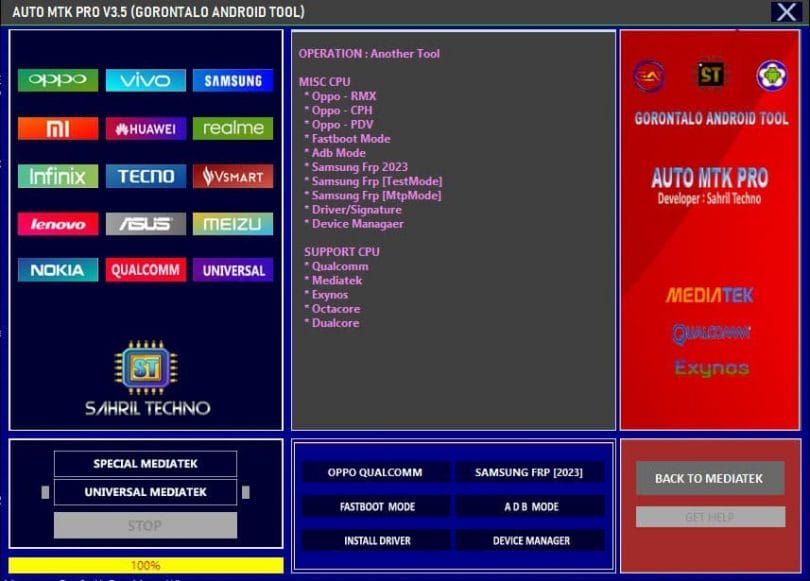
Auto MTK PRO v3.5 (Gorontalo Android Tool)
It also includes many other functions that apply to different chipsets. For instance the case of OPPO Qualcomm devices, the tool will provide instructions to enter EDL Mode and Recovery Mode and EDL Mode and execute operations like Erase FRP, PIN Pattern, as well Factory Reset. It also supports various modes such as Test Mode, MTP Mode, ADB Mode, and Odin Mode for Samsung devices. It can also download drivers for multiple chipsets, including MediaTek, Qloader, Samsung USBDk_64, LibUSB32, and ADB Fastboot.
Features:
Special MediaTek:
- FACTORY RESET
- SAFE FORMAT – – [PARA]
- SAFE FORMAT – – [MISCSAFE FORMAT – [MISC
- EASE FRP [ALL MTK[ALL MTK]
- AUTH BYPASS SAMSUNG FRP AUTH [MTK]
- MTK USER INTERFACE
- VIVO V23E DEMO
- IVO DEMO REMOTE
- XIAOMI ACCOUNT ERRASE
- RELOCK BOOTLOADER
- UNLOCK BOOTLOADER
Universal MediaTek:
- FORMAT Data
- FRP ERASE
- ERASE FRP [SAMSAM
- Authorized Bypass
- UNLOCK B-LOADER
- RELOCK B-LOADER RELOCK
- RESET MILOUD
- BACKUP NV
- ERASE N.V.
- RESTORE NV
Additional Tools section:
OPPO Qualcomm:
INSTRUCTION
SERVICE RESTORE MODE
- Switch on the device and enter recovery mode.
- Connect the USB cable
- Press Version 1.2 (below) frequently
- If you receive a notification, click OK until the device is turned off.
- If the driver is detected, Click the Execute button.
Service EDL MODE
- Execution can be directly in the edl mode
MODE EXECUTE
- Erase Frp-PIN – Pattern
- Factory Reset
CHIPSET SUPPORT
- Qualcomm
Samsung FRP Sections:
Mode Support:
- Test Mode
- Map Mode
- Adb Mode
- Odin Mode
CPU Support:
Mediatek Mediatek
- Qualcomm
- CuadCore
- OctaCore
Security Patch
- 2023 – 2023 [New Patch — 2023 [New Patch
- 2022
- 2021
- 2020
Help SamFrp Support Old
- Old Version (Method 1.[Method 1]
- Older Version, Method 2Old Version [Method 2
FASTBOOT MODE:
- Device ID
- GetVAR ALL
- GET Product
- FRP Reset [Method 1]
- FRP Reset [Method 2]
- Status of the Bootloader
- ARB Status
ADB Modal:
- Device ID
- Device Information
- FRP RESET [ADB]
- Reboot the device and switch it to the default mode.
Install Driver:
- MediaTek
- Qloader
- Samsung
- USBDk_64
- LibUSB32
- ADB Fastboot
Changelog!!!
SUPPORT :
Mediatek Mediatek Mediatek
- Qualcomm
- Exynos
- Octa/Dual Core
Option Work :
- Eliminar FRP
- Unlock/Relock the B.L.
- Format Data
- Format Factory Format Factory
- ETC. ETC
How to Use?
- The first step is to first download the file by clicking the following link
- Then, you should remove all files from the drive c: ( important)
- Verify that you have removed the antivirus before installing the application
- After that, you should open the folder and set up the setup file using some basic instructions
- Use this shortcut” Auto MTK Pro v3.5.”
- The next step is to enter the login page of the tool. Enter “Sahril Techno Gorontalo”
- After that, you’ll need to install all the drivers you already have installed. If you still need to, skip this step.
- Connect the phone and attempt to perform any task
- Enjoy !!!
AGRADECER Y DONAR…
※Please make a backup of your device before installing or updating ROM