
- Title: Backup ROM MIUI v9.2.2 Stable
- Listed: December, 2017
- Last modified: 01/19/2018 3:25 pm
- Version: Redmi Note2 V5.0.2
You must be logged for ROM download.
11756 total views, 1 today


 Member Info
DESCRIPTION
Happy New Year to everyone !
1 minute does not mean much to you, and yes to me Please Overall Rating.
Rot is not needed, You must have TWRP recovery
Exstrat in PC TWRP.rar and copy to exsternal sd card complet folder TWRP to your phone
and copy TWRP 3.0.2-0 by mic hermes or TWRP 3.2.1.0 RN2-Universal
restart your phone to TWRP
install TWRP 3.0.2-0 by mic hermes or TWRP 3.2.1.0 RN2-Universa
restart your phone to NEW TWRP
IN TWRP
1. wipe dalvick cashe, cahe, system,DATA, internal partition
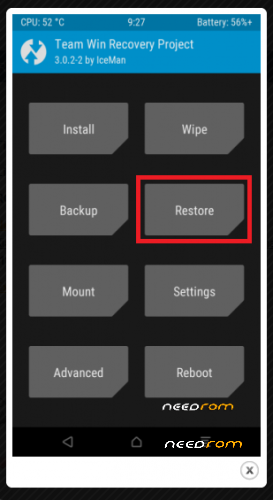
2. BACK to BACKUP-RESTORE
3. Tap RESTORE, and select from external sd card TWRP / BACKUPS / IBH65PFEFUTCKNTS / MIUI V 9.2.2 – 31-12-2017_xiaomi.eu
after restore , rebot to system. Wait 5-10 minutes and then enjoy
4. Rom is roted android 5.0.2
5. Work all
6.Multilang
7.Rom is full optimizet.
Everything at your own risk.
Please Overall Rating
※Please make a backup of your device before installing or updating ROM
Once you're done, insert your google acount and google update to update, there will be a few apk. After that you have a great good rom.
you need any gaps????
Gaps incluide in rom
I try but i don't see anathing in my sd card
Install twrp3.0.2-0 by mic hermes or
TWRP 3.2.1.0 RN2-Universal
after select restor
error :
No partitions selected for restore
i can't select partition for instal so an error occured: "No partition selected for restore"
Install twrp3.0.2-0 by mic hermes or
TWRP 3.2.1.0 RN2-Universal
using 3210 twrp, follow step but nothing in sd card
do with any TWRP 3210 any backup, because in some phones it changes the name of the folder, and then insert this backup into the backup, it surely sees it.