
- Title: Blade L6 Stock-ROM
- Listed: April, 2017
- Last modified: 04/26/2017 6:34 pm
- Version: Android 5.1
You must be logged for ROM download.
14372 total views, 2 today
5 Total favorites


 Member Info

DESCRIPTION
Nandroid-Stock-ROM-Backup made by essayn for the ZTE Blade L6.
[Multilanguage - (EU) International-Baseband - Customisable TWRP]
[flash via Miracle Box] or [flash via fastboot]
.:AWARE:.
May changes your IMEI after flashing! Want to keep yours ? -> Make an NVRAM/Data-backup of your phone. Otherwise you have to restore your IMEI with any MTK-Tool or via engineer-mode as shown in the Video at the end of this post!
______________________________________________________________________________
.:HOW TO FLASH via Miracle Box:. (recommended)
First read before doing any action!
-Download, unzip & install "MTVCOMP.rar" (contains MT65xx USB VCOM Preloader Drivers)
-Download, unzip & install "MiBo.rar" (contains Miracle Box Setup + Loader)
-Download & unzip "MiBoBackupL6.rar" (contains ZTE Blade L6 Backup)
After installing the MT65xx USB VCOM PRELOADER driver or to be sure it´s already installed:
-Install the "Miracle Box v2.27A.exe" to PC-root-directory (e.a. C:\Program Files\Miracle Box) (uncheck "read" and "start Miracle Box" after installation! So, just close the installer!)
("PL2303_Prolific"- driver will be installed automatically)
-Copy and paste all files within the "Miracle Box v2.27A Loader" (replace)
-Right click and open as admin on Miracle_Loader_2.27A.exe (which u´ve copied to the installation-folder)
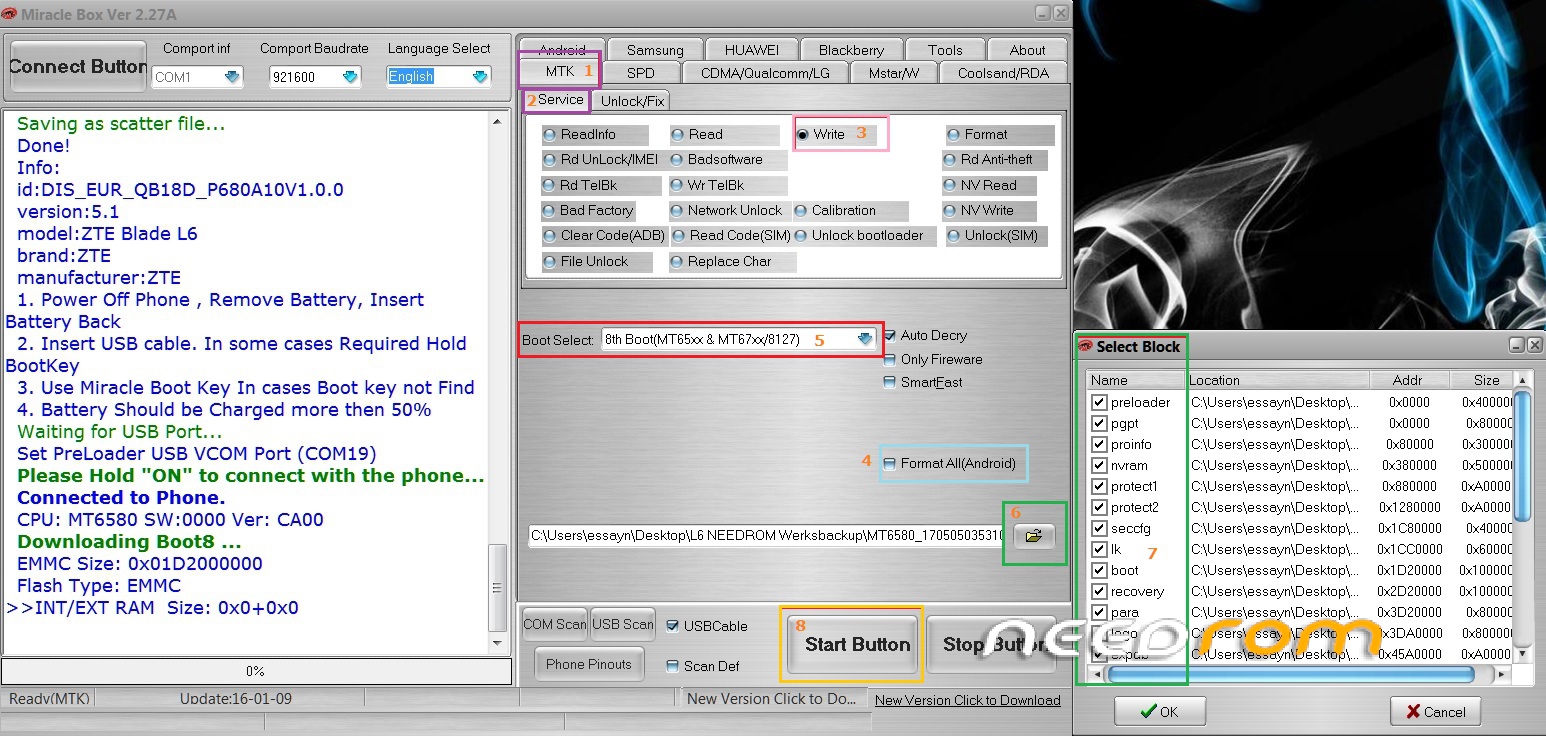
-Settings in Miracle Box (watch picture): MTK (1) -> Service (2). Check the box write (3)
Optional: Check "Format All (Android)" (4)
-Choose in the "Boot Select"-dropdown "8th Boot MT65xx & MT67xx/8127" (5) open the downloaded L6Backup via the folder-sign (6) and select ALL Blocks! (7)
-Hit "Start"-Button (8) and wait until: "…waiting for USB-port"
-Now connect your turned off phone via USB-Cable with PC
-MB starts writing (needs 25-30 minutes)
-When "Write Done.
(e.a.) >>Total time: 29 mins 57 s"
-Unplug phone and boot as usual
-New Blade L6 received!
.:HOW TO FLASH via Fastboot:.
Always unlock the bootloader for ROM-flashing!
Download "ZTE_Blade_L6 -FASTBOOT-DIS_EUR_QB18D_P680A10V1.0.0"
This is a (FlashFire-made) fastboot-restorable backup.
Extract all files to a new folder, reboot your device into fastboot mode and run flash-all.bat to restore.
The custom-recovery in the "XtraS"-folder, can be flashed after stock-ROM flashing and is just optional.
HOW TO RESTORE iMEi iN ENGiNEER-MODE
no root required (easy steps)
______________________________________________________________________________
Several files in an extra-folder (XtraS) can be used at its discretion
-firmware
-kernel
-mddb
-Stock Recovery
-TWRP – Custom Recovery
-modem
______________________________________________________________________________
Hardware : MT6580
Model : ZTE Blade L6
Build number : DIS_EUR_QB18D_P680A10V1.0.0
Build date UTC : 20151126-114500
Android v : 5.1
Baseband v: MOLY.WR8.W1449.MD.WG.MP.V6.P12, 2015/11/09 21:00
Kernel v : 3.10.72 (builder1@buildermachine15) (gcc version 4.8 (GCC) ) #1 SMP Thu Nov 26 19:55:55 CST 2015
______________________________________________________________________________
※Please make a backup of your device before installing or updating ROM
Endlich! Thank you, finally someone made it for the l6. Installing was so easy and it works perfect.
With a custom recover. Thank youuu.

Dem kann ich mich anschließen. Thanks for uploading the rom.
Please help! How I can unlock bootloader my ZTE Blade L6 before flashing rom?
works perfect with miracle box. try it. have tried 1st with fastboot but have had the bootloader bug too.
Is this rom ok for Europe ?
Kind regards, Skyfire.
Please read the description:
[Multilanguage - (EU) International-Baseband - Customisable TWRP]
So, yes it´s for Europe predestined.
Simplemente felicidades
What file should be loaded in point 5?
In Punkt 5 ? Keine. Nur "8th Boot MT65xx & MT67xx/8127" im Dropdown-Menü auswählen. Im Punkt 6 dann halt das von hier gedownloadete L6-Backup.
(At point 5 just choose the "8th Boot…". At point 6 choose the L6-backup-file from here)
Yeah the file I had to load was the scatter txt file, by doing so the popup with all the checkboxes popped out. Thanks.
One more question.. it seems that this comes with SuperSU installed (as system app, so can't be uninstalled unless the phone is rooted) but I don't remember seeing it in the stock rom when I bought the phone.. is it something you did? The reason I'm asking is because there's an app I'm reversing which checks for root and the presence of specific apps (such as SuperSU) and then it stops working. Is there a way to avoid to have these customization? Thanks!
Klar. Just uninstall SuSu via the App-settings itself or install SystemApp Remover.