
- Title: Block Cipher Tool V1.0.0.1 (Setup)
- Listed: November, 2025
- Last modified: 11/18/2025 8:24 pm
- Version: Android
You must be logged for ROM download.
4303 total views, 6 today
 Member Info
DESCRIPTION
Block Cipher Tool V1.0.0.1
Features List (Updated)
1. Samsung Services
FRP & Flash:
Reset FRP DLM (Download Mode) – Supports A01-A41, M-Series, F-Series
Reset FRP MTP (Browser/Dialer Method)
Reboot Download Mode (One-Click)
Odin Flash: Flash Firmware (BL, AP, CP, CSC)
ADB Functions:
Read Info (ADB)
Enable ADB (Samsung Old Security)
Change CSC
Remove FRP Account (ADB Mode)
Reboot Root & Fix App Root
KnoxGuard (KG) Unlock:
QR Code Enable ADB
Remove KnoxGuard (Android 12-13 Old & New Methods)
Remove KnoxGuard (Android 14 Security 08-2024)
Remove KnoxGuard 2025 (In Process)
2. Fastboot Operations (New)
Read Information:
Xiaomi Read Info
Huawei Read Info
Generic Read Info
System Repair & Fix:
Fix DM-Verify
Fix System Destroyed
Honor FRP Key
Device Control:
Reboot To: Normal, Bootloader, Recovery
Change Slot: Switch between Slot A / Slot B
3. MediaTek (MTK) Universal
Auth Bypass & Service:
Auth Bypass (Disable Auth)
Read GPT / Write Partitions
Format Partitions / Factory Reset
Erase FRP / Erase NVRM
Unlock / Relock Bootloader
Dump Boot / Dumping Partitions
Disable MiCloud
Flash Tool:
Scatter File Flashing
Custom DA & Auth File Support
4. Android General & App Manager
ADB Operations:
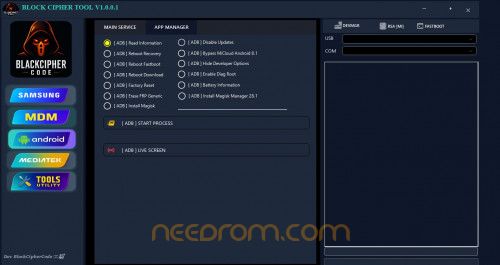
Read Information
Reboot Menu (Recovery, Fastboot, Download)
Factory Reset & Erase FRP Generic
Disable Updates & Hide Developer Options
Bypass MiCloud (Android 8.1)
Enable Diag Root
App Manager:
Install APKs: Install APK / XAPK / APKs
Virus Removal: Scan & Remove Virus
Get Activity / Search Package
5. MDM / Security / Network
Huawei / Honor:
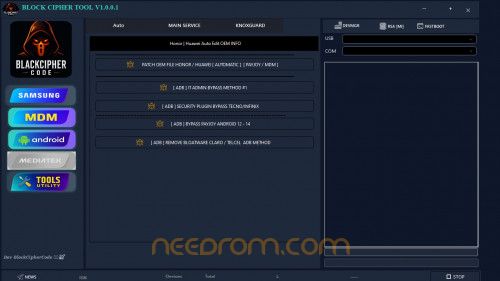
Auto Edit OEM Info
Patch OEM File (PayJoy / MDM)
Network & Volte:
Enable Volte IMS Settings (New)
IMS Settings & APN Edit
Open Network
Other MDM:
ADB IT Admin Bypass
Security Plugin Bypass (Tecno/Infinix)
Bypass PayJoy (Android 12-14)
Remove Bloatware (Claro / Telcel)
Samsung Supported Model List (FRP Download Mode)
A-Series:
A01 Core, A02, A03s, A04, A04e, A05, A10s, A12, A13 5G, A14 5G, A15, A21, A22 5G, A24 4G, A31, A32 5G, A34 5G, A41.
M-Series:
M01 Core, M01s, M02, M13 5G, M22, M32, M53 5G.
F/E-Series & Others:
F04, F22, F42 5G, J2 Prime, Jump 5G.
Tablets:
Tab A7 Lite (LTE/WiFi).
Password: 123
Thank and donate…
File Free
※Please make a backup of your device before installing or updating ROM

|