
- Title: BV8000Pro root
- Listed: July, 2017
- Last modified: 07/29/2017 4:01 pm
- Version: TWRP 3.1.1 by Jemmini
You must be logged for ROM download.
18200 total views, 3 today
3 Total favorites
CUSTOM
 Member Info
DESCRIPTION
TWRP 3.1.1 by Jemmini from 4pda.ru russsian (change language in settings)
※Please make a backup of your device before installing or updating ROM
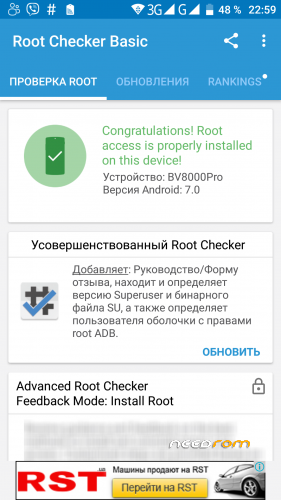
It says SU binary needs to be updated, and the update fails.
ill write the solution soon i had same issue over and over again finally found a fix. will update here. stay focused
I also noticed that it "half-roots" the device.
Example what is working: Root explorer can delete files from /system. Titanium backup can delete system apps.
What is not working: Adfree can not overwrite /system/etc/hosts. Busybox can not install. Titanium backup can not restore system apps properly (hangs).
working busybox.apk added
also: It says SU binary needs to be updated, and the update fails.
those who gets `su binary update fails` error follow these steps
1- check how to install firmware (u can find on 4pda)
2- download this mod lite firmware
https://cloud.mail.ru/public/K.....i2B/KpfaKYAsk
3 – install and flash supersu file
4- try to update su binary and wait for the error and reboot after that
5- now find this Superuser X Pro [Root] from google or google play (support dev)
6- download,install and give permissionz with supersu
7- now open Superuser X Pro [Root] and click install
8 – now reboot and open Superuser X Pro [Root] again and do root check
9 – if it successfully installed u can go to supersu app and remove supersu app from system (click unroot/clean)
10- reboot and u will have fully rooted phone
11-Bonus: those who wants to install and get errors try this app `BusyBox X Pro [Root]`
thats all
i now have fully rooted busybox installed bv8000 pro
ps: im noway affilated with that owner of super x pro app and busybox x
works great ! thx
Hi,my bv8000 pro stuck in the logo when i restart.i have tried to use recovery by pressing the power and vol up button but it doesn't work.i need help please
i need to talk with you , please , is so important , send email for rsj.paulo@gmail.com
Error: STATUS_PRELOADER_INVALID (0xxC0030004)
If you load the recovery scatter file, you must check preloader and klick to the pathfield. Then select the preloader file that you have installed. Now you can flash without errors…
please help cant use twrp after upgrade android 8