
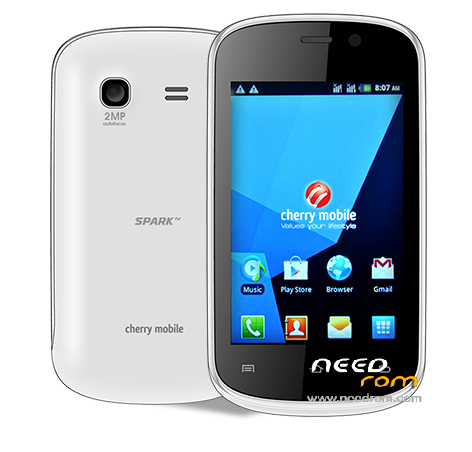
- Title: Cherry Spark TV
- Listed: December, 2015
- Last modified: 12/26/2015 2:57 pm
- Version: 2.3
You must be logged for ROM download.
11194 total views, 1 today
1 Total favorites
 Member Info
DESCRIPTION
Things need to consider when flashing.
1. You should have an extra battery, or if you can charge your battery thru your phone then charge it atleast 50%.
2. Double check your Micro USB Cable.
Let's proceed to flashing. Check the pictures for procedure
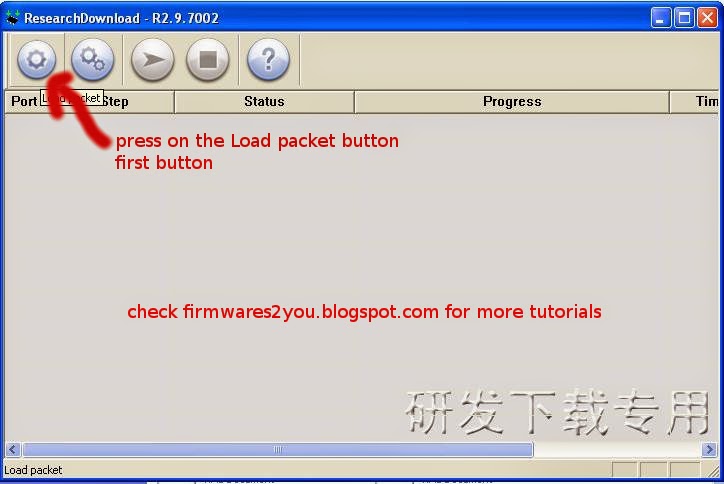
Click on Load Packet, you can see in the picture that it is the first button.
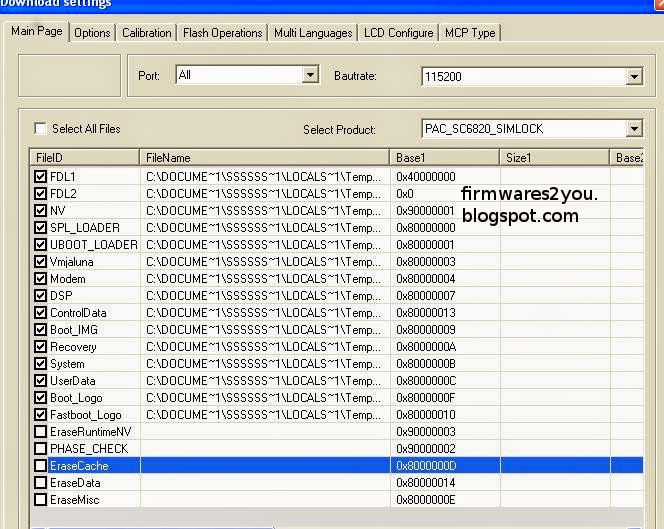
Then in the "Main Page", UNCHECK that is shown in the picture
This one is in "Calibration" section, UNCHECK all.

then press "OK"
Proceed pressing the "Play" button, then connect your to your PC. This should detect the phone and continue Flashing. If it is not detecting the phone, it means the driver is not properly installed.
Just wait for it to finish and VOILA your phone is back on its original state.
If your problem is you forgot your google account and your forgot it, this is also known as TMPA. You can also flash it via research download, i've tried it on VERSION 1 of SPARK TV. VERSION 1 Only OK.
Check the picture on the second picture of flashing. Check only the following
✓FDL1
✓FDL2
✓UserData
and then uncheck all in "Calibration" page. Press ok then lastly press on the Play button. Just wait for it to finish.
- See more at: http://firmwares2you.blogspot.com/2014/07/cherry-mobile-spark-tv-flashing-tmpa.html#sthash.XxasDqwe.dpuf
1. You should have an extra battery, or if you can charge your battery thru your phone then charge it atleast 50%.
2. Double check your Micro USB Cable.
Let's proceed to flashing. Check the pictures for procedure
Click on Load Packet, you can see in the picture that it is the first button.
Then in the "Main Page", UNCHECK that is shown in the picture
This one is in "Calibration" section, UNCHECK all.
then press "OK"
Proceed pressing the "Play" button, then connect your to your PC. This should detect the phone and continue Flashing. If it is not detecting the phone, it means the driver is not properly installed.
Just wait for it to finish and VOILA your phone is back on its original state.
If your problem is you forgot your google account and your forgot it, this is also known as TMPA. You can also flash it via research download, i've tried it on VERSION 1 of SPARK TV. VERSION 1 Only OK.
Check the picture on the second picture of flashing. Check only the following
✓FDL1
✓FDL2
✓UserData
and then uncheck all in "Calibration" page. Press ok then lastly press on the Play button. Just wait for it to finish.
- See more at: http://firmwares2you.blogspot.com/2014/07/cherry-mobile-spark-tv-flashing-tmpa.html#sthash.XxasDqwe.dpuf
※Please make a backup of your device before installing or updating ROM