
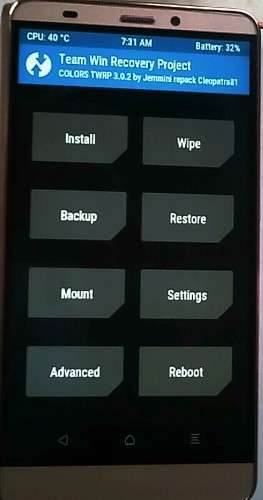
- Title: COLORS E20 TWRP
- Listed: June, 2016
- Last modified: 06/26/2016 3:42 pm
- Version: TWRP 3.0.2.0
You must be logged for ROM download.
10917 total views, 1 today
1 Total favorites
 Member Info
DESCRIPTION
Colors Mobile Xfactor Elite E-20 TWRP
ABOVE ALL UNLOCK THE BOOTLOADER
To unlock the bootloader please follow the next steps :
1 ) please download & install (both adb & fastboot) the "adb-setup-1.4.2.exe" from the next link :
http://www.mediafire.com/download/2df821420xpdp48/ADB_1.4.2.rar
2 ) Connect your phone to your pc with usb cable
3 ) Open cmd prompt … and type the next command :
adb reboot bootloader (and press enter)
4 ) Your phone will reboot into FASTBOOT mode. Now, type the next command :
fastboot getvar all (and press enter)
5 ) You will see
6 ) Now type the next command :
fastboot oem unlock (and press enter)
7 ) In the screen of your phone confirm to unlock the bootloader
8 ) Restart the phone in normal mode
STEPS TO INSTALL TWRP
1 ) Put the "BETA-SuperSU-v2.74-2-20160519174328.zip" into your external SD
2 ) Turn off the phone
3 ) Open SP Flash Tool
4 ) Load the scatter file ( "Download only" mode)
5 ) Click on "Download"
6 ) Connect your phone to your pc with USB cable
7 ) To gain access to the custom recovery, press a combination of volume & power buttons simultaneously
8 ) DO NOT REBOOT, but I STRONGLY RECOMMEND YOU to install "BETA-SuperSU-v2.74-2-20160519174328.zip"
9 ) Wipe cache/dalvik (FUNDAMENTAL before reboot)
10 ) Reboot and enjoy 
If you need any further assistance or if you have any questions, please do not hesitate to sign up & contact us at the following website :
http://www.chinaphonearena.com/forum/index.php
※Please make a backup of your device before installing or updating ROM
thanks cleopatra it worked !!
where did u get the TWRP?
It works!!! thanks. please update it in latest version.
where do i get the TWRP