
- Title: CrDroid v2.5 X32
- Listed: April, 2017
- Last modified: 04/18/2017 1:54 pm
- Version: 7.1.1
You must be logged for ROM download.
15968 total views, 2 today
1 Total favorites
CUSTOM


 Member Info
DESCRIPTION
Go to recovery TWRP
-> wipe -> Advansed wipe
-> Cleaning -> Custom Cleaning
Select the checkbox:
-Dalvik the ART the Cache
-System
-cache
-Data
Next Instal (setting) choose our SD card and on it the firmware, confirm, wait , restart
※Please make a backup of your device before installing or updating ROM
F-Driod
Kill Camera
https://f-droid.org/packages/i.....rio.killcamera/
Attention, you need root rights.
First you need to download the program Device Info HW
How to download open the program settings in the upper right corner and set as in the screenshot.
Rejoining the program and watch the item display in the General section.
Someone phones the first revision will be written otm1283a_cmi50_tps65132_hd , you can put the x64 firmware who telephones the second revision (list below) Unfortunately, you can not put x64 firmware.
A way to drain without root rights.
Ps new information, we have many different displays, otm1283a_cmi50_tps65132_hd (x64)
All other x32.
hx8394d_cmi50_blj_hd (x32)
nt35521_boe50_xld_hd (x32)
jd9365_inx50_jmg_hd (x32)
rm68200_cpt50_blj_hd (x32)
If your display is not listed, it is also x32.
URL Check x64 or x32
https://4pda.ru/forum/index.ph.....78385 
URL Unofficial firmware
https://4pda.ru/forum/index.ph.....0#entry61854084
SlimRom 6 (6.0.1) x32bit
AOSP R1-X5MP
SlimRoms (7.1.1)
AmigoOS 3.5
FiraOS
fastmod-x5maxpro
Yunos 5.1.1
Resurection Remix 5.8.3 bolt1502 x32bit
OctOS-N 7.1.1
LineageOS 7.1.2
Ressurrection 5.8.3 Remix
CrDroid v2.5
AEX
Lineage OS Stable X5 Max Pro x32bit
Mokee 7.1.1 Stable X5 Max Pro x32bit
Resurection Remix 5.8 Stable X5 Max Pro x32bit
XenonHD x32bit
Resurection Remix 5.8 x32bit
Mokee 7.1.1 x32bit
XOSP x32bit
AICP 12.1 x32bit
CyanogenMod 14 x32bit
Hi @karaya1
In the all ROMs in your previous post…what are multilinguaje, please? (in x32 platform)
I need spanish for my mother. She has a lot of spam and malware with stock ROMs
Hi @thunderfruit.
#
I try 3 Custom ROMs.
#
This Custom ROM is Better.
(3)Resurrection Remix 5.8 Stable X5 Max Pro x32bit
#
or
#
(1)Mokee 7.1.1
hmmmm…
・ Camera Recording do not work.
I can not bug fix about Camera Recording.
・ GPS do not fix….
#
I do not know other Custom ROMs support Español,
So please ask for more information about Custom ROMs support Español.
#
// Doogee International Communities(Español) //
http://community.doogee.cc/for.....lay&fid=65
#
// I find following Site with Google Search, So i try Mokee 7.1.1 in the 1st. //
#
@YouTube
Doogee X5 Max Pro – Stock + Xposed + Extras ou Mokee 7.1
https://www.youtube.com/watch?.....v=SuuY_K77waY
#
@Blog
Doogee X5 Max Pro – Stock + SU Xposed & Extras Ou Custom Rom Mokee 7.1
http://androidypt.blogspot.jp/.....-su-xposed.html
#
Is this Español ???
please ask for information in that Web Site about Custom Rom support Español.
#
try this Mokee 7.1.1
#
———————
(1)Mokee 7.1.1
(LineageOS 14.1 Base)
———————
Info Site
https://4pda.ru/forum/index.ph.....0#entry57315614
Download Site
https://yadi.sk/d/HWw-1nvH39fw.....mj
#
・Support Español : Yes
・Virus/Malwre check : OK(I check TWRP backup files,Kaspersky Internet Security with PC, Security Soft detect Virs/Malware when check Doogee Original ROM.)
・Home App
Nox : response good
Pixel Launcher/Google Now Launchr : respose lagging.
・Antutu Bench Mark : 28323(good score for Doogee X5 MAX Pro)
#
・Root : no need
・Fingerprint : OK
・Wi-Fi : OK(2.5GHz or 5GHz) // If Wi-Fi + Blutooth use, 5GHz is better.
・Blutooth : OK, But need pairing after reboot. // install Blutooth patch
・Network
4G LTE/3G WCDMA(SIM Slot 1) Data Commuication : OK
2G GSM(SIM Slot 2) : Unkown //no test because no support in Japan)
・Camera(Photo) : OK // install camera patch
・Camera(Recording) : "doesn't work(give up)" // install camera patch
・GPS : "No Fix"
・SD Card : OK
#
・Chorme : OK
・YouTube : OK
・Multi Window : OK
#
#
#
// Mekee is Linegae OS Base, so i try Linege OS 14.1 in the 2nd. //
#
————————————–
(2)Lineage OS Stable X5 Max Pro x32bit
————————————–
Info Site
https://4pda.ru/forum/index.ph.....0#entry58991673
!!! No Support Español : !!!
#
#
#
// Resurrection Remix OS support japanse, so i think support Español too
and try in the 3rd. //
#
————————————————–
(3)Resurrection Remix 5.8 Stable X5 Max Pro x32bit
————————————————–
Info Site
https://4pda.ru/forum/index.ph.....0#entry58984910
Download Site
https://yadi.sk/d/Yhg_R8BH3F2C.....RG
#
・Support Español : Yes
・Virus/Malwre check : OK
・Home App
Trebuchet : response good
Pixel Launcher/Google Now Launchr : respose a little lagging but ok.(or system animation off)
・Antutu Bench Mark : 28231(good score for Doogee X5 MAX Pro)
#
・Root : no need
・Fingerprint : OK
・Wi-Fi : OK(2.5GHz or 5GHz) // If Wi-Fi + Blutooth use, 5GHz is better.
・Blutooth : OK // install Blutooth patch
・Network
4G LTE/3G WCDMA(SIM Slot 1) Data Commuication : OK
2G GSM(SIM Slot 2) : Unkown //no test because no support in Japan)
・Camera(Photo) : OK // install camera patch
・Camera(Recording) : OK // install camera patch
・GPS : OK
・SD Card : OK
#
・Chorme : OK
・YouTube : OK
・Multi Window : OK
#
#
#
Open Gapps
http://opengapps.org
#
Open Gapps Package Comparison
https://github.com/opengapps/o.....kage-Comparison
#
#
#
!!! After setup complete Custom Rom via TWRP Recovery,
Sometimes TWRP Recovery go to auto reboot.
If Custom ROM do bootloop(Boot Amimation) or Blackout,
Please try power off or deattach and attach battery pack.
then power on .
If u can not fix or any trouble,
Please try to flash(erase all data and re format) Doogee Original ROM via SPI Flash Tool -> flash TWRP Recovery -> install Custom ROM via TWRP!!!
#
#
#
# I can not read russian word,
# so i use Google Chrome or Simjet(Chrome base) Web Browser
# with Auto Translate from russian to english.
# (from russian to spanish, but i do not know good translate.)
#
Good Luck and Have a Fun.
AOSP Luncher is better.
https://play.google.com/store/.....ware&hl=es
AOSP(Android Open Source Project)
There's got to be a better way.
You join Doogee International Communities(Español).
http://community.doogee.cc/for.....lay&fid=65
You find Custom ROMs Users about 15 – 20 people.
Then Custom ROMs User all spread the task and share the result which Custom support Español one by one.
Guauuuu @karaya1 a lot of thanks for all!!!
i will check (the first) the RR 5.8 (Android 7.1.1) in spanish and it seems hasn´t any bug
I forgot…
I tried another 2 Custom ROMs.
These Custom ROMs do not support Español.
#
Mokee 7.1.1 Stable X5 Max Pro x32bit
https://4pda.ru/forum/index.ph.....0#entry58988595
#
LineageOS 7.1.2
https://4pda.ru/forum/index.ph.....0#entry60676097
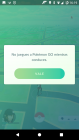
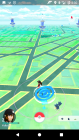
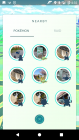
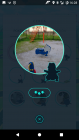
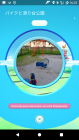
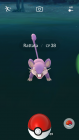
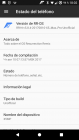
As for "Pokémon GO"
#
Pokémon GO work RR 5.8.4 with Maglisk(Rooted App).
Support Español@RR 5.8.4
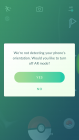
But Pokémon GO do not work "AR Mode".
Message is
"We're not detecting your phone's orientation.
Would you like to turn off AR Mode ?"
#
I check also,
#
crDroid 2.5(Re-Install, No Rooted)
"No support this Android Version"
#
RR 5.8.2(Re-Install, No Rooted)
"No support this Android Version"
#
RR 5.8.3(Re-Install, No Rooted)
I can not Login Pokémon GO.(Login loop)
@Not Support Español
ViperOS and AOSP Extended.
ViperOS and AOPS Extended.
Today's Custom ROMs
・lieage-13.0 x32
・SlimRom 6(6.0.1)