
- Title: Cyanogenmod 11
- Listed: January, 2014
- Last modified: 03/16/2014 1:29 am
- Version: 4.2.2
You must be logged for ROM download.
89635 total views, 4 today
146 Total favorites


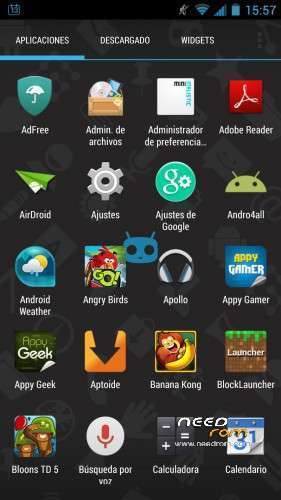
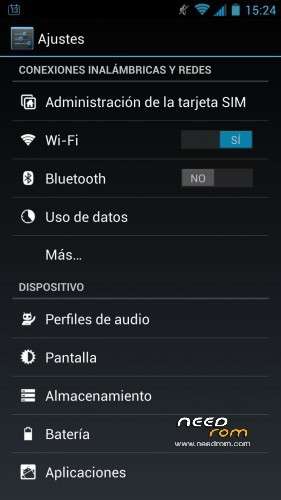
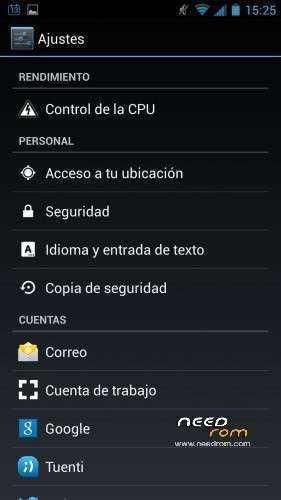
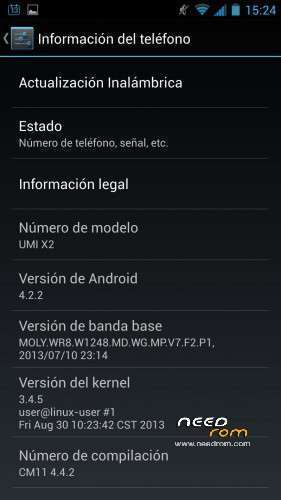
 Member Info
DESCRIPTION
Based on official ROM 4.2.1
Original site: http://www.htcmania.com/showthread.php?t=686542
CHANGES
- Appearance settings menu .
- Optimization of ROM .
- Improved performance .
- Deodex .
- RootExplorer .
- Multilanguage .
- Removed Chineses applications.
- Rooted .
- Improved GPS positioning and speed .
- Improved signal in the data connection (increases the time that is connected in H + mode).
- Fixed small bug in the Settings menu .
- Increase the battery life .
- Optimized signal quality in mobile networks .
- Added patch to remove the "R" roaming some companies with virtual networks.
- Removed unnecessary tweaks and added many others.
- Added new menu : "Performance" in " System Settings " .
- Improved Wi- Fi .
- Added support for busybox .
- Added support for init.d
- Added many script for init.d ( autonomy and improve performance ) .
- Added Flash Player.
- Zipalign (improved RAM management applications ) .
- Fully Based on the latest official update UMI ( v4.2.1 ) .
- Improved camera drivers .
- Fixed problem with the "Engineer mode".
- Holo -Updated version of " Rebooter " .
- Fixed a bug in which the symbol of the Wi- Fi signal appeared gray.
- Added " Google Chrome " as the default .
- Added app " Youtube " .
- Added Xposed installer and the module "gravity box" .
- Improved performance and AnTuTu score ( by using the JIT compiler and the use of GPU for 2D drawings).
- New – home menu to configure the terminal.
- Boot animation and sounds CM11 .
- Partial – Interface Android 4.4 and CM11 .
- Nova Launcher PRIME – Added default .
- Fixed bug in mass storage.
- Fixed bug in the quick reset.
- Changed default governor to " hotplug " .
- More optimized ROM (removed unnecessary scripts and tweaks ) .
- Fixed authentication error Wi- fi networks as " Andared " by using a new Wi -Fi module.
- Solved other minor bugs .
- More things I do not remember.
NEWS
-Changed the icons native interface and some applications to Android 4.4 KitKat.
-Fixed error with EPO failed download.
-Improved GPS.
-Added app 'ES File Explorer'.
-Return to the default browser.
-Added tweak to improve autonomy.
-Added script to enhance the reading speed of the microSD card.
-Removed duplicate RootExplorer app.
INSTALLATION PROCESS
1.- Download ROM and place any folder on the SD.
2.- Turn on the phone in recovery mode.
3.- Go to "Install Zip" and then to "Install zip from sdcard".
4.- Finally, select and install de ROM.
DONATIONS
-Mario Lange ($5,00 USD).
-Charvi Associates ($5,00 USD).
-Petrus van den Hurk ($5,00 USD).
-Cristi Paun ($10,00 USD).
-Marko Azdajic ($1,00 USD).
-Frank Börkircher ($5,00 USD).
- Eduardo Calzado Roura ($5,00 USD).
-Костючек Алла ($1,00 USD).
-Platon Dusha ($5,00 USD).
-David Leon ($10,00 USD).
-Darko Stefanovic ($5,00 USD).
-Thierry RAIMOND ($5,00 USD).
-Kolesnichenko Aleksey ($5,00 USD).
-Ermakov Dmitriy ($5,00 USD).
-Daniel Losappio ($5,00 USD).
※Please make a backup of your device before installing or updating ROM
@JCampano : When i erase first time a movie in gallery cynogenmod rebooting. When i erase second time havent problem. Why reboot when erasing first time. İs it a bug ?
Hi,
Phone: UMI X2 32GB
I wanted to install a New ROM. So, I have gone to CWM recovery, did a factory erase and then by mistake instead of installing the ZIP ROM from SD card I restarted the phone.
Now, the phone boots and shows UMI screen then goes to Android first screen and sits there for ever.
Trying to boot into recovery using Vol down and power button takes me to Chinese menu which is of no use.
How do I boot to CWM Recovery?
Regards,
Bency
Hi, maybe this can help you. http://www.sorexblog.altervist.....rg/recovery.php
Good luck
Or you can do a google web/image search : chinese recovery menu translation.
Thanks for the reply Philiph.
This does not help. In the Chinese recovery there is no option to perform any upgrade. This is not that CWM Recovery. These is the stock boot menu which has Testing options. Nothing related to upgrade.
Regards,
Bency
Then you have to use SP flash tool i think. There are lots of tutorials on how to use it. Good luck once more.
GPS still 50 meters offset.
Can we expect this is fix in your next version soon ?
In mobileuncle tools go to engineer mode (MTK), choose Location, then Location based service, A-GPS and tick Enable A-GPS. After that choose EPO, tick Enable EPO and Auto Download both. Leave engineer mode and if necessary restart your phone. Your problem should be fixed.
done but not fixed
but if i go to my house 2 floor roof then GPS working perfectly but in ground floor or in my office not work.
Try to test in open terra in.
Well there are 2 floors above you which will block almost all GPS satellite signals.
As mentioned in other reply test in open air.
Stiil the absolute position will be more than 1-2 meters out.That's normal for GPS.
Relative it will be better and the navigation software will lock to the nearest available road..
not working…
guys i get installation aborted what am i doing wrong
i put the rar file on the sd card and i wanted to update in startup from sd but i still have INSTALATION ABORTED whats wrong ? :O
Where can I find "Install Zip" and then to "Install zip from sdcard". In the recovery mode I cant get acces