
- Title: CyanogenMod Update
- Listed: January, 2016
- Last modified: 05/20/2016 10:15 am
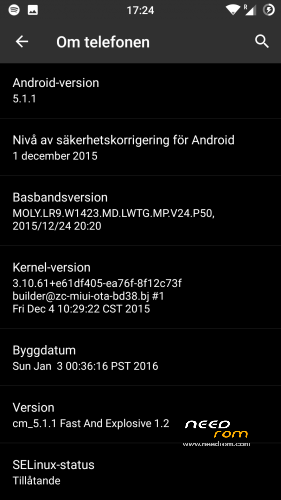
- Version: CyanogenMod 12.1
You must be logged for ROM download.
227743 total views, 17 today
243 Total favorites

 Member Info
DESCRIPTION
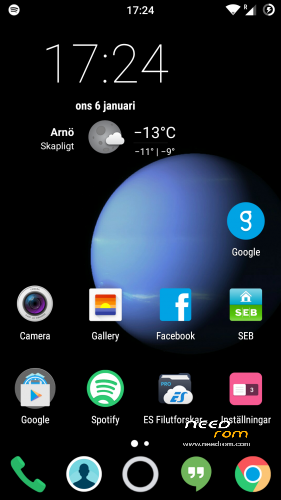
This is CyanogenMod 12.1 for xiaomi redmi note
Change log Fast and Explosive Update 5.2 Clean CM (Latest)
New build and a stable one 
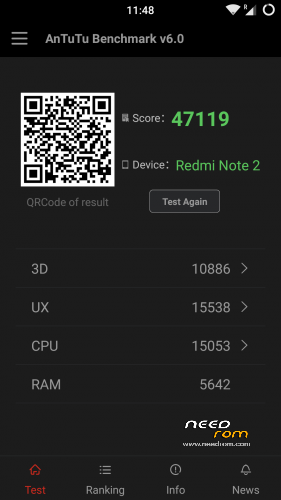
Battery friendly rom and kernel
Latest Gapps
FM-Radio (You need to factory reset your phone for it to work or just start music player once and push play then close the app and open FM-Radio and it should work.)
Clean CM
security patch update
This is the best build so far
Change log Fast and Explosive Build 4.0
New build 2016-03-14
new camera libs
Gapps updated
4G/LTE Optimized
New Modem
Camera apk moddded
Change log Fast and Explosive Build 3.7
Settings is now fixed so all the buttons are working
Maybe more, but i don´t remember
Change log Fast and Explosive Build 3.6
New libs for whole ROM @Coremainia ROM is now even faster!!
faster focus in camera
xposed deleted
uploading separate install for xposed framework
Change log Fast and Explosive Build 3.5
New Build 2016-02-21
kernel optimized by @Coremania
4G lock implemented
Faster and more explosive
Change log Fast and Explosive Build 3.2
New kernel and again optimized by @Coremania
added intelli3g.apk for xposed
added disable su idicator for xposed
some installer faults removed
some camera libs updated, can´t see any difference  Working on it..
Change log Fast and Explosive Build 3.0
New Build
The new kernel for this build has been optimized by @Coremania for battery and snappines (It`s a merged boot.img and it`s for testing)
Also @Coremania managed to do some magic so we can enjoy gestures in future updates
Busybox updated
Different framework
I did my best trying to fix the crazy bluetooth bug. If it`s not working now i can`t do it!!
I can recomend the DEEP DARKNESS theme by Manuel Moellmann
Enjoy
Install
Download zip file to sd
Reboot to TWRP
Factory reset
Wipe cash
Install zip
done
Enjoy CM!!
※Please make a backup of your device before installing or updating ROM
Good ROM but FM radio (not onlione) is missing. Suggest smart wake and / or auto on / off features if
feasable. Keep up the good work, thanks.
TWRP 1.2 installed. success
Reboot Freeze
Remove the battery , reboot
Why?
Self resolution
OK, got it booting into TWRP and flashed ok, you just have to let go + and volume at the right moment. Somewhere was also advice that you can get into TWRP with pushing all +, - and volume buttons together, but that doesn't work.
I wonder why booting into TWRP is so slow with this phone? If I remember correctly, it has been much quicker with my other phones.
I thought the matter of kernel. But it not too much annoying, just hold the indisppensable button, wait for screen turn on and leave it there.
You can also open the dev option , there there is an option to add the ADB AND RECOVERY optioms to the RESTART POWER OFF….
To get into twrp you have to press volume up and powerbutton simultaneously and when phone shows Mi you have to let volume up and keep pressing power button, hope that helps you
Wrong let power button and keep pressing volume up
I let go both buttons as soon as logo appears, then I got into TWRP.
i didnt realize the exact way that we could boot into recovery on this phone so i followed the way i got into my old phone and works So if this is another way thanks for the information
so im a little be confused with updates.. build 1.2 repack is better than 1.1, but not so stable as 1.1? Do we have to wait for build 1.3?
Eitherway Daniel thanks a lot again
with respect,
Nick
Mobile data connection problems:
I am using version 1.1 which is very good! Thanks Daniel!
But with this version I keep having problems with the mobile data connection of LTE (which is configured as the preferred network type).
Whenever I loose the mobile data connectivity I cant recover it, the only way is to reboot the phone.
I have tried to activate and deactivate airplane mode, disable wi-fi, enable and disable data connection with no result.
The phone keeps telling me that the network type is unknown under Network Signal Info App for example.
The only way to recover the mobile data is to disable wi-fi and reboot the phone.
I have 2 SIMs on the phone and LTE enabled on the 1st SIM.
Does anyone else have this problem?
Thanks.
hi, i have the same settings as those, build 1.2 repack, 2 SIM card, sim with LTE in slot 1, without problem. all works perfect (big thanks to Daniel)
Ir module not working?