
- Title: CyanogenMod Update
- Listed: January, 2016
- Last modified: 05/20/2016 10:15 am
- Version: CyanogenMod 12.1
You must be logged for ROM download.
227767 total views, 41 today
243 Total favorites

 Member Info
DESCRIPTION
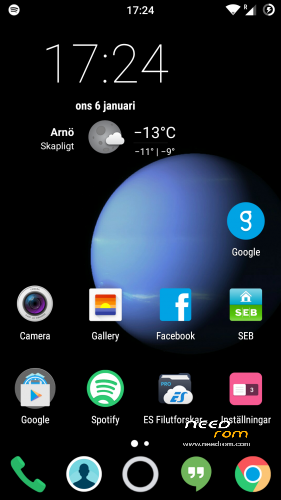
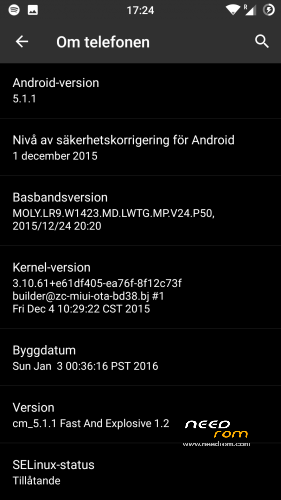
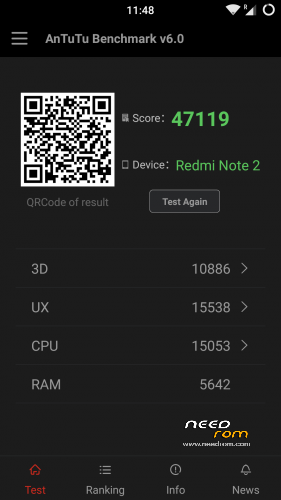
This is CyanogenMod 12.1 for xiaomi redmi note
Change log Fast and Explosive Update 5.2 Clean CM (Latest)
New build and a stable one 
Battery friendly rom and kernel
Latest Gapps
FM-Radio (You need to factory reset your phone for it to work or just start music player once and push play then close the app and open FM-Radio and it should work.)
Clean CM
security patch update
This is the best build so far
Change log Fast and Explosive Build 4.0
New build 2016-03-14
new camera libs
Gapps updated
4G/LTE Optimized
New Modem
Camera apk moddded
Change log Fast and Explosive Build 3.7
Settings is now fixed so all the buttons are working
Maybe more, but i don´t remember
Change log Fast and Explosive Build 3.6
New libs for whole ROM @Coremainia ROM is now even faster!!
faster focus in camera
xposed deleted
uploading separate install for xposed framework
Change log Fast and Explosive Build 3.5
New Build 2016-02-21
kernel optimized by @Coremania
4G lock implemented
Faster and more explosive
Change log Fast and Explosive Build 3.2
New kernel and again optimized by @Coremania
added intelli3g.apk for xposed
added disable su idicator for xposed
some installer faults removed
some camera libs updated, can´t see any difference  Working on it..
Change log Fast and Explosive Build 3.0
New Build
The new kernel for this build has been optimized by @Coremania for battery and snappines (It`s a merged boot.img and it`s for testing)
Also @Coremania managed to do some magic so we can enjoy gestures in future updates
Busybox updated
Different framework
I did my best trying to fix the crazy bluetooth bug. If it`s not working now i can`t do it!!
I can recomend the DEEP DARKNESS theme by Manuel Moellmann
Enjoy
Install
Download zip file to sd
Reboot to TWRP
Factory reset
Wipe cash
Install zip
done
Enjoy CM!!
※Please make a backup of your device before installing or updating ROM
Xposed module to hide # indicator is "Disable SU indicator" http://repo.xposed.info/module.....ablesuindicator
There is no need to install Chainfire's SuperSU
Xposed isn’t preinstalled anymore, that’s probably why he choose this method over the module solution
It’s faster without xposed
i can’t change the uses of menu button, home button and how long backlight is turned, although i turned on advanced menu. how can i change this??
Go to setting – buttons – in volume button section, enable wake up device – done..
You can wake your phone with vol button now
sorry, wrong reply..
those 3 settings that you mentioned are available after you flashed settings_fix
Please, feature again +/- volume buttons option for wake up the phone; always using on/off button could cause a early wear
you can use the gesture to wake up phone, swipe or double tap the proximity sensor, no need to use any button.
activate it in settings, gesture
no such gesture options in setting for me and now i cant disable backlight in buttons :X
What will happen if i stack 3.6 over 3.5 after wiping cache and dalvik?
Exposed is gone?
Will I get bootloop?
You won't get bootloop (usualy xD) but anything related to Xposed shouldn't work anymore.
You can even stack 3.6 + Gapps + Xposed (+ delete cache and dalvik) in one go
rom 3.60 gps does not work, taken many options from the menu to return 02.30
Please, put back in the rom option vol +/- to wake the phone. There are so many of us who need it back. please, pease
@interceptorshile
which was the last version it worked
2.3 bulid setting.apk include all missing options ;P
you can use the gesture to wake up phone, swipe or double tap the proximity sensor, no need to use any button.
activate it in settings, gesture
thank you Coremania, I'll give it a try
bad updates i cant even change key functions in setting or disable backlight and in gesture i have only 3 options is this normal ?:D And none of them are for screen unlock :X
(yes i do clean instal- wipe all included internal storage)
Just uploaded a setting’s fix. Sorry I don’t use those features, but I guess you are
Ota please.
Sim not saves property. I chouse 2 sim to call or “ask me” but after reboot all sim settings is random.
And big news from 4pda. Vova_vafin in your aosp ROM can do software HDR. And now this user talk about FM radio. Miui framework + cm framework = radio?
And please add weather info to lockscreen
Thank you Daniel and Coremania!
Your ROM is most battery friendly ROM as I see.