
- Title: Doogee DG350
- Last modified: 03/14/2015 2:34 pm
- Version: 4.4.2
You must be logged for ROM download.
18873 total views, N/A today
8 Total favorites

 Member Info
DESCRIPTION
This ROM is NOT mine!! However, I have tested it and believe that it is the best ROM out there for the Doogee DG350, better than the official ROM.
All credit goes to XABADOU from the Spanish forum at htcmania for the ROM. If you want to give a thank you, credit, donation, whatever for the ROM – it should go to this person.
I put this all together with instructions to make it as turn key as possible, feel free to donate if this work has helped you, but understand that Xabadou actually put this CWM ROM out there and deserves the credit for the actual ROM, so if you can get it to him, donate to him.
This entire process is designed to be done from a fully functioning Doogee DG350. You will need a Windows 7/8 computer (if not rooted) and microUSB to USB cable. If your DG350 is rooted, you will not need a computer or USB cable.
THERE ARE NOW TWO VERSIONS:
ONE (1) IS THE ORIGINAL POSTED VERSION TITLED Doogee DG350 Xabadou 1
THE SECOND IS THE UPDATED VERSION (2) TITLED Doogee DG350 Xabadou 2. TRY THIS UPDATED VERSION FIRST. ALL FILES ARE EXACTLY THE SAME IN BOTH EXCEPT THE ROM ITSELF!
An overview of the process:
DOWNLOAD file, unzip, and place "recovery.img" and "Xabadou350.zip" on root of SD card and install same SD card into phone SD slot.
1. BOOT your phone as normal.
2. INSTALL driver for your Windows computer (both autodriver and New inst. have been tested on Windows 7 x64)
3. CONNECT your phone via USB to your computer. The drivers should install automatically for the device.
2. ROOT using iROOT (install .exe and follow instructions). Allow updates. If drivers were correctly installed, it will work, reboot.
3. INSTALL MOBILEUNCLE MTK TOOLS (Google Playstore) AND GRANT ROOT WHEN ASKED
4. INSTALL CWM RECOVERY FROM MOBILEUNCLE by RECOVERY UPDATE and select RECOVERY.IMG
5. REBOOT INTO RECOVERY (you can do this from MobileUncle)
5. WIPE DATA/FACTORY RESET
6. WIPE CACHE PARTITION
7. ADVANCED – WIPE DALVIK CACHE – GO BACK
8. INSTALL ZIP FROM SD CARD
9. CHOOSE ZIP FROM SD CARD
10 SELECT XABADOU350.ZIP
11. ALLOW INSTALL
12. REBOOT
13. SETUP
14. REROOT ONLY IF NECESSARY AFTER DOWNLOADING ROOTCHECKER from Playstore
15. DONE
*IF CWM ASKS YOU AT ANY TIME TO "FIX ROOT", ALWAYS ANSWER YES!
Once you are happy with what you have (apps, setup, everything perfect), back it all up in CWM:
(BACKUP AND RESTORE – BACKUP)
You can boot into CWM using MobileUncle.
With the Doogee DG350, you cannot boot into CWM using only the phone and key combos! If you need to get into CWM and cannot do this using software (like MobileUncle), then you must use the following process:
1. Phone OFF
2. Press and HOLD the Volume Up/+
3. Plug phone into a power source via USB (wall, battery backup charger, or computer will all work just fine)
※Please make a backup of your device before installing or updating ROM
nice jobb ! gonna flash this baby right now, i have allready cwm installed so i hope it goes well with installiation Thank you for your work ! Keep it updated !
FLASHED IT AND IT WORKS AWESOME !
badbojus: how you set up mounts and storage section in CWM, what you have mounted and unmounted? Thx
i have mounted and unmounted nothing bro just did full wipe factory reset and wiped data and flashed zip, now working on my custom rom based on this, updating all gapps and removed so still unused stuff, gonna try to overclock and see how it works
badbojus: thank you, but I am not able to wipe cache in recovery, so I was wondering about it. Could you please upload a screen shot from your recovery?
Great rom, but the gps is absolutely useless. According screenshots, enough satellites are visible, but none of them are beeing used.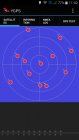
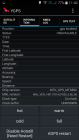
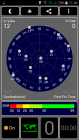
firstly you have wifi enabled, so you can´t test GPS properly and sadly, MTK GPS will not fully work in Europe.
Wifi is enable, and works fine, i read the original spanish forum, where nobody complained about gps. On the 4.2.2 gps works well in Europe.
i will share soon link here with all info about doogee dg350 so it will be easier to find everything, i just need to finish thread
Do I have to wipe cache? Because I am not able to do that.
I also have the problem with the GPS 50x already trying different ways to fix it, but still did not get any satellite.
Also in order engineer, in the mode location, the positon in que map shows me in Shezen!
My phone also don't find any location in KK widgets, transports apps using wifi … only in Google Maps app wifi location works! I have all the apps with permission enable to use phone location…
I lost my Doogee_DG350-d4u-senscamfix.zip file and no is not available for download anyhere… was the best rom until now, the Gps works great there, also the sound…
But the camera in this kitkat rom it's really great..
Hi, try to replace or create if not exist in system/etc to gps.conf for Europe, works for me.