
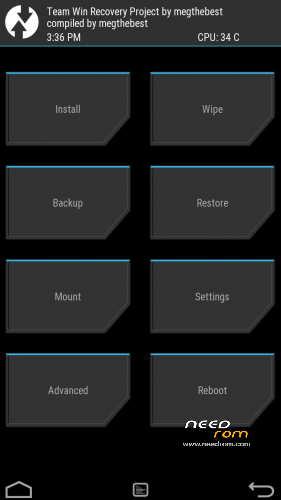
- Title: E04 Lite MT6753 TWRP
- Listed: January, 2016
- Last modified: 01/23/2016 11:46 pm
- Version: TWRP 2.8.7 by megthebest
You must be logged for ROM download.
18183 total views, 2 today
6 Total favorites
 Member Info
DESCRIPTION
Download and Install correctly Mediatek Preloader drivers
( Take care on Windows 8.1/10 drivers, you need to disable driver signature before install:
https://www.youtube.com/watch?v=50pD0mONm44
http://laurentiumihet.ro/technology/windows-10-mtk-vcom-usb-drivers-for-32-64-bit-drivers-installation-tutorial/
https://thebroodle.com/microsoft/windows/install-mediatek-mt65xx-usb-vcom-drivers-windows-8-8-1/ )
1- With flashtool load MT6753_Android_Scatter TWRP.txt
2- Select download and connect smartphone to pc (smartphone must be powered off)… in few seconds will start the process and the new TWRP will be flashed.
To restore original stock recovery, you need load ad point 1 the file MT6753_Android_Scatter.txt
P.P.S to enter in the recovery, power off the smartphone, push VOL + and Power at the same time, you will see three words with VOL + you move selection, with VOL – you must select Recovery
To have root flash with TWRP the archive supersu.zip found here: https://download.chainfire.eu/696/supersu/
Consider donate if i help you!
And please rate me 5 stars
※Please make a backup of your device before installing or updating ROM
Please! Will THERE BE CUSTOM FIRMWARE FOR ECOO E04 MT6753???!!!
Not yet
Thank you so much ! This was very easy ! #gotroot
I install the recovery without problems but when you update the app from sdcard file abort operationg link I have to wipe cache ? before I intalarlo ? You do root with another file ? sorry for my English is by googlem
my
Hello. I've installed twrp, but in the beggining i've chosee something to not change partitions and after some time rom ha reinstalled stock recovery. The second time I reinstalled TWRP, it didn't ask me about that option to reformat partition. What now? How can I have TWRP permanently? Thanks.
I can not install the recovery for some reason. It always shows an error – Obtain DRAM failed. And something regarding File Size not matching. Any idea how to fix this?
Worked like a charm on my Ecoo Aurora E04 3GB MTK6753 (known as ecoo e04+) on Android 5.1 (20151010 version)
Thank you very much, you're the best
Братишка,это ахуенна!
Thank You!