
- Title: E5573Cs-322 Huawei Unlock Done!
- Listed: May, 2017
- Last modified: 05/13/2017 1:32 pm
- Version: N/A
You must be logged for ROM download.
31915 total views, 2 today
 Member Info
DESCRIPTION
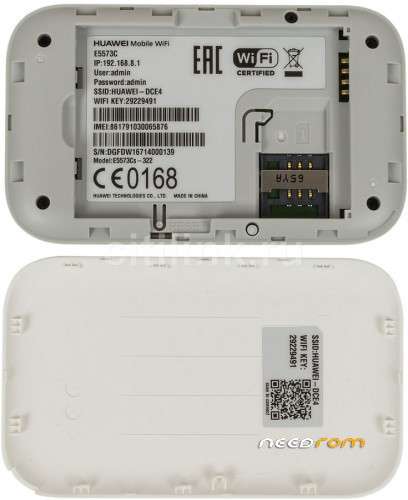
1. Download the E5573cs-322 USB loader file
2. Dismantle or unscrew the device.
3. Let the battery inside the device and switch off the router.
4. Connect USB cable to router.
5. Touch the boot pin and ground of the board from any metal / wire as shown in above image.
6. From the other hand, insert USB cable another end to PC.
7. It will produce a sound and you will see something is installing on your device.
8. Remove the metal / wire from the board.
9. Now download Balong tool.
10. Install the latest “Huawei mobile partner“ on your computer.
11. Run Balong tool.
12. Click “Detect” button. It will show COM Port with “BOOT_3G”.
13. Locate the “Loader” file which you have got in the email.
14. Click on “Load”.15. Once progress bar reaches the end, you will again notice something is installing on your PC.
Note: You can check in COM ports, you will see two Huawei ports.
16. Close the USB Balong tool now.
17. Now download E5573cs-322 firmware version 21.318.99.03.00.
18. Run the Exe file and update your device.
※Please make a backup of your device before installing or updating ROM
Dear All,
after unlocking of Zong E5573cs-322 i am facing these issues.
1- Ufone 2G and 3G Both are not working, on Ufone Sim home page comes with error "No Service".
2- Telenor 4G not working.
3- on Telenor 3G network stuck after 5 to 7 Minutes.
4- on boot device became signal less on reboot device shows green light or signal.
5- Zong 3G and 4G working but after some time like 15 to 20 minutes network stuck and became red light.
6- Mobilink 3G working same issue # 5.
7- Warid Lte some time works and some time called "No Service"
8- 2G of any network not working.
is there any solution.
(Fw Versions: 21.318.03.00.00 & 21.318.09.00.00)
i tried both verions but same issues on different devices.
100% agreed with you brother
please provide me usbloader file of e5573cs-322.
mohsinhassan334@yahoo.com
is software se unlock nai hogi se link pe chk karo unlock ka tarika mene ye chk kiya ha unock ho jati ha
http://linkshrink.net/7CxI9Z yahan par solution ha
again share the link plz video deleted
my modem becomes dead after flashing firmware 21.318.03.00.00.please provide me solution and also updated usbloader file of e5573cs-322.
mohsinhassan334@yahoo.com
bad idea not working
To Unlock E5573cs-322 follow these procedure:
1) Simply Boot shot your mifi
2) Install Huawei Mobile Partner and restart your PC, if you cant find "HUAWEI MOBILE CONNECT 3G PC UI INTERFACE [BOOT_3G]" in your device manager or it has an exclamation sign.
3) Also run this registry entry file – BOS_Solution – if you get "Unknown USB Device (Device Failed Enumeration)" after boot shot in your device manager. Dont forget to restart after running that file also.
4)Now open Balong_USB_Downloader_1.0.1.10 to load this "uldr_oem-nck_e5573b" bin file.
5) After successful loading of bin file, run putty, and make sure you change connection type to serial then set the serial line to the com port of "FC – PC UI Interface". Then set Local Echo and Local Line Editing to "Force On" under Terminal. Then click OPEN. Putty will run and calculate your OEM Lock And NCK Lock Code.
6) Pop in any sim other than that of the locked network into the Mifi, which will prompt it to ask for unlock code.
7) Enter the NCK code calculated earlier. Your MIfi should now be unlocked.
FILES NEEDED :-
HUAWEI Stick UTPS-V200R003B015D11SP01C983( for win10) – Mobile Partner
Balong_USB_Downloader_1.0.1.10 – Balong Tool
uldr_oem-nck_e5573b.bin – Bin file
BOS_solution – Registry Entries File
putty-0.65-installer – Putty
o , I love it.
dont try this method. u will end up with a signaless/ network less modem. the balong tool will wipe ur NV data responsible for receiving network.
link is not working in download please share in other link
E5573cs-322 need test point
Does NOT work !
boot shot is break in my device can anybody help me where is 2nd point is boot shot