
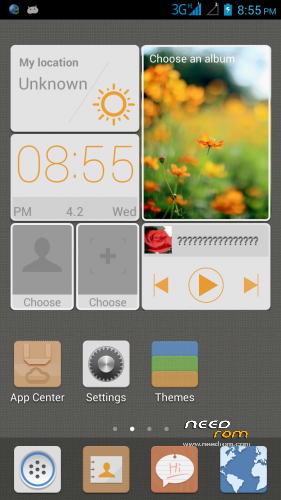
- Title: Emotion UI JMModded (CN)
- Listed: April, 2014
- Last modified: 04/02/2014 3:29 pm
- Version: Android 4.2.1
You must be logged for ROM download.
16987 total views, 2 today
 Member Info
DESCRIPTION
from user jpunkers request,here is EMOTION_UI ….CN base
original ROM from Eyealan,but a few modded from me…
CHANGELOG from eyealan:
Transplanted from G700 Dual Card EMUI, and features its own sound equipment, add original no headset radio.
Fix splash screen, flashlight and other issues. Add a compass, gyroscope support.
1 transplanted from Huawei G700 official EMUI, perfect dual card, worth MIUI, an independent desktop, many global theme.
(2) modify the kernel, improved equipment, repair splash screen, sound. Almost no BUG.
3 camera interpolation to 1300W, super-camera configuration, imaging, far more than 800W pixels. Reserved native camera (small footprint), for easy selection.
4 repair data flow, resolve to stay when WIFI connection "Obtaining IP in" In the BUG.
5 Increase compass function, increased radio without headphones.
6 Modify the switch machine animation Lenovo factory, streamlined out several unable to view the movie.
7 perfect solution cust partition is mounted, restart the phone does not restore the default settings.
8 Recommended Applications to streamline and upgrade to the highest version. Solve software conflicts FC.
9 Built RE Manager, XDA assistant ING markets. Recommended phone housekeeper, Baidu application, Baidu search, UC browser.
ADDED:
i didnt remember… :p
INSTRUCTIONS:
Download EMOTION_UI_JMModded and place it in root of sdcard.
Reboot to CWM/CT Recovery and do a full wipe
a)Wipe data/factory reset
b)Wipe cache partition
c)Formatsystem
d)wipe dalvik cache
Install zip from sdcard
Choose zip from sdcard>find and select EMOTION_UI_JMModded
Reboot system now
※Please make a backup of your device before installing or updating ROM
titanum backup>menu>preferences>backup folder location>detect>whole device>mark /storage/sdcardX/titanumbackup>use current folder
support 3G switch sim?
sorry i didnt remember….you can try it sir
Can i use gravitybox and xposed installer in this rom?