
- Title: Coolpad F1 MIUI 8297W multilanguage
- Listed: May, 2014
- Last modified: 06/25/2014 2:40 pm
- Version: ROM Android 4.2.2
You must be logged for ROM download.
58536 total views, 9 today
25 Total favorites
 Member Info
DESCRIPTION
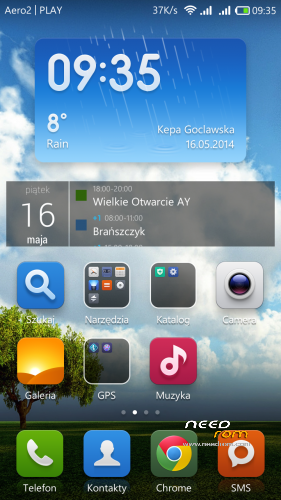
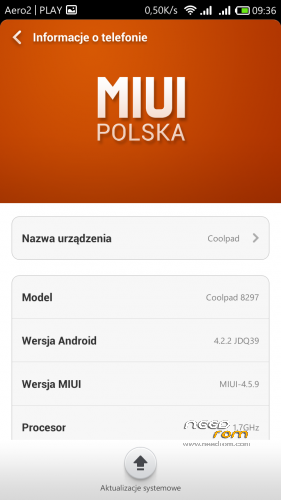
WCDMA ROM based on port for Coolpad F1 Dashen from miui.com. Changed modem data so it works also on international version of the phone.
Please do not repost this ROM on other hostings!
If you want your language included, PM me with link to MIUI translation repository.
To upgrade from earlier version simply "install from external sdcard" in CWM, do not make data / cache wipe!
v 0.5a:
- updated MIUI to 4.6.21
- added Hungarian language
v 0.5:
- MIUI updated to 4.6.16
- removed cyrlic letters from dialer
v 0.4a:
- removed MTKTweak that was limiting performance and battery life
- WSM Tools updated to 2.34
v 0.4:
- MIUI updated to 4.6.7
- Hongmi Camera / CP Camera selectable via Stock Settings
- libs updated to 081 stock rom version
- included MTKTweak
- several additional languages added. Now supports Brazilian-Portuguese, Bulgarian, Croatian, Czech, Danish, Finnish, French, Greek, Indonesian, Italian, Japanese, Lithuanian, Norwegian, Polish, Romanian, Russian, Slovak, Spanish, Swedish, Turkish, Ukrainian
v 0.3a:
- MIUI updated to 4.5.30
- different test camera APK that records FHD video in MP4
v 0.3:
- MIUI updated to 4.5.26
- added italian and greek language files
- GAPPS now included
- WSM Tools included
- improved camera video performance (from 4.5.26 by xs)
- should now work on both TD-SCDMA and WCDMA versions
- uses ad blocking hosts file from AdAway
v 0.2 spflash:
Version of ROM for SPFlash Tool / MTK Flash Tool. Includes root and CWM recovery. Could help people with stock rom v.21, that is particulary difficult to root.
v 0.2:
added support for additional 22 languages. Updated to MIUI 4.5.16.
keyboard is now included in rom, no need to flash separatley.
v 0.1:
Added support for polish language.
You have to flash additional keyboard for MIUI, as stock keyboard crashes.
Google Gapps not included – you have to flash it separately.
Tested on CWM, should also work on TWRP.
Supported languages: English, Chinese, Polish
※Please make a backup of your device before installing or updating ROM
video was better in 4.5.30 mp4 format , now it I have lags
Video recording sucks big time in v0.4,how can i go back to previus version v0.3a??????
All problems are because of MTKTweak – this does not work well with this ROM.
You can manually remove its apk file from /system/app folder, remove all files from /system root folder (apart from build.prop) and first three files from /system/etc/init.d then reboot.
Or you can wait for new version arount Monday/Tuesday next week.
You need to be careful and use ROOT explorer – make nandroid backup first.
Thank's emjot for your quick reply,we will wait until Monday Tuesday then!
I read in a greek forum that with Color 1.4 rom and official beta 029 http://www.7to.cn/androidrom/r.....omdetail/2871 both shoot 50fps video at 1080p ,is it possible we can get that kind of fps with your miui rom?
no german language?
Give me URL of German MIUI translation repository, I will then add it to this ROM with next version. I couldn't find one.
is this is safe to install it if i have now installed AOSP ROM V 1.0 by jonzalvo ???
and is this MIUI v 0.4a is installed normally by recovery or what ? I've never used a MIUI but I have problem with sound with my present ROM. Speaker plays sound more quiet than it should be.
i in this MIUI v 0.4a is everything working ?
EDIT: ok so I manage to install MIUI v 0.4a to my Coolpad F1 and I must say it's better looking and better performing so far
ANTUTU score improved but I must get used to this MIUI looks and options but problem with sound is gone and now it's play loau and clear
thanks @emjot1981 ♥
"- removed cyrlic letters from dialer" – still there
Hi, installed update as per instructions and it did not remove cyrlic letters from dialer ….cheers
Tell me what language version you are using. In Polish that I am using there are no Russian letters.
UK…….. English here.
romanian language
I have problem with opera mini.
After the installation from google play, at the first start, is appears a black screen with the message: "Unable to connect to the internet. Check your settings".
With the stock MIUI browser i m connected normaly.
I think the problem is about MIUI and java. I remember that i reed somewhere that opera mini is a java based application. Also some operations of the browser related to javascripts (like log in for some sites) are not working.