
- Title: Globe Rom 5.0.2
- Listed: September, 2017
- Last modified: 11/11/2017 1:15 am
- Version: globeROM v9 hermes 7.9.21 cfg
You must be logged for ROM download.
14975 total views, 1 today
14 Total favorites

 Member Info
DESCRIPTION
THANKS FOR Overall Rating
MiUI globeROM basic Features:
init.d Support for startup scripts
zipaligned APKs on every Boot
Battery Tweaks
Performance Tweaks
RAM Tweaks
Clean UI
Removed Chinese Apps
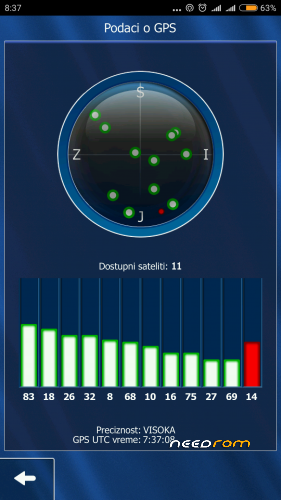
Faster GPS Fix for EUROPE
3-Way Reboot Menu (added Recovery and Bootloader)
CPU and Thermal Tweaks
Flash with TWRP
1. wipe dalvick cashe, cahe, system,Data, internal partition
2. Rebot to recovery
3.instal MIUI 8 globeROM_v8_hermes_7.6.8_cfg-ojgosop.zip from sd card
or MIUI 9 globeROM_v9_hermes_7.9.7_cfg-power-save.zip
or MIUI 9 globeROM_v9_hermes_7.9.14_cfg-aougs
after flash , rebot to system. Wait 10 minutes and then enjoy
4. Rom is roted android 5.0.2
5. Work all
6.Multilang
7.If you want another boot logo, install for twrp.
After install wipe cache and long cache.
this is recovery rom not fastboot rom
Changelog
Optimize GPS : Europe
Root Access : SuperSu
GovTuner Mod : Balanced
Install Dolby ATMOS
Install BeautyMod
Wipe Dalvik/ART Cache
Updated all apps to latest version
Everything at your own risk.
Please Overall Rating
※Please make a backup of your device before installing or updating ROM
Your link doesn’t work.
Work all normal.
Work all normal.
multi langure
1. wipe dalvick cashe, cahe, system, internal partition
Is it necessary to wipe “internal partitition”? thanks
1. wipe dalvick cashe, cahe, system, internal partition
2. Rebot to recovery
3 install rom.zip from sd card …
what's different between these two?
MIUI 9 globeROM_v9_hermes_7.9.7_cfg-power-save.zip
MIUI 9 globeROM_v9_hermes_7.9.14_cfg-aougs
MIUI 9 globeROM_v9_hermes_7.9.7_cfg-power-save.zip
is an older version, and in the kernel instead of a balanced energy saving.
And it is not routed, it must be routed afterwards.
MIUI 9 globeROM_v9_hermes_7.9.14_cfg-aougs
Here is a balanced powered kernel for better use of the phone and the latest apk with that date. I specifically propose this newer one, but I personally use it
GlobeROM v8 hermes 7.6.8 cfg-ojgosop because it has a Serbian language and there are no in this miui 9.
Thank you for your interest and I would like a review in your opinion.
Link Beauty mod
http://mi-globe.com/index.php/.....8;device=hermes
I have MIUI 9.1 GlobeRom 7.11.2 instaled on my redmi 2 note prime.
Is 7.9.21 version a newer than my 7.11.2?
MIUI 9.1 GlobeRom 7.11.2 = 02/11/2017
MIUI 9.1 GlobeRom 7.9.21 = 21/09/2017
no.
How to uninstall beauty mod? Thanks for the ROM it’s great! (I’m new here in needrom, can we change the rating? Sorry, I accidentally klik 2 star, and can’t change it)
I do not know how to get rid of the beaty mode, but how much I am the video is just flashing and you can see it in the picture I've just put here.
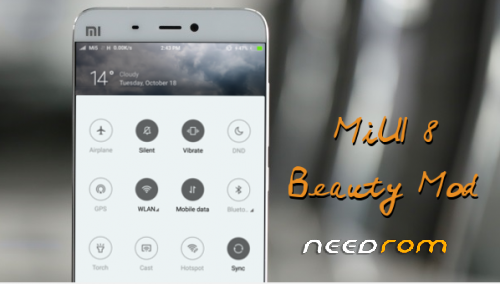
Have you ever looked down on your phone and thought that these Miui v8 colors for the statusbar and Toggles are really ugly? Well then our MiUI 8 “Beauty Mod” is the solution for you!
We have redesigned the Statusbar with beautyfull images which are actually changing depending on the current weather. We removed the ugly Searchbar as well! The toggles are displayed in an elegant static grey.
Tim wrote:
Hi! How I can uninstall your beauty mod?
replace miuisystemui.apk and framework-ext-res.apk with original from your rom or install your rom again.
Have you ever looked down on your phone and thought that these Miui v8 colors for the statusbar and Toggles are really ugly? Well then our MiUI 8 “Beauty Mod” is the solution for you!
We have redesigned the Statusbar with beautyfull images which are actually changing depending on the current weather. We removed the ugly Searchbar as well! The toggles are displayed in an elegant static grey.
Tim wrote:
Hi! How I can uninstall your beauty mod?
replace miuisystemui.apk and framework-ext-res.apk with original from your rom or install your rom again.
Getting ERROR 7 with globeROM_v9_hermes_7.11.9_cfg-vgaujos ….
Flash with TWRP
1. wipe dalvick cashe, cahe, system, Data , internal partition
2. Rebot to recovery
3. Instal zip from sd card ….