
- Title: GT-I9500
- Listed: January, 2014
- Last modified: 01/16/2014 3:09 pm
- Version: I9500XXUAMDK- JDQ39.XXUAMDK
You must be logged for ROM download.
69259 total views, 2 today
183 Total favorites

 Member Info
DESCRIPTION
Hardware : MT6589 (UNIVERSAL5410(exynos5) is Fake!)
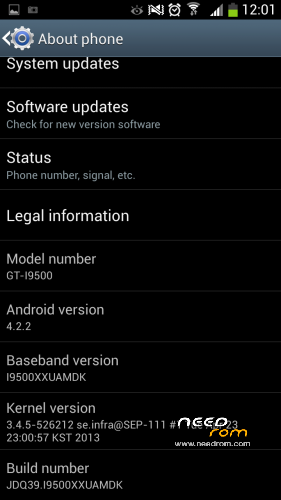
Model : GT-I9500
Build number : JDQ39.I9500XXUAMDK
Build date UTC : 20131122-050656
Android v : 4.2.2
Baseband v: MOLY.WR8.W1248.MD.WG.MP.V7.P11, 2013/05/28 20:28
Kernel v : 3.4.5 (bz@ubuntu) (gcc version 4.6.x-google 20120106 (prerelease) (GCC) ) #1 SMP Fri Nov 22 13:04:18 CST 2013
Uboot build v : —–
LCD Driver IC : 0-lg4591_dsi
This ROM is fully compatible with other Kernel versions. Example
3.4.5-526212 se.infra@Sep-111#1 Tue Apr 23:00:53 KST 2013
GT-I9500
1.2 GHz QUAD CORE with 1 GB RAM and 4 GB FLASH.
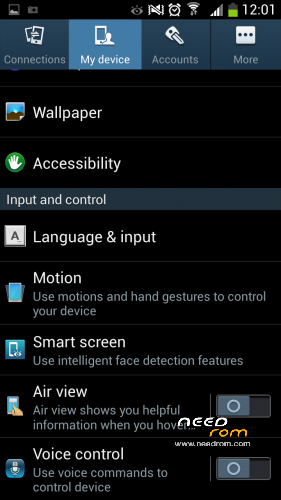
with Air Gestures and Smart Pause, Smart Scroll working.
With Samsung Boot Logo and Samsung Boot Animation.
Install ROM:
- Unpack FlashTools, and Click on Flash_tool.exe
- Select a the MT6589_Android_scatter_emmc.txt in MAIN FOLDER
- Wait file to be added into Flash Tool
- choose Option->USB Model,click USB Model
–> Choose Option->DA DownLoad All->Speed->High Speed, click High Speed
- Turn off your phone, remove the battery.
- "Press F9 (hit Download button)" OR " if upgrade ROM Firmware->Upgrade "
- and connect your phone into the computer via USB data cable.
- The process will start and a red progress bar will appear after color purple, yellow.
- And green (O) circles display
- Finish !
- You can now safely disconnect your phone and turn it on.
"Please, reply if you have any difficulties to install this ROM."
※Please make a backup of your device before installing or updating ROM
Wich Spmdt to change lcd driver for this rom ? i get a white screen
where flash tool? i mean where to download
Google it as "SP FLASH TOOL"
SEARCH ON GOOGLE AND TYPE "SP FLASH TOOL"
forum.xda-developers.com/showpost.php?p=49597819&postcount=922
Good Rom, however, the wi-fi and 3G connect, unless I turn them on and have no way to customize the home screen.
Wi Fi and 3G turned on, unless I turn them on.
Hi, i got the same phone, so i wanna ask :
Did the ROM have problem with Google Play Services? (just like mine)
Dide the ROM have problem with Add Account feature? (just like mine)
Google Play Services required to saving game on several games.
Thx for attention.
(sorry for the bad english)
No!! this Rom is successfully tested by me and it didn't have any problem with google play services but first u have to download/update google play service, it should be update automatically. u have to just turn on ur data connection or WIFI.
NO! I UPLOAD THIS ROM FROM A FRESH (NEW) PHONE AND IT HAVE'NT ANY PROBLEM U THAT U MENTIONED HERE
Selam alejkum brother shanu..i have a chinese s4 i 9500 mt6589..i flashed this rom but camera dont work and air view so, and imei is invalid but this i will fix with mtk drooid tools inshAllah..please tell me what to do inshaAllah or upload for me that rom i need..jazakaAllahu kjahran brother..
WALEIKUM AS SALAM, INSHALLAH I WILL UPLOAD A ROM FOR U BUT PLEASE LET ME KNOW ABOUT UR PHONE WELL…
my brother got a Clon of the S4, but this have not android… can i install this rom ?
WHICH MODEL UR BROTHER HAVE??
how this install rom can send in my memory card rom and go to boot wipe calche dalvik and install from memory card? or just flash tool install ?
U CAN FLASH THIS ROM WITH SP FLASH TOOLS THAT U CAN EASILY GET FROM GOOGLE.
hmm i have samsung s4 clone but my tab in blue light tab down and i have 1gb internal memory i can install rom?
LET ME KNOW ABOUT MODEL OF UR PHONE
Do all procedures.
Unpack FlashTools, and Click on Flash_tool.exe
- Select a MT6589_Android_scatter_emmc.txt in the MAIN FOLDER
- Wait file to be added into Flash Tool
- Choose Option-> USB Model, click USB Model
-> Choose Option-> DA All Downloads-> Speed-> High Speed, High Speed click
- Turn off your phone, remove the battery.
- "Press F9 (hit Download button)" OR "if-ROM Firmware Upgrade> Upgrade"
- And connect your phone into the computer via USB data cable.
but not loads, remains at 0%.
what´s missing?
Hi did you get a solution? I have same problem. mtk driver is right connected but I can´t use flash tool line is always red
I THINK U DONT HAVE ACTUAL DRIVERS INSTALLED FOR UR PHONE…
yes. is a small detail that does not speak here.
Write the procedure normally.
- Select a MT6589_Android_scatter_emmc.txt in the MAIN FOLDER
- Wait file to be added into Flash Tool
- Choose Option-> USB Model, click USB Model
-> Choose Option-> DA All Downloads-> Speed-> High Speed, High Speed click
- Turn off your phone, remove the battery.
- "Press F9 (hit Download button)" OR "if-ROM Firmware Upgrade> Upgrade"
Here the detail:
Plug the USB into the phone "NO BATTERY" and after that put the battery.
now yes it will start the process.
Sorry my english.