
- Title: HOW TO EXIT DEMO MODE ON OPPO PHONES
- Listed: July, 2025
- Last modified: 07/11/2025 4:30 pm
- Version: ANDROID
You must be logged for ROM download.
7173 total views, 7 today
 Member Info
DESCRIPTION
OPPO DEMO CODE & PASSWORD
NO PC & TOOL REQUIRED (2025)
If you're working on OPPO phones for demo mode exit, engineering testing, or unlocking features like FRP/UserLock – this is your go-to list. These demo codes are tested and widely used by mobile technicians, repair shops, and software engineers.
Each OPPO model may have one or more demo codes. Some codes differ based on regions or variants (like CPH numbers), so make sure to match your model accurately.
Getting Out of Demo Mode on OPPO Phones – Made Simple
If your OPPO phone is stuck in Demo Mode (commonly used for showroom displays), you’ll need to disable it before you can use the phone like normal. Here's how:
Method 1: Using the Demo Code (For Listed Models)
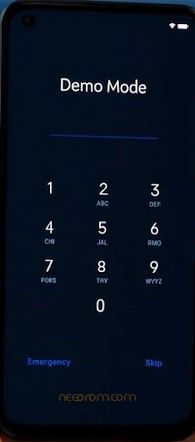
- Power on the phone – Open Demo Mode.
- Check your phone’s model number (on the box, back panel, or under About Phone).
- Look up the demo code for your model (A12 uses 676538).
- Enter this code on the lock screen or password prompt.
- If accepted, the phone will unlock.
-
Head to:
Settings > Additional Settings > Developer Options (or Special Features) - Turn OFF anything related to Demo Mode.
- Restart the phone — it should now behave like a brand-new device.
Method 2: Erase via "Find My Device"
Works even when:
- Password doesn't work
- Demo Mode blocks manual reset
- You see errors like “Factory reset is disabled in demo mode”
Steps:
- Use another phone or laptop.
- Go to ► Find My Device
- Log in with the same Google account that’s on your OPPO phone.
- Once your device shows up, select Erase Device and confirm.
- The phone will reset remotely, wiping Demo Mode.
- After reboot, you’re ready to set it up like new.
Thank and donate…
File Free
※Please make a backup of your device before installing or updating ROM

|