
- Title: HTH ND AIO TOOL V2.7.0
- Listed: October, 2024
- Last modified: 10/14/2024 8:26 pm
- Version: IOS
You must be logged for ROM download.
8263 total views, 11 today
5 Total favorites
 Member Info
DESCRIPTION
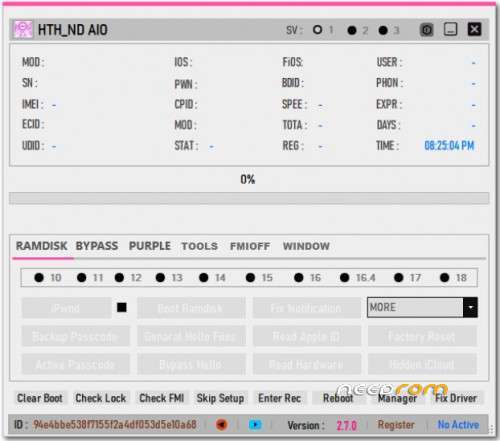
 HTH ND AIO TOOL V2.7.0
Features of HTH ND AIO TOOL
Ramdisk:
IPWND
BOOT Ramdisk
Backup passcode
Active Passcode
General Hello Files
Bypass Hello
Fix Notification(.sisv)
Read Apple ID
Read Hardware
Block/Enable OTA-R (This function only supports iOS 12 and above)
Remove restriction (You need IPWND & Boot ramdisk before removing restriction !!!)
Block Reset/Update (This function only supports iOS 12 and above)
Factory Reset
Hidden iCloud
Helper guide
+ Serial bypass Hello: F4KK9WWGF196
+ Bypass Passcode full signal (iOS 11.x – 17.x)
+ Bypass Hello without signal (iOS 12.x – 17.x)
+ Hide iCloud, remove restriction (screen time), read hardware info,
+ AppleID Finder, Fix iServices, Block OTA update and Reset, Factory reset device, …
+ iOS supported : A7-A11 devices: 11.x – 17.x
+ Model supported : 6-X, Mini4, Air2, Gen5,6,7,Pro 9.7, Pro10.5, Pro12.9, Pro2 12.9
A) Bypass Passcode – Ramdisk mode:
-> Backup Activation : Put device to Recovery mode > PwnDFU > Boot RD > Backup Passcode
-> Factory Reset
-> Restore Activation : Put device to Recovery mode > PwnDFU > Boot RD > ReActive Passcode
Note:
- When boot ramdisk, you need to choose the correct boot for the device's iOS.
- Put the device to Recovery mode to tool read the device's iOS
- The device has iOS version 11.x, if boot 11 fails, you can try with boot 12 or 10
B) Bypass Passcode – Jailbreak mode :
1- Use CheckRa1n to Jailbreak device (https://checkra.in)
2- Backup Activation: Backup Passcode
3- Earse All Data (Factory Reset)
4- Restore Activation: ReActive Passcode
C) Bypass Hello without signal (sim not working)- Ramdisk mode: support A8 – A11 devices
1- General Hello Files
2- Bypass Hello: Put device to Recovery mode > PwnDFU > Boot RD > Bypass Hello
- IMPORTANT When booting ramdisk, you need to choose the correct boot for the device's iOS.
- Put the device to Recovery mode so the tool will auto-read the device's iOS
Also read :007 Ramdisk V6.6.0.0 Free Tool (LifeTime) -2023
E) Bypass Hello without signal (sim not working)- Jailbreak mode: support A7 – A11 devices
1- Use this Tool or other tools to jailbreak (CheckRa1n, WinRa1n, …)
2- Bypass Hello
- Bypass Hello 12-17 function : support A8 to A11 devices, iOS 12.x to 17.x
F) Read iCloud/Telephone – Ramdisk mode :
– Put device to Recovery mode -> PwnDFU -> Boot RD -> Read iCloud/iPhone
G) Read iCloud/Telephone – jailbreak mode :
- jailbreak device -> Read iCloud/iPhone
H) Hidden iCloud – Ramdisk mode :
- Put device to Recovery mode -> PwnDFU -> Boot RD -> Hidden iCloud
Also read :RomFw Tool Version 28.07.23 Free Update
I) Hidden iCloud – jailbreak mode :
- jailbreak device -> Hidden iCloud
K) Read HardWare – Ramdisk mode :
- Put device to Recovery mode -> PwnDFU -> Boot RD -> Read Hardware
L) Read HardWare – Jailbreak mode :
– Jailbreak device -> Read Hardware
iOS Version:
10
11
12
13
14
15
16
16.4
17
Bypass Functions:
Jailbreak iOS 15 – 17
Backup passcode
Active passcode
Winra1n 2.1
Erase All Data
Bypass Hello 12- 17
Remove Restriction in Hello mode
Hidden iCloud
Read Hardware
Hello Signal bypass
Block or Enable OTA Update and Reset
Fix iService 2
Fix Still Signal
Read iCloud/Phone
Bypass Hello 12 -14
FMI OFF
FMI OFF – OPEN MENU (New)
Method AppleID, Pet Token
Clear Apple ID
Clear Pet Token
Clear ALL
Jailbreak 12 – 14
Jailbreak 15 – 17
Read Apple ID
Remove Restrictions
Download ElcomSoft
Extra:
Clear Boot
Check Lock
Check FMI
Skip Setup
Enter Rec
Reboot
Manager
Fix Driver
Changelog!
►Add Check FMI free
►Fix Notification (Passcode Backup not full)
►Fix some error
►Incluye driver dentro del programa
►Compatible en sistemas W7, 8, 10, 11 de x86bit & x64bit respectivamente
THANK AND DONATE…
FILE FREE
※Please make a backup of your device before installing or updating ROM
link pls
disable Adblock amigo and it will show up.
ecid not registered error