
- Title: HUAWEI U9508
- Listed: January, 2013
- Last modified: 01/23/2013 6:28 pm
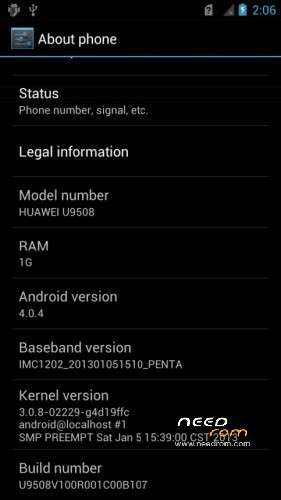
- Version: ROM Android 4.0.4
You must be logged for ROM download.
21718 total views, 1 today
13 Total favorites
 Member Info
DESCRIPTION
ROM mobile HUAWEI U9508 Android 4.0.4 U9508V100R001C00B107
Rom Official of Huawei
ROM install :
Step 1. A MICRO SD card of 2GB or more should be available. The MICRO SD card made by Sandisk, Kingstone, or Kingmax is recommended.
Step 2. Format the MICRO SD card (This operation is optional).
Step 3. Make sure that there is an UPDATE.APP under the dload. Copy the Main package of dload in PC to dload of SD card.
Step 4. Make sure your handset is power off. Insert the MICRO SD card into the handset. Pressing the
VOLUME UP key and VOLUME DOWN key, then press the POWER key to power on the phone, and VOLUME UP key and VOLUME DOWN key should be pressed more than 3 seconds, then enter the Software Upgrade Mode.
※Please make a backup of your device before installing or updating ROM
This rom, are original rom ? from huawei ?
yes
One stupid question, how can i place a shortcut on the desktop?
I can place only shortcut for the Settings , but i would like to place a shortcut for an xls file.
I've heard that this is the best rom for the battery life(i have about 3,5h screen time, and 2 days standby time). Could you recommend a rom in that i have a littlebit more free hand in setting, but everything works fine, and doesn't cut down the standby time?
Thanks!
this rom run in huawei honor 2 latino
ممكن اعرف الحل لكيفية او الوسيله لتركيب الروم هل في برنامج اودن او برنامج اخر لاجهزة هواوي لان برنامج اودن لا يقرء حهازي الهواوي