
- Title: Volume HDC Note 3 Max Ir Remote
- Listed: January, 2015
- Last modified: 01/09/2015 2:16 pm
- Version: MTK6589 Note 3 IR Remote
You must be logged for ROM download.
15817 total views, 1 today
1 Total favorites
 Member Info
DESCRIPTION
Attention – Read Carrefully !
We all know that our phone HDC N9006 Max IR Remote MTK6589 1.2Ghz has a problem with the low volume on the Earspeaker piece and Loudspeaker Set…
This tutorial will help you increase the Volume, make it more Loud and Clear Volume Earspeaker and also Loud Speaker Sound
I´m sharing this values for those guys that want to have better sound in their N9006 Max :
Attention : This method may work also for other Phones, test it at your own risk ! If it does work for other Phones also, please let me know in the comment section.
Thank you
You Need to Have Root Acces to the Device !
The tweaking Value's Would be the following :
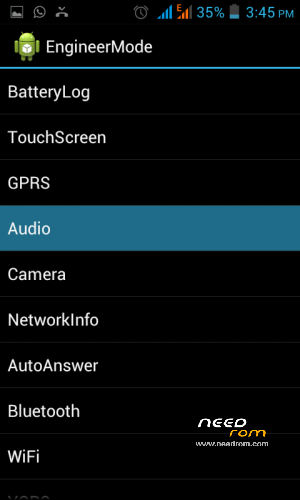
Enter with MobileUncle Tools into Engineer Mode ( MTK ) – Hardware Testing – Audio and change this :
Normal Mode
Type – Sip
Max Volume Box 0-160 Insert 160 – Set – Press OK
Type – Sph
Level 0 – 50 – Set – Press OK
Level 1 – 74 – Set – Press OK
Level 2 – 88 – Set – Press OK
Level 3 – 100 – Set – Press OK
Level 4 – 120 – Set – Press OK
Level 5 – 140 – Set – Press OK
Level 6 – 160 – Set – Press OK
Type – Sph2
Level 0 – 50 – Set – Press OK
Level 1 – 74 – Set – Press OK
Level 2 – 88 – Set – Press OK
Level 3 – 100 – Set – Press OK
Level 4 – 120 – Set – Press OK
Level 5 – 140 – Set – Press OK
Level 6 – 160 – Set – Press OK
Go back to Audio – Loudspeaker Mode
Type – Ring
Level 0 – 112 – Set – Press OK
Level 1 – 136 – Set – Press OK
Level 2 – 160 – Set – Press OK
Level 3 – 184 – Set – Press OK
Level 4 – 208 – Set – Press OK
Level 5 – 232 – Set – Press OK
Level 6 – 255 – Set – Press OK
Type – Sph
Level 0 – 40 – Set – Press OK
Level 1 – 80 – Set – Press OK
Level 2 – 100 – Set – Press OK
Level 3 – 116 – Set – Press OK
Level 4 – 128 – Set – Press OK
Level 5 – 144 – Set – Press OK
Level 6 – 160 – Set – Press OK
Type – Sph2
Level 0 – 40 – Set – Press OK
Level 1 – 80 – Set – Press OK
Level 2 – 100 – Set – Press OK
Level 3 – 116 – Set – Press OK
Level 4 – 128 – Set – Press OK
Level 5 – 144 – Set – Press OK
Level 6 – 160 – Set – Press OK
Max Volume Box insert 160 – Set – Press Ok
Go back to Audio – Headset_LoudSpeaker Mode
Type – Ring
Level 0 – 112 – Set – Press OK
Level 1 – 136 – Set – Press OK
Level 2 – 160 – Set – Press OK
Level 3 – 184 – Set – Press OK
Level 4 – 208 – Set – Press OK
Level 5 – 232 – Set – Press OK
Level 6 – 255 – Set – Press OK
Max Headset Box Vol 0-160 – Insert 160 – Press Set – Ok
Max Speaker Box Vol 0-160 – Insert 160 – Press Set – Ok
Reboot Your Phone
Hope this will help your Max giving a better sound, this has worked for my N9006 Max, now is a little bit louder when i listen music and also when i talk in a phone call.
※Please make a backup of your device before installing or updating ROM
Hi , may i know where is the download link ?
This is a tutorial, there is no download link.