
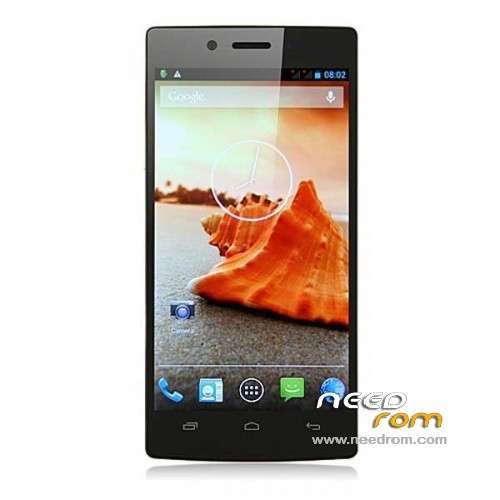
- Title: iOCEAN X7 Elite
- Listed: July, 2013
- Last modified: 07/13/2013 1:20 pm
- Version: ROM Android 4.2.1
You must be logged for ROM download.
34794 total views, 3 today
1 Total favorites
 Member Info
DESCRIPTION
ROM Mobile iOCEAN X7 Elite – ROM Android 4.2.1
Update Official iOCEAN X7 Elite Version: X7_3.0_13_ 20130705-174504
1, system optimization
ROM Install Just For Update : with Flashtool (you download file iOCEAN X7 Elite FL )
Unpack FlashTools, and Click on Flash_tool.exe
Select a the MT6589_Android_scatter_emmc.txt in ROM
Turn off your phone, remove the battery.
Press F9 (or hit Download button) and connect your phone into the computer via USB data cable.
The process will start and a red progress bar will appear after color purple, yellow.
And green circles display
Finish !
You can now safely disconnect your phone and turn it on.
or
ROM Install : with update on sd card (you download file iOCEAN X7 Elite SD )
Card brush, set the software package two files into the T card root directory, as shown below:
(1) upgrade package: update.zip
(2) AAAAB3NzaC1kc3MAAACBANLc2NCufBz0lBUupztiXI7rUnhY3bOojTMmGD0SR68e8kK00EM5n0ghfpaDxayZD.zip Folder
- Enter the interface as shown below, click on the system upgrade interface shown in the figure appears, click on the down arrow to the right, appearing in interface begins upgrade
————————————————————————————————————————————————————
Official ROM iOCEAN X7 Elite Version: X7_322_3.0 20130618-205117
Gapps include – No Rooted
Language support: Multilang
Install ROM :
- Unpack FlashTools, and Click on Flash_tool.exe
- Select a the MT6589_Android_scatter_emmc.txt in ROM
- Wait file to be added into Flash Tool
- choose Option->USB Model,click USB Model
–> Choose Option->DA DownLoad All->Speed->High Speed, click High Speed
- Turn off your phone, remove the battery.
- "Press F9 (hit Download button)" OR " if upgrade ROM Firmware->Upgrade "
- and connect your phone into the computer via USB data cable.
- The process will start and a red progress bar will appear after color purple, yellow.
- And green circles display
- Finish !
- You can now safely disconnect your phone and turn it on.
※Please make a backup of your device before installing or updating ROM
Gets an error message "MT 89_V9 … ro.board.platform."
I recovered in CWM 6.0.3.0 with this image. Even very chinese, after language selection it works fast and fine. But GPS is still NOT working on my iOcean Elite, even with hardware antenna fix, correction of gps.conf, adjusting the developer options and installing newest gapps. Everything is amazing, camera is working. But no GPS. For any hint I am very thankful! Regards, Uthruban
Therte is a new stock software dated 20130618
Hey,
Really hoping someone can help me. Trying to flash the stock rom back onto my iOcean (want to go back to stock after installing a custom rom) but the FlashTools method doesn't seem to work for me so I'm trying the SD card update method. I can locate the Update.zip file no problems but the AAAAB3NzaC1kc3MAAACBANLc2NCufBz0lBUupztiXI7rUnhY3bOojTMmGD0SR68e8kK00EM5n0ghfpaDxayZD.zip isn't in the downloaded .rar file?
I can't work out how to flash this rom? Any help is greatly appreciated! Thanks in advance
This is my method:
I downloaded MobileUncle MTK Tools (https://play.google.com/store/.....leuncle.toolbox). Then I have downloaded the recory.img (http://forum.xda-developers.co.....38;d=1375185557) & the rom (the rom from this topic).
My elite edition of Iocean doesn't recognize the additional 25 gigs anymore. In a post made earlier about this problem, the user mentioned something about reformatting the card. I couldn't find anything on Google about this problem. The additional storage is also not recognized as a sd card.
Got my elite (32 Go ROM 2Go RAM) bricked as soon as i tried flashing some recovery.img and rooting.
I lost sim card recognition and imei number. Flashing the stock rom was a bit long (difficulties with the drivers) but it finally unbricked the phone!!
Same as Jorisbelier my phone listed only 1,5 Go storage, but reformating internal data (factory reset from the phone settings, not from recovery) did grant me back the 30 Go.
Thanks a lot for the ROM!
Hello, I just got the phone iocean X7 elite, the phone is working properly, I install the App through Wi.Fi. but connecting it to the PC is not detected even after installing the drivers as you can see from the attached picture.
how can I fix it??
thanks