
- Title: Jiayu G3 Canvas JB 4.2 Emir
- Listed: October, 2014
- Last modified: 12/02/2014 4:54 am
- Version: 4.2.2
You must be logged for ROM download.
34648 total views, N/A today
 Member Info
DESCRIPTION
This is the best ASOP 4.2 ROM as of yet! If you have tried my previous ROM, Jiayu G3 4.2 Emir, https://www.needrom.com/download/jiayu-g3-jb-4-2-emir/, and liked it, you should absolutely give this one a try !!
It has been edited thoroughly, removing most, if not all bugs from the original moder of this ported Zopo ROM. Thx to Haiduong to have customised it this way & to FlickAir for bringing this.
I have odexed the ROM completely with the latest odexing script, promising better speed, operations and power usage. Boot time takes around 20 seconds. Battery life is excellent.
- Contain only usefull apps, customised.
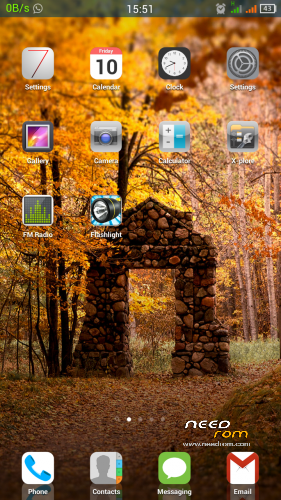
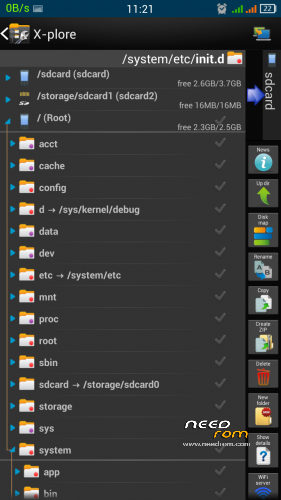
- Loopysmoothness, tweaked for Opera Mini, Xplore, Xperia keyboard, iOS7 launcher, iQuran and usual system processes
- KickAssKernerliser for better memory management and battery life
- 250Mhz frequency when charging and when phone is on standby even with hog resource apps running
- Updated build.prop for better system management
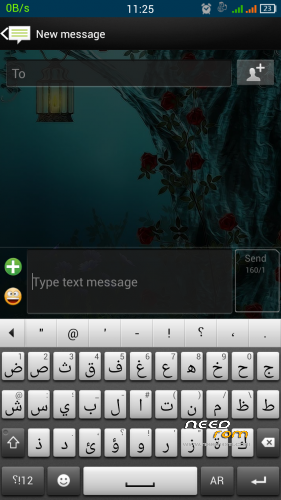
- Xperia keyborad with dozen language libs, iOS7 launcher, Xposed, Xui, GravityBox
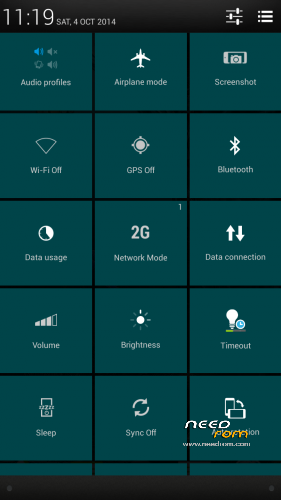
- Middle clock, colored status bar, fancy tiles & Xperia animations/transitions
- Jiayu boot logo and Google Nexus boot animation with support for multiple OS boots
- Bravia Engine v3 (optional), smoother operations, movies, image viewing
INSTALLATION PROCEDURE
1. Flash JiayuG3_Canvas_Emir.zip
2. Flash Updated UpgradePackage_Emir.zip
3. Flash BraviaEngine_Emir.zip (optional)
4. Boot system
* NOTE (A): Flashing process will wipe your /data and /system partitions. So make necessary backups of contacts, sms etc
* NOTE (B): See update
————————————————————-
17 OCT 2014 UPDATE : Snappier system
- Flash Updated UpgradePackage
- Flash Bravia Engine again after flashing Updated UpgradePackage (if you are using Bravia Engine)
————————————————————-
SOME MORE ABOUT MY ROM
- Logs: sqlite, zipalign, init.d test and kernel tweaks are logged in root of /data partition
- Boost: if your system lags after some time (your RAM keeps decreasing), no need to reboot, adrenaline boost your device
Open terminal
Type: su
(enter) boost
————————————————————-
01 DEC 2013 UPDATED FINAL UPDATE : Even better
- Updated build.prop & init.d tweaks
- Edited boot.img (kennel) for faster, lighter, smoother experience and better internet. I corrected some codings, disabled log, changed DNS, hosts and some more
- Changed TCP congestion to westwood for faster internet and some more kernel values.
facebook.com/rehaan.emir
facebook.com/savepalestinemilitarily
※Please make a backup of your device before installing or updating ROM
Walaikumsalam.
U mean BlackBerry messaging? From where you downloaded
Hi emiratiprince,
I also have problems with the sd-card. I installed the Rom 3 times, But the sd-card ist not accessible. It is Not a problem of the card. I tried several ones and in recovery it is accessible, but not after normal boot. Do you have an idea?
Dear Emiratiprince,
I have the same problem with SD card as HoGe-n & corwin The SD card is fine it is visible in recovery. Please help. Everything else is working fine and smooth and I realy enjoy Your rom but this SD thing is ruining it.
Try
Setting – Storage – Mount SD Card
Mount SD Card dont work.
What I also noticed that I need to take out batery wen I turn off or reboot with power buton to turn on again. Otherwise it wont start just shuts down.
Turn off takes a couple of seconds. Be patient. Phone will vibrate after turning off. What I suggest you do for solving the problems you encountered:
1. Make sure QUICK BOOT IS NOT TICKED (settings -accessibility- quick boot)
2. Clear settings’ data ( settings-apps-all-settings-wipe data)
3. Delete emir_super (use a root file manager and browse to system-etc-init.d)
But tell me first are you using G3 or G3N
I can confirm ryc_erz's observation. After shut down there is no vibration signal even after minutes and any reboot requires to take aout the battery before.
The sd card ist also dead and sometimes there is a message after boot like: system UI stopped.
I have a G3.
Maybe the info will help to sort out the root cause.
@emirati
I have G3N and I did use G3 to G3N patch.
I' ve tried all 3 points that you wrote. Nothing changed.
I am patient. Even after vibrate I can not turn on. Reboot does not work either.
I found a procedure for SDcard on android 4.2.2 trouble, link below:
http://www.dobreprogramy.pl/De.....rzna,55447.html
It is in polish but last screen shows mod in vold.fstab. When I applied it I could see my sdcard via file explorer but now I have msg "process com.google.process.gapps unfortunately stoped" and google play wont work even after undoing the change in vold.fstab . So the case is still open but maybe it will give you some direction.
Well, the screenshots differ from the actual ROM.. the statusbar (Image 3 in your list of images) is made of gray tiles and it's ugly.
Thank you Wrakor for your meaninglessly comment on my post concerning your sense of aesthete.
@ryc_erz I didn't answer to your comment
Lol
@wrakor
You can select any color for the tiles, go to, XUI app – notification – random colors
@ryc
I’m thinking about it and trying to figure out what’s happening. Understand that I don’t have this issue and it may be impossible to solve. However I’m working on it.
To resume, erz (G3N) has issue with switching on/off and SD card and cowin has also both issues with G3? Plz confirm. And tell me which recovery you used and its version
It's not the color only, it's the design.. It's really different from the ones in the image you show. Or am I the only one having this different statusbar? :S
cwm 5.5.0.4 jiayu g3n