
- Title: JIAYU G4HGW OFFICIAL
- Listed: October, 2013
- Last modified: 10/16/2013 2:14 pm
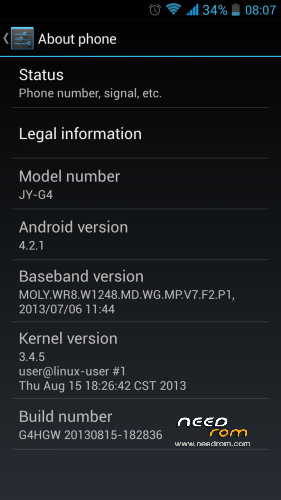
- Version: G4HGW 20130815-182836
You must be logged for ROM download.
26027 total views, 4 today
1 Total favorites

 Member Info
DESCRIPTION
ROM Mobile JIAYU G4HGW – ROM Android 4.2.1
Official JIAYU G4HGW: Version: G4HGW 20130815-182836
G4 Advanced Sofware
Install ROM :
ROM Install : with Flashtool (you download file JIAYU G4HGW )
Unpack FlashTools, and Click on Flash_tool.exe
Select a the MT6589_Android_scatter_emmc.txt in ROM
Turn off your phone, remove the battery.
Press F9 (or hit Download button) and connect your phone into the computer via USB data cable.
The process will start and a red progress bar will appear after color purple, yellow.
And green circles display
Finish !
You can now safely disconnect your phone and turn it on.
※Please make a backup of your device before installing or updating ROM
sorry but this rom that has launche? how can you set the screen like in the picture?
hello, you can get the patch to set the internal memory of the phone as a favorite instead of the external sd? thanks
I used this on my Jiayu G4 advanced (2gb/32gb) but the storage now only displays <2gb of space.
Do i need to format before flashing or have I done something wrong?
always do format phone storage after install any rom, to see the 28+GB space.
In my G4 advanced the touch's calibration is wrong and and I get error tryng to calibrate it.
it doesnt work, the download doesnt start. Can anybody help me?
it doesn't work. It can't find me the phone
Hello. Does this ROM support Bulgarian language? And is it appropriate for Jiayu G4 Basic(1GB RAM and 4GB ROM)?