
- Title: KEY TOOL V7.1
- Listed: April, 2025
- Last modified: 04/19/2025 8:34 pm
- Version: ANDROID
You must be logged for ROM download.
5926 total views, 1 today
1 Total favorites
 Member Info
DESCRIPTION
Key Tool V7.1
Is a compact application developed by someone for a complete login bypass. This program is now available free of charge and employs loader files to facilitate easy user login and access to its numerous features. A selection of these features is provided below for your consideration.
Features: Direct Unlock, Read Code, Change CSC, FRP, EmToken | Support for Vortex & FIH devices.
Full Changelog
Added Supported Read Code Devices:
- Azumi V5+
- BLU C5L
- BLU M8L
- DIGICEL DL3
- DIGICEL DL3PlusPro
- DIGICEL DL4
- Hisense E32 Pro
- Hisense E50 Lite
- Hisense U30
- Hisense U40
- Hisense U50
- Hisense U963
- Hurricane H61
- ITEL L5007S
- TECNO CG7
- TECNO KG5k
- TECNO RB6S
- TECNO RA8
- TECNO RC6
- TECNO SC7S
- WIKO W-V600
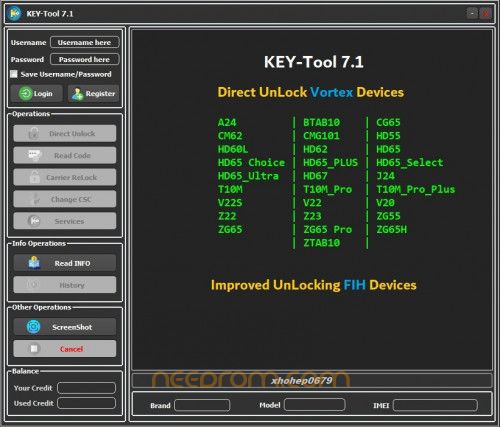
- Direct Unlock Vortex Devices
A24, BTAB10, CG65, CM62, CMG101
HD55, HD60L, HD62, HD65, HD65 Choice
HD65_PLUS, HD65_Select, HD65_Ultra, HD67
J24, T10M, T10M_Pro, T10M_Pro_Plus
V22S, V22, V20, Z22
- What’s New in KEY Tool 7.1
- Direct Unlock – New Vortex Devices
A24, BTAB10, CG65, CM62, CMG101
HD55, HD60L, HD62, HD65, HD65 Choice
HD65_PLUS, HD65_Select, HD65_Ultra, HD67
J24, T10M, T10M_Pro, T10M_Pro_Plus
V22S, V22, V20, Z22, Z23
ZG55, ZG65, ZG65 Pro, ZG65H, ZTAB10
- Improved Unlocking – FIH Devices
- KEY Tool 7.0
- Added Supported Read Code
- New Samsung Services
- Direct Unlock (MTK BRom)
- Direct Unlock (MTK ISP)
Notes:
MTK BRom: Works for Ask Code & TracFone Devices (requires manual BROM mode)
MTK ISP: Requires raw image format files (nvdata.img, nvram.img, protect1.img, protect2.img)
Supported Samsung TracFone Models:
- SM-S127DL, SM-S136DL, SM-S215DL, SM-S326DL
- KEY Tool 6.9
- Read Code – Samsung Exynos Devices
- New Security (Android 12/13/14 Beta)
- Models like SM-A047F/M, SM-A135F/M, SM-A217F/M, SM-E135F, etc.
- Improved Read Code
- SM-G960F, SM-G965F
- KEY Tool 6.8
- Samsung Devices Support (Android 13/14)
- Direct Unlock – Sprint
- Carrier ReLock – Exynos
- Change CSC – ADB
- Reset MCK Code – QCOM
- Restore Security – QCOM
- KEY Tool 6.7
- Direct Unlock Samsung (No Test Point)
- Devices like SM-A037F/G/M/U/U1/W, A042F, A146U/U1, A215U/U1/W, etc.
- Direct Unlock Samsung (Need Test Point)
- Devices like SM-A136B/M/S/U/U1/W, A225F/M, A325F/M/N, A326 Series, etc.
- KEY Tool 6.6
- Read Code – Vortex Devices (Beta)
- A24, BTAB10, CG65, CM62, CMG101
- HD55, HD60i, HD60L, HD62, HD65, HD65_Ultra
- HD65 Choice, HD65_Select, HD65_PLUS, HD67, HD68
- J24, NS65, T10M, T10M_Pro, V22S, Z22, Z23
- ZG65, ZG65H, ZG65 Pro, ZTAB10
- New Services – NCK Code Calculation
- Calculate NCK by IMEI (MTK, SPD)
- KEY Tool 6.5
- Direct Unlock Samsung Devices
- SM-A022F/G/M, SM-M022F/G/M (Binary 1–4)
- Samsung Services – Repair Boot (MTK)
- Same supported models as above
How to Install & Use KEY-Tool 7.1
1. Download the Tool
- Begin by downloading the KEY-Tool 7.1 files from the official or provided link.
2. Extract the Files
- Once downloaded, extract all files to your desktop for easy access.
3. Open the Folder
- Navigate to the extracted folder on your desktop.
4. Run the Setup
- Find the file named "KEY-Tool 7.1.exe", right-click, and choose “Run as
Administrator.”
Install the Program
Follow the basic installation steps provided in the setup wizard. It should be
quick and easy.
Launch the Program
After installation, go to your desktop and run the "Key-Tool" shortcut as
Administrator.
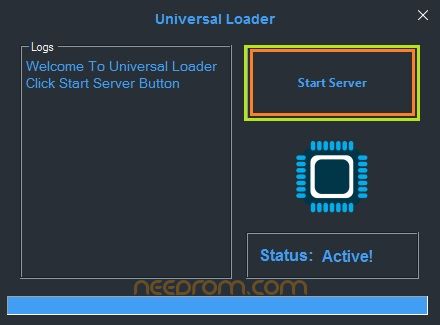
Start the Server
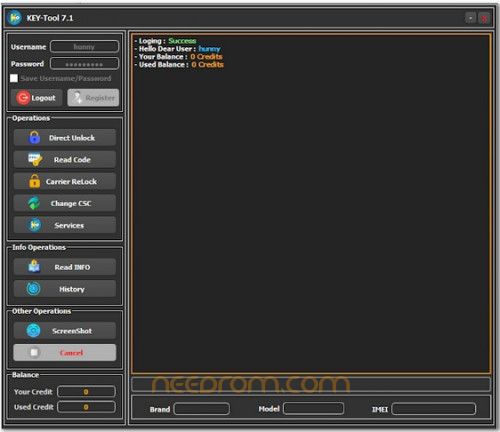
When the loader opens and the popup appears, simply click on "Start Server" and wait a few moments for the main interface to load.
5. Log in to the Tool
-
Once the main tool interface appears, enter the following login details:
- Username: hunny
- Password: HUNNY@123
- Password .rar : 123
6. Enjoy the Features
You're now logged in and ready to use all the powerful unlocking and servicing
7. Features of KEY-Tool 7.1 free of cost!
8. Done…
※Please make a backup of your device before installing or updating ROM