
- Title: King Rom Evolution
- Listed: November, 2013
- Last modified: 11/09/2013 2:10 pm
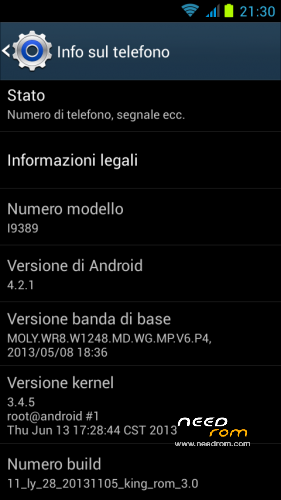
- Version: ROM Android 4.2.1
You must be logged for ROM download.
21402 total views, 4 today




 Member Info
DESCRIPTION
Complete firmware to be installed via FlashTool and valid for all models of Haipai I9389.
Links to everything that is required for proper installation can be found in the following paragraphs.
If you are looking for fluidity and speed, if you want a gps fix in a few seconds, if you want a wi fi stable and fast, if you want the best performance from your phone, then download it, this is your Rom!!
- Root
- Deodex
- Kernel (boot.img) modified with real support init.d
- ClockworkMod Recovery already installed on restart
- Zipalign at every boot
- Sqlite optimization at every boot
- Smoother and faster
- Absolutely minimal app in the system
- Extremely stable
- Improved from stock in every aspect
- Optimized
- Busybox
- SuperSu
- New Boot Animation
- New Logo.bin
- Build.prop optimized
- Gps.conf optimized
- Gps engaging the satellites in a few seconds
- Hosts file modified
- Scripts and Tweaks listed in the following section.
- Changed several system app (Launcher, Internet Browser, Audio Player, Calendar, Calculator, Email, File Manager, Sound Recorder, Torch) and replace them with other extremely more efficient.
- Added a package Sony Media reworked for this device that optimizes beyond imagination every aspect of multimedia (see specifications below):
- Soundenhancement
- Clear Audio+
- Clear Bass
- Clear Stereo
- Dynamic Normalizer
- ClearPhase(Actived by default)
- xLoud(Actived by default)
- Surround Sound VPT
- Bravia Engine 2/X-Reality for Photo & Movies
- And many more
* New Wifi connect speed tweak
* Allow Dalvik to use JIT Compiler
* Enable Adaptive Multi-Rate Wideband
* Better Flashlight intensity & camera-flash quality
* Overall improved performance and battery life
* Increased sensitivity of the touchscreen
* Less RAM usage through the Zipalign at every boot
* Reduced /dbdata, /data, /sdcard use of *.db files and faster database access.
* Faster access to the disk through remount script
* Improved network throughput using TCP tweaks and 3G tweaks
* Less lags through LMK and VM Tweaks Tweak
* Extremely improved the speed of read/write of sdcard
* Cache cleaned up automatically on every boot
* Navigation faster internet (EDGE, 3G, WLAN, VPN).
* Compression and decompression of the web site for a lower use of data and surfing more fluent
* Increased the power of the network signal so as not to have fallen during phone calls
* Faster Download from Android Market/Google Play (all versions)
* No more sudden disconnections while you surf the Internet
* Audio Improvements in all (speaker, sound quality, etc.)
* Improved quality photos via the Sony Bravia Engine technology
* Introduced a host of other improvements, but it is not possible to list them all…
After careful selection and long and patient work, in order to adapt to this device and delete all the conflicts I could insert different and will list only the main ones:
- Adrenaline Engine
- Loopy Smothness
- Geeky Engine
- Net-Fork
- Supremacy
- VelocityTweaks
- SlaidyBoost
- BeatsAudio
- CosmisTweak LightSpeed
Before installing the Rom you need to make a backup of your device in case something goes wrong. Do it with MTKDroidTools flashabile with FlashTool.
Those who have already installed the recovery Cwm they can make a second directly from recovery.
For the first, here is a guide to the procedure of backup, for the latest version of MTKDroidTools and drivers necessary for the proper use of the application Backup with MtkDroidTools
Just this already, but if you want here is the guide for the second procedure to install the modified recovery Cwm How to install Cwm recovery
After you have made the backup of your device we can proceed to install the Rom You may have already downloaded the zip file from the link above and unpacked in the position you want into the PC.
- If you've never installed on your pc, download the preloader drivers from here Driver preloader
- Unzip this file and start the installer.
- Now download the latest version of FlashTools from here FlashTool
- Unzip the file to a location of your choice on your PC
- You start Flash_tools.exe with administrator privileges ( right-click on the exe file and from the menu "Run as administrator" )
- In Flashtools click the voice Scatter-loading (top right) and look for the file "MT6589_Android_scatter_emmc.txt" into the directory where you unzipped the firmware.
- In flashtool will be lines with the check mark at the beginning, leave a check all lines that have the check mark active
- Click the Download button (or press the F9 key ) , click on yes to any request and connect the phone off and without battery to PC USB cable.
- If everything is ok the phone is recognized and the procedure begins, you will see a red bar and then yellow, advancing at the bottom of flash tools and end of the procedure, you will see a small window with a green circle.
- The procedure is completed . Disconnect the phone from the computer , replace the battery , turn it on and have fun!
I invite everyone to make a backup.
Only if you have done the backup and you are able to restore the device then you can write me relatively few bugs in the rom or any other problem.
So ATTENTION! … You did not do a Nandroid backup? … You are not able to restore the device? … Well, do not write to me, because I will not answer to you!!
Enjoy my work. It's really powerful and optimized. Enjoy!!
I have put, too, the link to the CRT recovery version 2.1, which I made for this device. It 's a good recovery full touch. The features in this link https://www.needrom.com/mobile/recovery-cwm-full-touch/
P.S. I'm Italian and sorry if I have not written in good English
※Please make a backup of your device before installing or updating ROM
Ok, vamos a testear la rom Hace días baje unas, pero no me gustaron mucho, vamos a ver que tal esta
Hola…
ok quiero saber si te gusta.
Dany
La he probado y no esta mal, pero me gustaria puntualizar algunas cosas.
1. Ningun haipai i9389 tiene 2g de ram, el sistema esta falseado.
2. tampoco tienen 8g de rom, el sistema esta falseado.
3. Te animaria a que cambiaras el tamaño de las particiones, modificando los ficheros EBR1 y EBR2 hay en la red algunos manuales.
4. Tambien modificar vold.fstab para que la sd ext se convierta en Almacenamiento del telefono.
Espero que os sea util.
@ toscalillo
Qué crees que has descubierto … todo el mundo sabe que 2 GB de RAM y 8 GB de ROM son falsos … Creo que sólo ti no sabia ya que desea que apunte.
Ciao
Tranquilo.
He revisado varios foros y en la mayoria no dicen nada de 2 GB de RAM y 8 GB de ROM son falsos.Yo solo he querido aportar lo que se, y creo que seria bueno que si ofreces una ROM que mantiene los 2 GB de RAM y 8 GB de ROM falsos, que lo digas, y evitaras que nadie te lo recuerde.
Creo que la envidia es fea.
Todos los Rom para I9389 dicen 2/8 gb, también aquí en Needrom, pero a ti importa solo de esta.
Tal vez usted tiene problemas.
NO LA INSTALE POR FAVOR.
Gracias
No te preocupes lo la instalare. Pero mientes mas que hablas.
Si usted insiste es porque estás cansado y con problemas y no entiende lo que dice.
No puedo ayudarte.
Daniela
Daniela, do not get hungry, internet is full of lamers that speaks without knowledge pretending to be experts!
No voy a entrar en temas personales, pero cuando se pierden las formas se pierde la razon.
Has abierto un foro para hablar del haipai i9389 o de ti.?.
Seguramente hay un mal entendido o tienes una ulcera de estomago.
Ciao.
Lo mismo que yo pienso de ti.
Ves que estamos de acuerdo.
Dany
Is Multilanguage?
Yes it is
Which are teh fondamentale data/version of
Kernel
Baseband